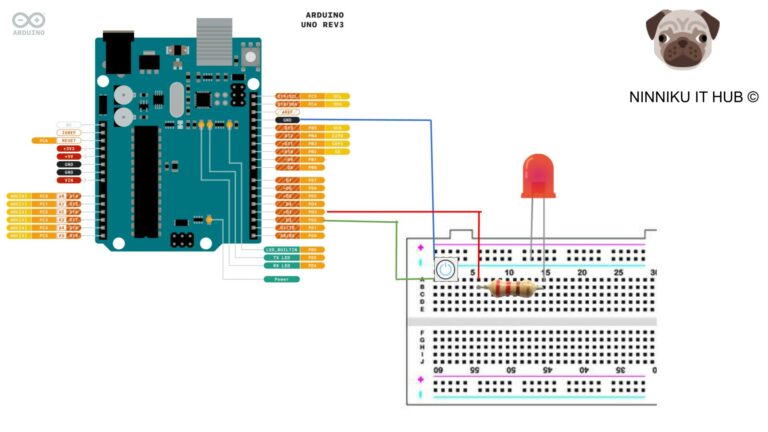
Arduino is a popular platform for creating electronic projects due to its ease of use and versatility. However, when working with digital inputs, it is important to be aware of the concept of “floating state”. In this article, we will explain what floating state is and how it can affect your Arduino projects.
What is Floating State?
In simple terms, floating state occurs when a digital input pin is not connected to a voltage source or a ground, and its voltage level is undefined. This can happen when a pin is left unconnected or when the connection is loose.
When a pin is in floating state, it can randomly fluctuate between HIGH and LOW states, even if there is no input signal. This can lead to unpredictable behavior in your project, and can make it difficult to reliably read the input state.
How Floating State Affects Arduino Projects
Floating state can affect your Arduino project in several ways. One common issue is that it can cause false triggering of digital inputs, resulting in incorrect readings and unexpected behavior. For example, if you have a button connected to an input pin, the pin may read a HIGH state even if the button is not pressed, due to the pin being in floating state.
Floating state can also cause excessive power consumption in your circuit, as the input pin is constantly switching between states. This can drain the battery and reduce the lifespan of your project.
Preventing Floating State
To prevent floating state in your Arduino project, there are several steps you can take:
- Always connect your input pins to a voltage source or a ground. If you are not using an input pin, make sure to set it to either INPUT or OUTPUT mode to prevent it from floating.
- Use pull-up or pull-down resistors to hold your input pins at a specific voltage level when they are not connected to a voltage source or a ground. A pull-up resistor connects the pin to a voltage source, while a pull-down resistor connects it to ground.
- Make sure your connections are secure and tight, and avoid using loose jumper wires.
Conclusion
In conclusion, floating state is a common issue in Arduino projects that can cause unpredictable behavior and false triggering of digital inputs. By understanding what floating state is and taking steps to prevent it, you can ensure the reliability and stability of your Arduino projects. Remember to always connect your input pins to a voltage source or a ground, and consider using pull-up or pull-down resistors when needed.
English Version
Arduino is a popular platform for creating electronic projects due to its ease of use and versatility. However, when working with digital inputs, it is important to be aware of the concept of “floating state”. In this article, we will explain what floating state is and how it can affect your Arduino projects.
What is Floating State?
In simple terms, floating state occurs when a digital input pin is not connected to a voltage source or a ground, and its voltage level is undefined. This can happen when a pin is left unconnected or when the connection is loose.
When a pin is in floating state, it can randomly fluctuate between HIGH and LOW states, even if there is no input signal. This can lead to unpredictable behavior in your project, and can make it difficult to reliably read the input state.
How Floating State Affects Arduino Projects
Floating state can affect your Arduino project in several ways. One common issue is that it can cause false triggering of digital inputs, resulting in incorrect readings and unexpected behavior. For example, if you have a button connected to an input pin, the pin may read a HIGH state even if the button is not pressed, due to the pin being in floating state.
Floating state can also cause excessive power consumption in your circuit, as the input pin is constantly switching between states. This can drain the battery and reduce the lifespan of your project.
Preventing Floating State
To prevent floating state in your Arduino project, there are several steps you can take:
- Always connect your input pins to a voltage source or a ground. If you are not using an input pin, make sure to set it to either INPUT or OUTPUT mode to prevent it from floating.
- Use pull-up or pull-down resistors to hold your input pins at a specific voltage level when they are not connected to a voltage source or a ground. A pull-up resistor connects the pin to a voltage source, while a pull-down resistor connects it to ground.
- Make sure your connections are secure and tight, and avoid using loose jumper wires.
Conclusion
In conclusion, floating state is a common issue in Arduino projects that can cause unpredictable behavior and false triggering of digital inputs. By understanding what floating state is and taking steps to prevent it, you can ensure the reliability and stability of your Arduino projects. Remember to always connect your input pins to a voltage source or a ground, and consider using pull-up or pull-down resistors when needed.
日本語版
Arduino is a popular platform for creating electronic projects due to its ease of use and versatility. However, when working with digital inputs, it is important to be aware of the concept of “floating state”. In this article, we will explain what floating state is and how it can affect your Arduino projects.
フローティング状態とは?
簡単に言うと、フローティング状態とは、デジタル入力ピンが電圧源にもグランドにも接続されておらず、その電圧レベルが未定義の状態のことです。ピンが未接続のままになっている場合や、接続が緩んでいる場合に発生します。
ピンがフローティング状態にあると、入力信号がなくてもHIGHとLOWの状態がランダムに変動する可能性があります。これにより、プロジェクトで予測不可能な動作が発生し、入力状態を確実に読み取ることが困難になります。
フローティング状態がArduinoプロジェクトに与える影響
フローティング状態はArduinoプロジェクトにさまざまな影響を与えます。よくある問題の一つは、デジタル入力の誤トリガーを引き起こし、不正確な読み取りや予期しない動作につながることです。例えば、入力ピンにボタンを接続している場合、ピンがフローティング状態であるために、ボタンが押されていなくてもHIGH状態を読み取ることがあります。
また、フローティング状態は入力ピンが常に状態を切り替えているため、回路の過剰な電力消費を引き起こす可能性があります。これによりバッテリーが消耗し、プロジェクトの寿命が短くなります。
フローティング状態の防止
Arduinoプロジェクトでフローティング状態を防ぐために、いくつかの対策を講じることができます:
- 入力ピンは常に電圧源またはグランドに接続してください。入力ピンを使用しない場合は、フローティングを防ぐためにINPUTまたはOUTPUTモードに設定してください。
- 入力ピンが電圧源やグランドに接続されていない場合、特定の電圧レベルに保持するためにプルアップ抵抗またはプルダウン抵抗を使用してください。プルアップ抵抗はピンを電圧源に接続し、プルダウン抵抗はグランドに接続します。
- 接続がしっかりと固定されていることを確認し、緩いジャンパーワイヤーの使用を避けてください。
まとめ
まとめると、フローティング状態はArduinoプロジェクトでよく見られる問題であり、予測不可能な動作やデジタル入力の誤トリガーを引き起こす可能性があります。フローティング状態とは何かを理解し、それを防ぐための対策を講じることで、Arduinoプロジェクトの信頼性と安定性を確保できます。入力ピンは常に電圧源またはグランドに接続し、必要に応じてプルアップ抵抗やプルダウン抵抗の使用を検討してください。