理解 Gadget URI:Fragment 專案是否為必要條件?
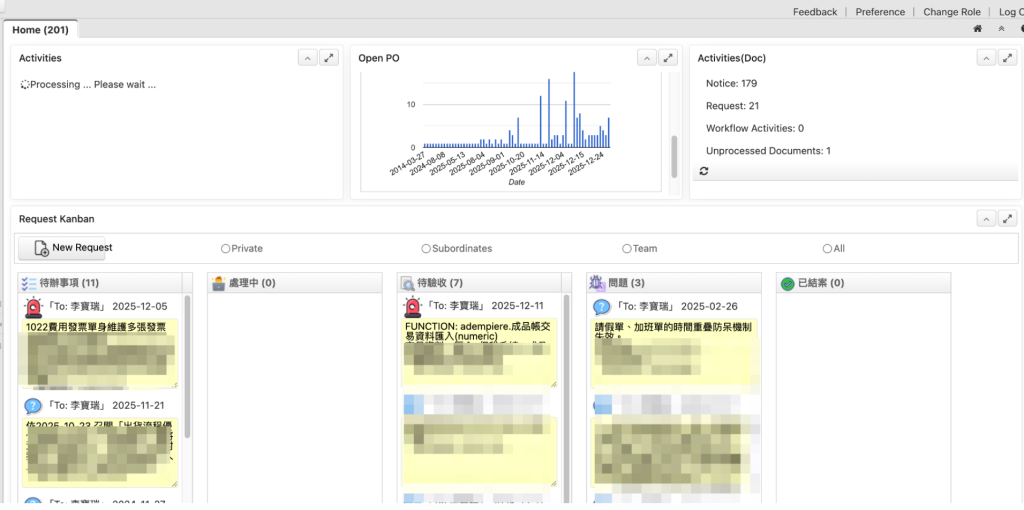
在 iDempiere ERP 開發領域中,建立自訂儀表板小工具(Dashboard Gadgets)是提升使用者體驗的強大方式。然而,開發者在 Gadget URI 無法解析時常常會遇到瓶頸。一個常見的問題是:「使用 Gadget URI 調用儀表板內容時,是否必須使用 Fragment 專案?」
簡短的回答是:是的,基本上是必要的。在本文中,我們將深入探討技術上的「為什麼」以及實施的最佳實務。
挑戰:為什麼您的標準 Bundle 會失敗
在定義 Gadget URI 時,開發者通常會嘗試引用標準 OSGi bundle 內的 ZUL 檔案。然而,iDempiere 的 UI 是由 ZK Framework 驅動的,它使用特定的資源載入邏輯。
1. ~./ 前綴與 Web Context Root
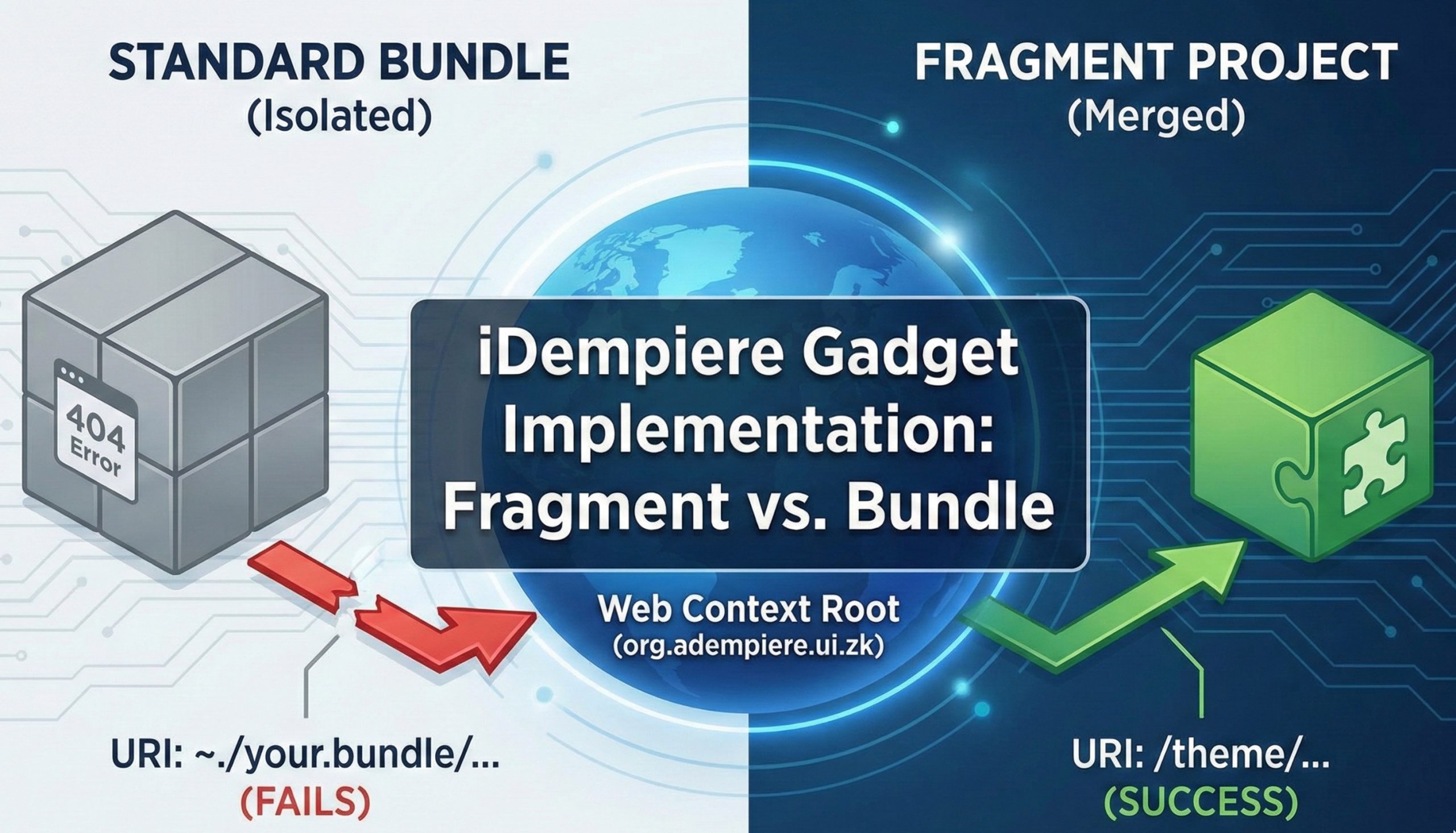
在 iDempiere 中,URI 中的 ~./ 前綴指的是運行中應用程式的 Web Context Root——具體來說是 org.adempiere.ui.zk bundle。
- 標準 Bundle(隔離的):標準 OSGi bundle 在設計上是隔離的。其內部資源(如
.zul檔案)不會自動暴露給 ZK UI bundle 的 web context。如果您將 URI 指向~./your.bundle.symbolic.name/my_gadget.zul,主機 bundle 將在自己的 context 中查找,找不到檔案後返回 404 錯誤。 - Fragment Bundle(合併的):當您建立 Fragment Bundle 並將其附加到
org.adempiere.ui.zk(主機)時,其資源——例如位於theme/資料夾中的資源——會被有效地合併到主機的 classpath 中。這使得它們可以像核心 UI bundle 的一部分一樣被存取。
不使用 Fragment 是否可以實現 Gadget?
技術上是可能的,但對於標準企業環境而言,很少被推薦。
- Web Application Bundle(WAB):您可以將 bundle 註冊為獨立的 WAB,或使用
HttpContext服務透過特定別名來暴露資源。 - 缺點:儀表板小工具設計為在主要的 iDempiere UI session 中運行。從完全獨立的 web context 載入 ZUL 通常會導致 session 狀態中斷、認證問題和主題不一致。
逐步推薦方案
要實現穩定且可維護的基於 ZUL 的 Gadget,請遵循以下指南:
步驟 1:使用 Fragment 專案
始終建立 Fragment 專案,並將 Host Plug-in 設定為 org.adempiere.ui.zk。
步驟 2:組織您的目錄結構
將您的檔案放置在 Fragment 中,遵循如下結構:
your.fragment.project/theme/default/zul/dashboard/my_custom_gadget.zul
步驟 3:正確的 URI 語法
在 iDempiere 的「Dashboard Content」視窗中註冊 Gadget 時,使用以 / 開頭的絕對路徑。
推薦語法:
Plaintext
/theme/default/zul/dashboard/my_custom_gadget.zul
注意:雖然
~./用於 Classpath Web Resources,但在 Fragment 中使用直接絕對路徑/是 iDempiere 儀表板中資源解析的已驗證方法。
驗證結果
根據我們的技術測試,以下是不同配置的行為表現:
| 配置 | URI 模式 | 結果 | 原因 |
| 標準 Bundle | /my_path/file.zul | 失敗 | 隔離的 Context |
| Fragment 專案 | ~./theme/.../file.zul | 失敗 | 此情境下映射不正確 |
| Fragment 專案 | /theme/.../file.zul | 成功 | 資源合併至主機根目錄 |
要實施上述方案,您的 Fragment 專案 必須具有正確配置的 MANIFEST.MF 檔案。此檔案告訴 OSGi 容器將您的資源「附加」到主要的 iDempiere ZK web bundle。
以下是專門為 iDempiere 環境量身定制的 MANIFEST.MF 檔案範本:
MANIFEST.MF 配置
Manifest-Version: 1.0
Bundle-ManifestVersion: 2
Bundle-Name: iDempiere Custom Dashboard Gadgets Fragment
Bundle-SymbolicName: com.yourcompany.ui.zk.fragment;singleton:=true
Bundle-Version: 1.0.0.qualifier
Fragment-Host: org.adempiere.ui.zk;bundle-version="[11.0.0,12.0.0)"
Bundle-Vendor: Your Company
Bundle-RequiredExecutionEnvironment: JavaSE-17
關鍵屬性說明
Bundle-SymbolicName:Fragment 的唯一識別碼。建議在名稱中包含.fragment以區分標準 bundle。Fragment-Host:這是最關鍵的一行。它指定org.adempiere.ui.zk為主機。- 注意:
bundle-version範圍[11.0.0,12.0.0)確保與 iDempiere 11 的相容性(如果使用不同版本如 iDempiere 12,請調整此值)。
- 注意:
singleton:=true:防止此特定 Fragment 的多個版本同時處於活動狀態,這是 UI 自訂的標準做法。
目錄結構要求
為使 /theme/... URI 正確解析,請確保您的專案資料夾結構如下:
com.yourcompany.ui.zk.fragment/
├── META-INF/
│   └── MANIFEST.MF
└── theme/
    └── default/              <-- 或您的自訂主題名稱
        └── zul/
            └── dashboard/
                └── my_gadget.zul
總結
為確保您的 iDempiere Gadget 與現有 UI 無縫運作,請堅持使用 Fragment 專案。這符合 iDempiere 使用的 OSGi 架構,並確保 ZK 引擎能在無需複雜變通方案的情況下解析您的資源。
參考資料
English Version
Understanding Gadget URI: Is a Fragment Project Mandatory?
In the world of iDempiere ERP development, creating custom Dashboard Gadgets is a powerful way to enhance user experience. However, developers often hit a wall when their Gadget URIs fail to resolve. A common question arises: “Is it mandatory to use a fragment project to invoke Dashboard Content via Gadget URI?”
The short answer is: Yes, effectively. In this post, we’ll dive into the technical “why” and the best practices for implementation.
The Challenge: Why Your Standard Bundle Fails
When defining a Gadget URI, developers often attempt to reference a ZUL file inside a standard OSGi bundle. However, iDempiere’s UI is powered by the ZK Framework, which utilizes specific resource loading logic.
1. The ~./ Prefix and the Web Context Root
In iDempiere, the ~./ prefix in a URI refers to the Web Context Root of the running application—specifically the org.adempiere.ui.zk bundle.
- Standard Bundles (Isolated): A standard OSGi bundle is isolated by design. Its internal resources (like
.zulfiles) are not automatically exposed to the web context of the ZK UI bundle. If you point a URI to~./your.bundle.symbolic.name/my_gadget.zul, the Host bundle will look within its own context, fail to find the file, and return a 404 error. - Fragment Bundles (Merged): When you create a Fragment Bundle and attach it to
org.adempiere.ui.zk(the Host), its resources—such as those located in thetheme/folder—are effectively merged into the Host’s classpath. This makes them accessible as if they were part of the core UI bundle.
Can You Implement Gadgets Without a Fragment?
Technically, it is possible, but it is rarely recommended for standard enterprise environments.
- Web Application Bundles (WAB): You could register your bundle as a separate WAB or use an
HttpContextservice to expose resources via a specific alias. - The Drawback: Dashboard Gadgets are designed to run within the main iDempiere UI session. Loading a ZUL from a completely separate web context often leads to broken session states, authentication issues, and inconsistent theming.
Step-by-Step Recommendation
For a stable and maintainable ZUL-based Gadget implementation, follow these guidelines:
Step 1: Use a Fragment Project
Always create a Fragment Project and set the Host Plug-in to org.adempiere.ui.zk.
Step 2: Organize Your Directory
Place your files within the fragment, following a structure like:
your.fragment.project/theme/default/zul/dashboard/my_custom_gadget.zul
Step 3: Correct URI Syntax
When registering the Gadget in the iDempiere Window “Dashboard Content”, use the absolute path starting with /.
Recommended Syntax:
Plaintext
/theme/default/zul/dashboard/my_custom_gadget.zul
Note: While
~./is used for Classpath Web Resources, using the direct absolute path/within a Fragment is the proven method for resource resolution in the iDempiere Dashboard.
Verification Results
Based on our technical testing, here is how different configurations behave:
| Configuration | URI Pattern | Result | Reason |
| Standard Bundle | /my_path/file.zul | Fail | Isolated Context |
| Fragment Project | ~./theme/.../file.zul | Fail | Incorrect mapping for this context |
| Fragment Project | /theme/.../file.zul | SUCCESS | Resources merged into Host Root |
To implement the solution discussed, your Fragment Project must have a correctly configured MANIFEST.MF file. This file tells the OSGi container to “attach” your resources to the main iDempiere ZK web bundle.
Here is the template for the MANIFEST.MF file, specifically tailored for an iDempiere environment:
MANIFEST.MF Configuration
Manifest-Version: 1.0
Bundle-ManifestVersion: 2
Bundle-Name: iDempiere Custom Dashboard Gadgets Fragment
Bundle-SymbolicName: com.yourcompany.ui.zk.fragment;singleton:=true
Bundle-Version: 1.0.0.qualifier
Fragment-Host: org.adempiere.ui.zk;bundle-version="[11.0.0,12.0.0)"
Bundle-Vendor: Your Company
Bundle-RequiredExecutionEnvironment: JavaSE-17
Key Attributes Breakdown
Bundle-SymbolicName: A unique ID for your fragment. It is good practice to include.fragmentin the name to distinguish it from standard bundles.Fragment-Host: This is the most critical line. It specifiesorg.adempiere.ui.zkas the host.- Note: The
bundle-versionrange[11.0.0,12.0.0)ensures compatibility with iDempiere 11 (adjust this if you are using a different version like iDempiere 12).
- Note: The
singleton:=true: Prevents multiple versions of this specific fragment from being active at the same time, which is standard for UI customizations.
Directory Structure Requirement
For the /theme/... URI to resolve correctly, ensure your project folder structure looks exactly like this:
com.yourcompany.ui.zk.fragment/
├── META-INF/
│   └── MANIFEST.MF
└── theme/
    └── default/              <-- or your custom theme name
        └── zul/
            └── dashboard/
                └── my_gadget.zul
Summary
To ensure your iDempiere Gadgets work seamlessly with the existing UI, stick to Fragment Projects. It aligns with the OSGi architecture used by iDempiere and ensures that the ZK engine can resolve your resources without complex workarounds.
Reference
日本語版
Gadget URI の理解:Fragment プロジェクトは必須か?
iDempiere ERP 開発において、カスタムダッシュボードガジェットの作成はユーザーエクスペリエンスを向上させる強力な方法です。しかし、Gadget URI が解決できない場合、開発者は壁にぶつかることがあります。よくある質問は:「Gadget URI でダッシュボードコンテンツを呼び出すには、Fragment プロジェクトの使用が必須ですか?」
簡潔な回答:はい、事実上必須です。この記事では、技術的な「なぜ」と実装のベストプラクティスについて詳しく解説します。
課題:標準 Bundle が失敗する理由
Gadget URI を定義する際、開発者は標準 OSGi bundle 内の ZUL ファイルを参照しようとすることがよくあります。しかし、iDempiere の UI は ZK Framework で動作しており、特定のリソース読み込みロジックを使用しています。
1. ~./ プレフィックスと Web Context Root
iDempiere において、URI の ~./ プレフィックスは実行中のアプリケーションの Web Context Root、具体的には org.adempiere.ui.zk bundle を指します。
- 標準 Bundle(分離型):標準 OSGi bundle は設計上分離されています。その内部リソース(
.zulファイルなど)は ZK UI bundle の web context に自動的に公開されません。URI を~./your.bundle.symbolic.name/my_gadget.zulに指定した場合、ホスト bundle は自身の context 内を検索し、ファイルが見つからず 404 エラーを返します。 - Fragment Bundle(統合型):Fragment Bundle を作成して
org.adempiere.ui.zk(ホスト)にアタッチすると、そのリソース(theme/フォルダ内のリソースなど)はホストのクラスパスに事実上統合されます。これにより、コア UI bundle の一部であるかのようにアクセス可能になります。
Fragment なしでガジェットを実装できるか?
技術的には可能ですが、標準的なエンタープライズ環境では推奨されることはほとんどありません。
- Web Application Bundle(WAB):bundle を独立した WAB として登録するか、
HttpContextサービスを使用して特定のエイリアス経由でリソースを公開することができます。 - デメリット:ダッシュボードガジェットはメインの iDempiere UI セッション内で実行されるよう設計されています。完全に別の web context から ZUL を読み込むと、セッション状態の破損、認証の問題、テーマの不整合が発生することがよくあります。
ステップバイステップの推奨手順
安定的で保守可能なZUL ベースのガジェットを実装するには、以下のガイドラインに従ってください:
ステップ 1:Fragment プロジェクトを使用する
常に Fragment プロジェクトを作成し、Host Plug-in を org.adempiere.ui.zk に設定してください。
ステップ 2:ディレクトリの整理
以下のような構造に従って、Fragment 内にファイルを配置してください:
your.fragment.project/theme/default/zul/dashboard/my_custom_gadget.zul
ステップ 3:正しい URI 構文
iDempiere の「Dashboard Content」ウィンドウでガジェットを登録する際は、/ で始まる絶対パスを使用してください。
推奨構文:
Plaintext
/theme/default/zul/dashboard/my_custom_gadget.zul
注意:
~./は Classpath Web Resources に使用されますが、Fragment 内では直接絶対パス/を使用することが、iDempiere ダッシュボードでのリソース解決の実証済みの方法です。
検証結果
技術テストに基づく各設定の動作結果は以下の通りです:
| 設定 | URI パターン | 結果 | 理由 |
| 標準 Bundle | /my_path/file.zul | 失敗 | 分離された Context |
| Fragment プロジェクト | ~./theme/.../file.zul | 失敗 | このコンテキストでのマッピングが不正 |
| Fragment プロジェクト | /theme/.../file.zul | 成功 | リソースがホストルートに統合 |
上記のソリューションを実装するには、Fragment プロジェクトに正しく設定された MANIFEST.MF ファイルが必要です。このファイルは OSGi コンテナに対し、リソースをメインの iDempiere ZK web bundle に「アタッチ」するよう指示します。
以下は iDempiere 環境に特化した MANIFEST.MF ファイルのテンプレートです:
MANIFEST.MF の設定
Manifest-Version: 1.0
Bundle-ManifestVersion: 2
Bundle-Name: iDempiere Custom Dashboard Gadgets Fragment
Bundle-SymbolicName: com.yourcompany.ui.zk.fragment;singleton:=true
Bundle-Version: 1.0.0.qualifier
Fragment-Host: org.adempiere.ui.zk;bundle-version="[11.0.0,12.0.0)"
Bundle-Vendor: Your Company
Bundle-RequiredExecutionEnvironment: JavaSE-17
主要属性の説明
Bundle-SymbolicName:Fragment の一意な識別子です。標準 bundle と区別するため、名前に.fragmentを含めることが推奨されます。Fragment-Host:これが最も重要な行です。org.adempiere.ui.zkをホストとして指定します。- 注意:
bundle-versionの範囲[11.0.0,12.0.0)は iDempiere 11 との互換性を保証します(iDempiere 12 など異なるバージョンを使用している場合は調整してください)。
- 注意:
singleton:=true:この特定の Fragment の複数バージョンが同時にアクティブになることを防ぎます。UI カスタマイズの標準的な設定です。
ディレクトリ構造の要件
/theme/... URI が正しく解決されるように、プロジェクトのフォルダ構造を以下のようにしてください:
com.yourcompany.ui.zk.fragment/
├── META-INF/
│   └── MANIFEST.MF
└── theme/
    └── default/              <-- またはカスタムテーマ名
        └── zul/
            └── dashboard/
                └── my_gadget.zul
まとめ
iDempiere のガジェットが既存の UI とシームレスに動作するようにするには、Fragment プロジェクトの使用を推奨します。これは iDempiere が使用する OSGi アーキテクチャに準拠し、複雑なワークアラウンドなしに ZK エンジンがリソースを解決できるようにします。