When customers are unable to pay their outstanding debts, it can create challenges for businesses trying to maintain accurate financial records. One way to handle bad debts is to use the payment allocation window in iDempiere ERP. Simply create a new charge for the bad debt expense, write it off using the payment allocation window,…
Description
In the business world, it is not uncommon to encounter situations where customers are unable to pay their outstanding debts due to financial difficulties or bankruptcy. This can result in bad debts, which can create challenges for businesses trying to balance their books and maintain accurate financial records. However, there is an easy way to write off bad debts using the payment allocation window in iDempiere ERP.
To begin, create a new charge for the Bad Debt Expense. This charge will be used to record the bad debt expense in your financial records. Once the charge has been created, you can write off the bad debt by allocating the outstanding balance to the Bad Debt Expense charge.
Create a new charge for the Bad Debt Expense
When a customer is unable to pay their outstanding debts, businesses may need to write off the bad debt as a loss. To properly account for this, businesses can create a new charge for the bad debt expense in their accounting system. This charge will serve as a record of the loss and can be used to track the amount of bad debt written off over time. By creating a new charge for the bad debt expense, businesses can ensure that their financial records accurately reflect the impact of bad debts on their bottom line.
First, we create a new charge in the Charge window.
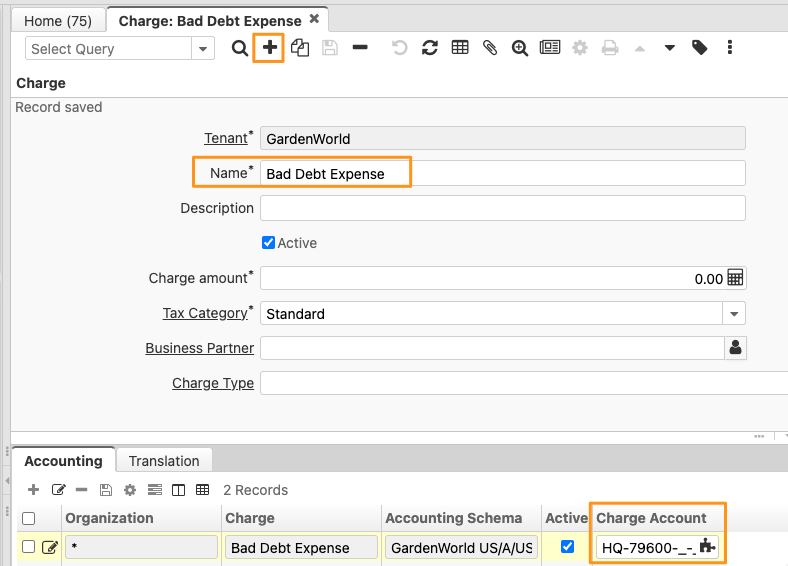
This is very important. Remember to set up accounting for the charge.
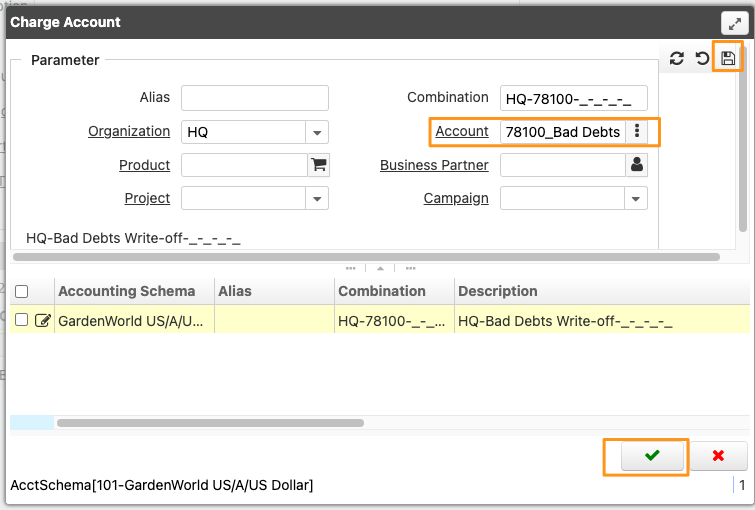
Payment Allocation
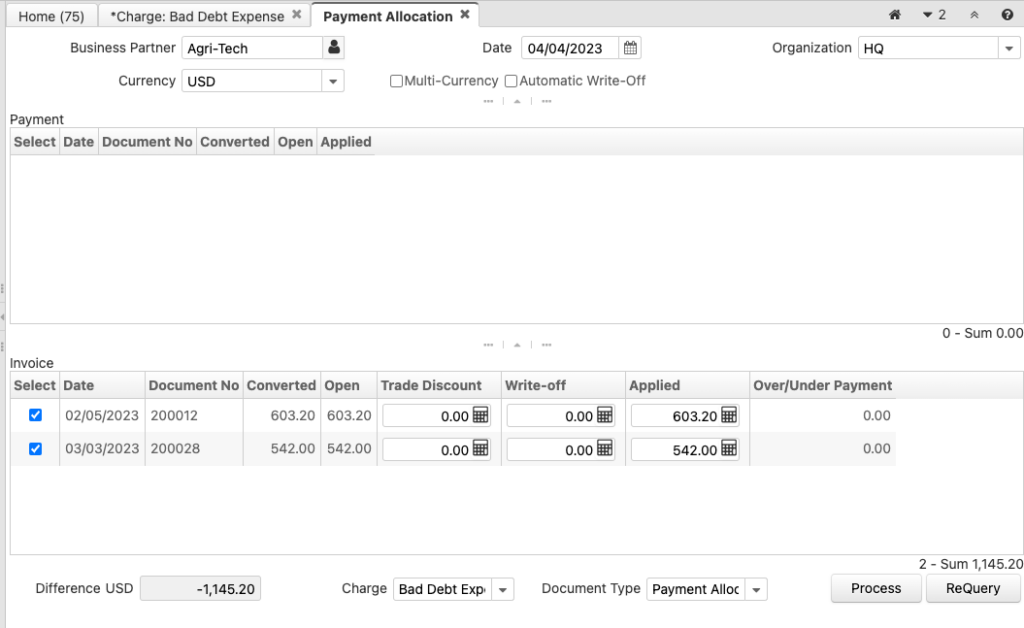
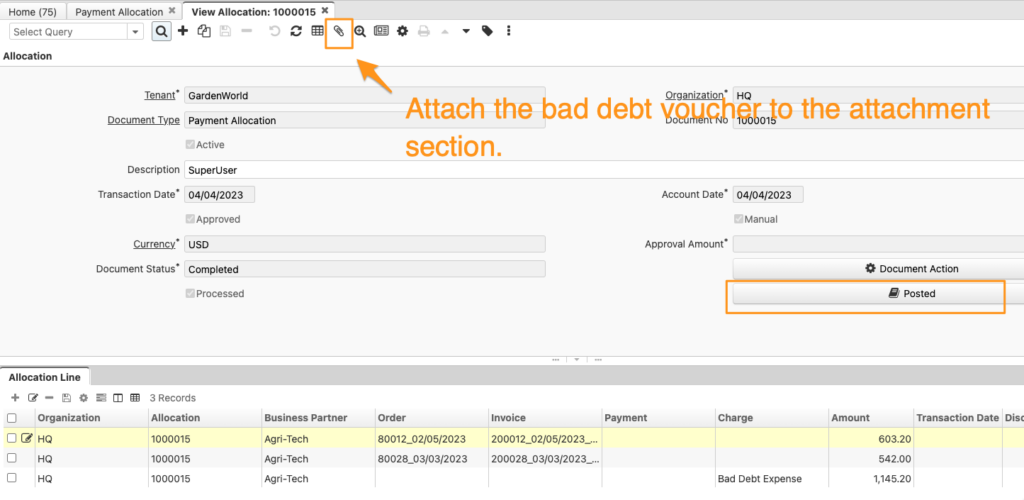
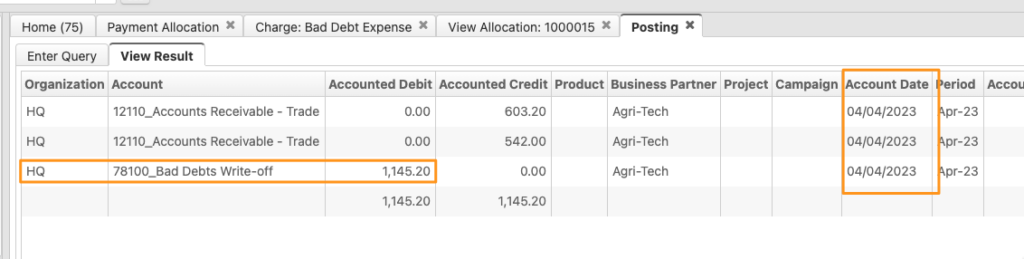
Once the new charge has been created, you can proceed to write off the customer’s outstanding receivables. To do this, open the payment allocation window in iDempiere ERP and select the corresponding invoice or receivable in the payment allocation window and allocate the payment to the newly created bad debt expense charge. This will reduce the customer’s accounts receivable balance and increase the balance in the bad debt expense.
It’s important to note that before writing off bad debt, you should first confirm that the customer’s account status has been changed to “bad debt” or “uncollectible” to ensure that the bad debt is being handled correctly. Additionally, seeking the advice of a professional accountant or financial advisor can help ensure that you’re following best practices and staying compliant with accounting standards and regulations.
In summary, it is possible to use the payment allocation window to handle bad debts as well. By creating a new charge for the bad debt expense and allocating payments to this charge in the payment allocation window, you can ensure that your financial records are accurate and up-to-date even in the face of bad debts caused by customer bankruptcy or financial difficulties.
English Version
When customers are unable to pay their outstanding debts, it can create challenges for businesses trying to maintain accurate financial records. One way to handle bad debts is to use the payment allocation window in iDempiere ERP. Simply create a new charge for the bad debt expense, write it off using the payment allocation window,…
Description
In the business world, it is not uncommon to encounter situations where customers are unable to pay their outstanding debts due to financial difficulties or bankruptcy. This can result in bad debts, which can create challenges for businesses trying to balance their books and maintain accurate financial records. However, there is an easy way to write off bad debts using the payment allocation window in iDempiere ERP.
To begin, create a new charge for the Bad Debt Expense. This charge will be used to record the bad debt expense in your financial records. Once the charge has been created, you can write off the bad debt by allocating the outstanding balance to the Bad Debt Expense charge.
Create a new charge for the Bad Debt Expense
When a customer is unable to pay their outstanding debts, businesses may need to write off the bad debt as a loss. To properly account for this, businesses can create a new charge for the bad debt expense in their accounting system. This charge will serve as a record of the loss and can be used to track the amount of bad debt written off over time. By creating a new charge for the bad debt expense, businesses can ensure that their financial records accurately reflect the impact of bad debts on their bottom line.
First, we create a new charge in the Charge window.
This is very important. Remember to set up accounting for the charge.
Payment Allocation
Once the new charge has been created, you can proceed to write off the customer’s outstanding receivables. To do this, open the payment allocation window in iDempiere ERP and select the corresponding invoice or receivable in the payment allocation window and allocate the payment to the newly created bad debt expense charge. This will reduce the customer’s accounts receivable balance and increase the balance in the bad debt expense.
It’s important to note that before writing off bad debt, you should first confirm that the customer’s account status has been changed to “bad debt” or “uncollectible” to ensure that the bad debt is being handled correctly. Additionally, seeking the advice of a professional accountant or financial advisor can help ensure that you’re following best practices and staying compliant with accounting standards and regulations.
In summary, it is possible to use the payment allocation window to handle bad debts as well. By creating a new charge for the bad debt expense and allocating payments to this charge in the payment allocation window, you can ensure that your financial records are accurate and up-to-date even in the face of bad debts caused by customer bankruptcy or financial difficulties.
日本語版
When customers are unable to pay their outstanding debts, it can create challenges for businesses trying to maintain accurate financial records. One way to handle bad debts is to use the payment allocation window in iDempiere ERP. Simply create a new charge for the bad debt expense, write it off using the payment allocation window,…
概要
ビジネスの世界では、財務上の困難や倒産により、顧客が未払い債務を支払えない状況に遭遇することは珍しくありません。これにより貸倒が発生し、帳簿のバランスを保ち正確な財務記録を維持しようとする企業にとって課題となります。しかし、iDempiere ERPの支払配賦ウィンドウを使用すれば、簡単に貸倒を償却することができます。
まず、貸倒費用の新しい課金項目を作成します。この課金項目は、財務記録に貸倒費用を記録するために使用されます。課金項目を作成したら、未払い残高を貸倒費用の課金項目に配賦することで、貸倒を償却できます。
貸倒費用の新しい課金項目を作成する
顧客が未払い債務を支払えない場合、企業は貸倒を損失として償却する必要があるかもしれません。これを適切に会計処理するために、企業は会計システムに貸倒費用の新しい課金項目を作成できます。この課金項目は損失の記録として機能し、時間の経過とともに償却された貸倒金額を追跡するために使用できます。貸倒費用の新しい課金項目を作成することで、企業は財務記録が貸倒の収益への影響を正確に反映していることを確認できます。
まず、課金項目ウィンドウで新しい課金項目を作成します。
これは非常に重要です。課金項目の会計設定を忘れずに行ってください。
支払配賦
新しい課金項目を作成したら、顧客の未払い売掛金の償却に進むことができます。これを行うには、iDempiere ERPの支払配賦ウィンドウを開き、対応する請求書または売掛金を選択して、新しく作成した貸倒費用の課金項目に支払を配賦します。これにより、顧客の売掛金残高が減少し、貸倒費用の残高が増加します。
貸倒を償却する前に、まず顧客の口座ステータスが「貸倒」または「回収不能」に変更されていることを確認し、貸倒が正しく処理されていることを確認することが重要です。また、専門の会計士やファイナンシャルアドバイザーの助言を求めることで、ベストプラクティスに従い、会計基準や規制を遵守していることを確認できます。
まとめると、支払配賦ウィンドウを使用して貸倒を処理することも可能です。貸倒費用の新しい課金項目を作成し、支払配賦ウィンドウでこの課金項目に支払を配賦することで、顧客の倒産や財務上の困難による貸倒が発生した場合でも、財務記録が正確で最新の状態を維持できます。