 Apple
AppleExploring Java Version Switching: Advanced Techniques for Easy Java Version Management on MacOS
Java Version Manager (jenv) is a powerful tool that helps you effortlessly switch Java versions on your system.
AppleJava Version Manager (jenv) is a powerful tool that helps you effortlessly switch Java versions on your system.
 iDempiere
Introduction: Efficient data management is a cornerstone of successful ERP systems, and iDempiere stands out for its flexibility in addressing specific business needs. In this...
 Productivity
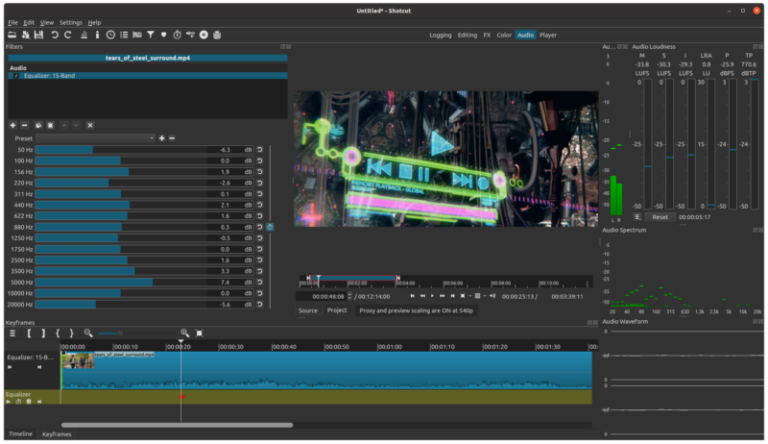
If you're looking for open-source alternatives to Adobe Premiere Pro, there are several powerful video editing software options available. In this blog post, we'll explore...
 iDempiere
Do you ever find yourself frustrated during meetings because someone always seems to disregard the rules and occupy meeting rooms longer than necessary? We've all...
 IT Tools
Creating a GitHub repository from a local folder involves a few steps. You'll need to have Git installed on your computer and be logged into...
 iDempiere
In the ever-evolving world of Java development, the OSGi (Open Service Gateway Initiative) framework has been a game-changer, enabling modular and dynamic applications. One crucial...
 iDempiere
Introduction PostgreSQL is a powerful, open-source relational database management system that continues to evolve with each new release. Upgrading to a newer version of PostgreSQL...
 iDempiere
In the world of modular software development, the OSGi framework stands out for its ability to create flexible and dynamic applications. One powerful feature of...
 iDempiere
This Java class, named InsertHRAccess, appears to be responsible for loading data from a database (presumably Microsoft Access) and performing some data processing and transformation...
 iDempiere
摘要 在 iDempiere 7.1 之後的版本中,系統引入了一項新功能:在輸入和儲存匯率後,會自動檢查是否存在重疊的匯率。然而,有時候您需要建立長期匯率與即期匯率並存的情況,這可能會觸發不必要的重疊警告,如圖 1 所示。本教學深入探討了此情境的實用解決方案,提供逐步指導,教您如何有效地撰寫程式碼並實作繞過重疊檢查的機制。透過清晰的說明和實際範例,本指南將幫助您在 iDempiere 中順利調整匯率檢查流程,以滿足您特定的業務需求。 使用方式 在系統設定中,建立一個名為「Is_CurrencyRate_Overlap」的新設定,並將其值設為「N」。 使用「Y」將啟用重疊檢查。使用「N」將停用重疊檢查。如圖 2 所示。 圖 2 程式碼 操作步驟: 首先建立一個名為 CustomMConversionRate 的新類別,繼承自 org.compiere.model.MConversionRate。 覆寫兩個方法:beforeSave 和 afterSave,如下方程式碼片段所示。...