If you’re looking for open-source alternatives to Adobe Premiere Pro, there are several powerful video editing software options available. In this blog post, we’ll explore some of the top open-source video editing tools that can effectively replace Premiere Pro.
1. DaVinci Resolve:
- DaVinci Resolve is a professional-grade video editing software that offers a free version with an impressive array of features. It provides advanced color correction, audio post-production, and even visual effects capabilities. It’s a robust alternative for both beginners and experienced video editors.
- Official Website URL: https://www.blackmagicdesign.com/products/davinciresolve/studio
2. Shotcut:
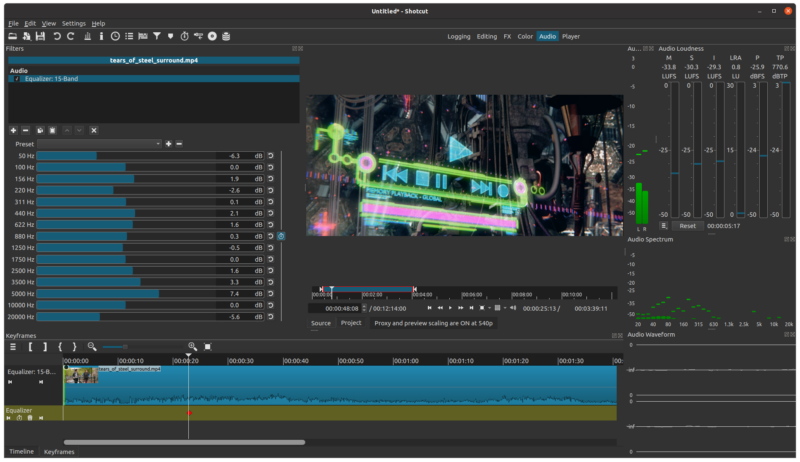
- Shotcut is a free, open-source, cross-platform video editor with a user-friendly interface. It supports a wide range of video formats and has a rich set of editing features, including timeline editing, advanced filters, and 4K resolution support.
- Official Website URL: https://shotcut.org/download/
3. OpenShot:
- OpenShot is another user-friendly open-source video editor known for its simplicity and ease of use. It offers a drag-and-drop interface, basic video editing tools, and support for multiple tracks and keyframes. It’s a great option for beginners.
- Official Website URL: https://www.openshot.org/download/
4. Kdenlive:
- Kdenlive is an open-source video editing software designed for Linux systems but also available for Windows and macOS. It offers a wide range of video editing features, including multi-track editing, effects, and transitions.
- Official Website URL: https://kdenlive.org/en/download/
5. Lightworks:
- Lightworks has been used in professional film and television editing and offers a free version with a powerful feature set. It includes professional-grade tools for video editing, audio editing, and visual effects.
- Official Website URL: https://lwks.com/
6. Cinelerra-GG:
- Cinelerra-GG is a robust video editing software that offers features like 4K editing, advanced compositing, and audio processing. It’s available for Linux and offers a unique set of capabilities.
- Official Website URL: https://www.cinelerra-gg.org/downloads/
7. Flowblade:
- Flowblade is an open-source video editor designed for Linux systems. It provides an intuitive user interface and supports multiple tracks, transitions, and various video formats.
- Official Website URL: http://jliljebl.github.io/flowblade/
8. HitFilm Express:
- HitFilm Express is a free video editing and visual effects software that offers a wide range of special effects and compositing tools. While it’s not fully open source, it’s free to use and an excellent option for creative video projects.
- Official Website URL: https://fxhome.com/product/hitfilm
These open-source video editing tools can serve as effective alternatives to Adobe Premiere Pro, catering to a range of needs and skill levels. Whether you’re a professional video editor or a hobbyist, you can find a suitable open-source solution to meet your video editing requirements without breaking the bank.
English Version
If you’re looking for open-source alternatives to Adobe Premiere Pro, there are several powerful video editing software options available. In this blog post, we’ll explore some of the top open-source video editing tools that can effectively replace Premiere Pro.
1. DaVinci Resolve:
- DaVinci Resolve is a professional-grade video editing software that offers a free version with an impressive array of features. It provides advanced color correction, audio post-production, and even visual effects capabilities. It’s a robust alternative for both beginners and experienced video editors.
- Official Website URL: https://www.blackmagicdesign.com/products/davinciresolve/studio
2. Shotcut:
- Shotcut is a free, open-source, cross-platform video editor with a user-friendly interface. It supports a wide range of video formats and has a rich set of editing features, including timeline editing, advanced filters, and 4K resolution support.
- Official Website URL: https://shotcut.org/download/
3. OpenShot:
- OpenShot is another user-friendly open-source video editor known for its simplicity and ease of use. It offers a drag-and-drop interface, basic video editing tools, and support for multiple tracks and keyframes. It’s a great option for beginners.
- Official Website URL: https://www.openshot.org/download/
4. Kdenlive:
- Kdenlive is an open-source video editing software designed for Linux systems but also available for Windows and macOS. It offers a wide range of video editing features, including multi-track editing, effects, and transitions.
- Official Website URL: https://kdenlive.org/en/download/
5. Lightworks:
- Lightworks has been used in professional film and television editing and offers a free version with a powerful feature set. It includes professional-grade tools for video editing, audio editing, and visual effects.
- Official Website URL: https://lwks.com/
6. Cinelerra-GG:
- Cinelerra-GG is a robust video editing software that offers features like 4K editing, advanced compositing, and audio processing. It’s available for Linux and offers a unique set of capabilities.
- Official Website URL: https://www.cinelerra-gg.org/downloads/
7. Flowblade:
- Flowblade is an open-source video editor designed for Linux systems. It provides an intuitive user interface and supports multiple tracks, transitions, and various video formats.
- Official Website URL: http://jliljebl.github.io/flowblade/
8. HitFilm Express:
- HitFilm Express is a free video editing and visual effects software that offers a wide range of special effects and compositing tools. While it’s not fully open source, it’s free to use and an excellent option for creative video projects.
- Official Website URL: https://fxhome.com/product/hitfilm
These open-source video editing tools can serve as effective alternatives to Adobe Premiere Pro, catering to a range of needs and skill levels. Whether you’re a professional video editor or a hobbyist, you can find a suitable open-source solution to meet your video editing requirements without breaking the bank.
日本語版
Adobe Premiere Proのオープンソース代替ソフトウェアをお探しなら、強力な動画編集ソフトウェアがいくつか利用可能です。このブログ記事では、Premiere Proを効果的に置き換えることができるオープンソースの動画編集ツールのトップをご紹介します。
1. DaVinci Resolve:
- DaVinci Resolveは、印象的な機能を備えた無料版を提供するプロフェッショナルグレードの動画編集ソフトウェアです。高度なカラーコレクション、オーディオポストプロダクション、さらにはビジュアルエフェクト機能を提供します。初心者から経験豊富な動画編集者まで、堅実な代替ソフトです。
- 公式サイト URL: https://www.blackmagicdesign.com/products/davinciresolve/studio
2. Shotcut:
- Shotcutは、ユーザーフレンドリーなインターフェースを備えた無料のオープンソース・クロスプラットフォーム動画エディタです。幅広い動画フォーマットをサポートし、タイムライン編集、高度なフィルター、4K解像度サポートなど、豊富な編集機能を備えています。
- 公式サイト URL: https://shotcut.org/download/
3. OpenShot:
- OpenShotは、シンプルさと使いやすさで知られるユーザーフレンドリーなオープンソース動画エディタです。ドラッグ&ドロップインターフェース、基本的な動画編集ツール、複数トラックやキーフレームのサポートを提供します。初心者に最適な選択肢です。
- 公式サイト URL: https://www.openshot.org/download/
4. Kdenlive:
- KdenliveはLinuxシステム向けに設計されたオープンソースの動画編集ソフトウェアですが、WindowsやmacOSでも利用可能です。マルチトラック編集、エフェクト、トランジションなど、幅広い動画編集機能を提供します。
- 公式サイト URL: https://kdenlive.org/en/download/
5. Lightworks:
- Lightworksはプロフェッショナルな映画やテレビの編集に使用されており、強力な機能セットを備えた無料版を提供しています。動画編集、オーディオ編集、ビジュアルエフェクト用のプロフェッショナルグレードのツールが含まれています。
- 公式サイト URL: https://lwks.com/
6. Cinelerra-GG:
- Cinelerra-GGは、4K編集、高度なコンポジティング、オーディオ処理などの機能を提供する堅牢な動画編集ソフトウェアです。Linux向けに提供されており、独自の機能セットを備えています。
- 公式サイト URL: https://www.cinelerra-gg.org/downloads/
7. Flowblade:
- FlowbladeはLinuxシステム向けに設計されたオープンソースの動画エディタです。直感的なユーザーインターフェースを提供し、複数トラック、トランジション、さまざまな動画フォーマットをサポートしています。
- 公式サイト URL: http://jliljebl.github.io/flowblade/
8. HitFilm Express:
- HitFilm Expressは、幅広い特殊効果やコンポジティングツールを提供する無料の動画編集・ビジュアルエフェクトソフトウェアです。完全なオープンソースではありませんが、無料で使用でき、クリエイティブな動画プロジェクトに最適な選択肢です。
- 公式サイト URL: https://fxhome.com/product/hitfilm
これらのオープンソース動画編集ツールは、Adobe Premiere Proの効果的な代替ソフトとして、さまざまなニーズやスキルレベルに対応します。プロフェッショナルな動画編集者であれ趣味で編集する方であれ、費用をかけずに動画編集のニーズを満たす適切なオープンソースソリューションを見つけることができます。