ExcerptThis article discusses the process of generating material confirmations in iDempiere ERP. It explains the steps involved in creating a receipt confirmation for materials and how the system automatically updates the receipt data once the confirmation is completed. By using iDempiere’s material confirmation feature, businesses can ensure the accuracy of their inventory and streamline their…
iDempiere ERP is an open-source enterprise resource planning (ERP) system that offers a wide range of functionalities for managing business processes. One of the core modules of iDempiere ERP is the Material Receipt and Confirm module, which is used for managing the receipt of goods and confirming their delivery.
The Material Receipt and Confirm module allows organizations to efficiently manage the receipt of goods, including raw materials, finished products, and supplies. It provides a streamlined process for receiving goods, tracking inventory levels, and confirming delivery, which helps to ensure that the right products are available at the right time and in the right quantities.
When a purchase order is created in iDempiere ERP, the Material Receipt and Confirm module allows users to create a corresponding receipt record for each item in the order. This receipt record contains information such as the quantity of the item received, the date of receipt, and the supplier information. Once the goods have been received, users can then confirm the receipt, which updates the inventory levels in the system.
The Material Receipt and Confirm module also allows users to manage partial receipts, which can be useful when only a portion of the order has been received. For example, if an order for 100 units is placed, but only 50 units are received, users can create a partial receipt for the 50 units and update the remaining 50 units as back-ordered. This helps to ensure that inventory levels are accurately reflected in the system and that future orders can be placed accordingly.
In addition to managing the receipt of goods, the Material Receipt and Confirm module also provides functionality for managing returns and rejections. If a shipment is received and found to be defective or incorrect, users can create a return record to initiate the process of returning the goods to the supplier. Similarly, if goods are received and found to be unsatisfactory, users can create a rejection record to initiate the process of rejecting the goods and forming a replacement order.
Overall, the Material Receipt and Confirm module in iDempiere ERP is an essential tool for managing the receipt of goods and confirming their delivery. It provides a streamlined process for receiving goods, tracking inventory levels, and managing returns and rejections. By using this module, organizations can improve their supply chain management processes and ensure that the right products are available at the right time and in the right quantities.
How to receive and return non-inventory items?
This is a topic worth exploring. In iDempiere ERP, the process of receiving and returning also applies to non-inventory items.
For non-inventory items, such as services or other expenses, the receiving process may involve more documents or agreements. The Material Receipt and Confirm module in iDempiere ERP provides a function to associate relevant documents or agreements with specific orders or items. After the receipt is completed, the related documents or agreements will be archived and can be queried and retrieved through the document management system in iDempiere ERP.
If a return or refund is needed, the processing method for non-inventory items is different from that of inventory items. In iDempiere ERP, a Credit Memo can be used to handle returns or refunds. When a return or refund is needed, a Credit Memo can be created to associate the relevant order or item with the amount. Then, the Credit Memo can be sent to the supplier or customer for the return or refund process. In iDempiere ERP, the progress of returns or refunds can be tracked by querying the status of the Credit Memo.
In summary, the process of receiving and returning non-inventory items can be managed through the Material Receipt and Confirm module in iDempiere ERP. The module provides a powerful system that can associate relevant documents or agreements with orders or items and handle returns or refunds through Credit Memo. This can help organizations better manage the process of receiving and returning non-inventory items and improve supply chain management efficiency.
The workflow of Material receipt confirmation
The Material Receipt Confirm process begins with creating a purchase order for the items that need to be received. Once the order is created, the items are shipped from the supplier to the receiving location. The receiving personnel then physically receive the items and verify that the quantity and quality of the items received match the information on the purchase order.
After verifying the items received, the receiving personnel then log into iDempiere ERP and create a receipt for the items in the system. The receiver can manually or automatically generate a confirmation receipt after inputting the received quantity, which will be thoroughly inspected by the IQC or other department personnel, and record the confirmed quantity and scrapped quantity. After completion, the data will be automatically updated to the receipt. They can also attach any relevant documents or agreements related to the receipt.
Once the receipt is created, the system will automatically update the inventory levels and the purchase order status in real time. If there are any discrepancies or damages, the system will also create an alert or notification for the relevant personnel to take corrective action.
The Material Receipt Confirm process is not limited to inventory items only. Non-inventory items, such as services or expenses, can also be managed through the Material Receipt Confirm module in iDempiere ERP. For non-inventory items, the relevant documents or agreements can be attached to the receipt and a Credit Memo can be used to handle returns or refunds, as I explained in my previous response.
In conclusion, the Material Receipt Confirm process in iDempiere ERP streamlines the process of receiving and managing items, both inventory and non-inventory, by automating inventory updates, providing alerts for discrepancies or damages, and associating relevant documents or agreements with the receipts.
The differences between the PickQAConfirm and ShipReceiptConfirm type in iDempiere ERP
PickQAConfirm is a type of confirmation used to verify the picking and quality assurance of items prior to shipment. This confirm type is used when items are being prepared for shipment from a warehouse or distribution center. In this process, the system generates a pick list based on the sales order or other shipping document. The pick list identifies the specific items and quantities that need to be picked and prepared for shipment. Once the items are picked, they are then sent to the quality assurance area for inspection. The quality assurance personnel will check the items to ensure they meet the required quality standards. If any issues are found, the items may need to be reworked or replaced before they can be shipped. Once the quality check is completed, the PickQAConfirm is created to confirm that the items are ready for shipment.
On the other hand, ShipReceiptConfirm is a type of confirmation used to verify the receipt of items by the customer. This confirm type is used when items are delivered to the customer’s location. In this process, the items are shipped from the warehouse or distribution center to the customer’s location. Once the items arrive at the customer’s location, the customer verifies the items received and confirms the shipment. This confirmation can be done through the ShipReceiptConfirm in iDempiere ERP. The ShipReceiptConfirm verifies that the items were received in good condition and that the quantity and quality of the items received match the information on the shipping documents. This confirmation triggers the final steps in the order fulfillment process, such as invoicing and payment processing.
In summary, the PickQAConfirm and ShipReceiptConfirm confirm types serve different purposes in the order fulfillment process. PickQAConfirm is used to verify the picking and quality assurance of items prior to shipment, while ShipReceiptConfirm is used to verify the receipt of items by the customer. Both confirm types are important for ensuring the accuracy and quality of the items being shipped and received and are key components of the overall order fulfillment process in iDempiere ERP.
How to calculate the actual quantity received?
| Confirmation Type | Calculation of Material Receipt Movement Quantity |
| PickQAConfirm | Movement Quantity = Confirmed Quantity (confirm) Picked Quantity = Confirmed Quantity (confirm) Scrapped Quantity = Scrapped Quantity (confirm) |
| ShipReceiptConfirm (In Material Receipt) | Movement Quantity = Confirmed Quantity + Scrapped Quantity (confirm) |
For example
Entered Quantity = 100
Confirmed Quantity = 70
Scrapped Quantity = 30
| Confirmation Type | Calculation of Material Receipt Movement Quantity |
| PickQAConfirm | Movement Quantity = 70 Picked Quantity = 70 Scrapped Quantity = 30 |
| ShipReceiptConfirm (In Material Receipt) | Movement Quantity = 100 Scrapped Quantity = 30 |
How to generate material confirmation manually and automatically?
Manually
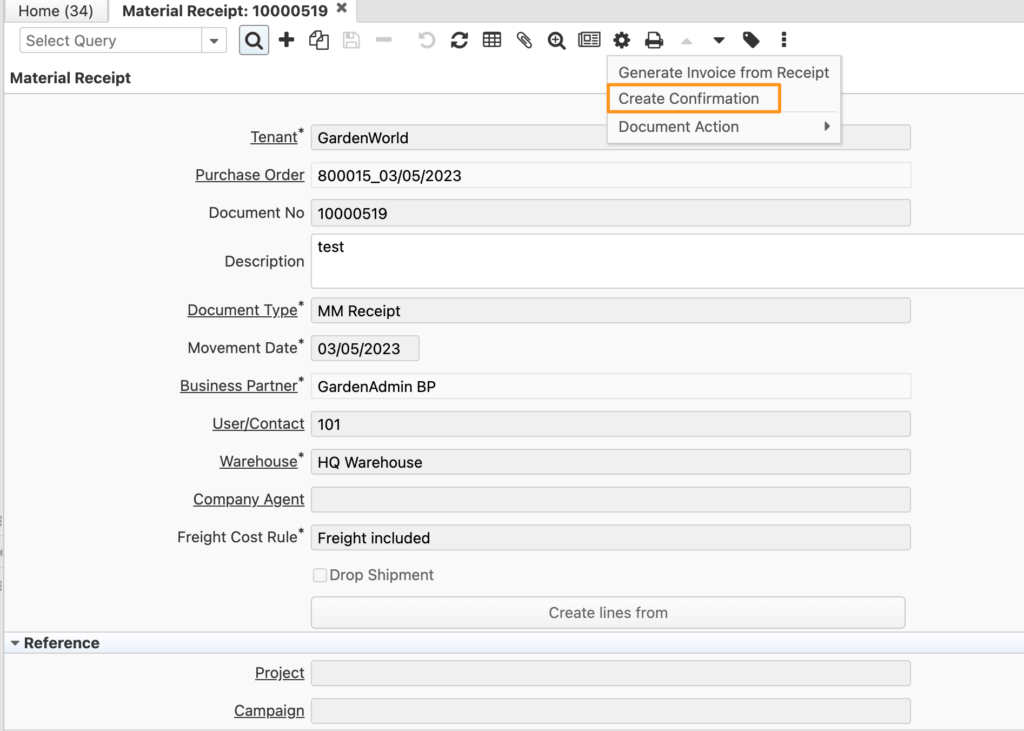
Click on the “Create Confirmation” process icon in the toolbar.
Automatically
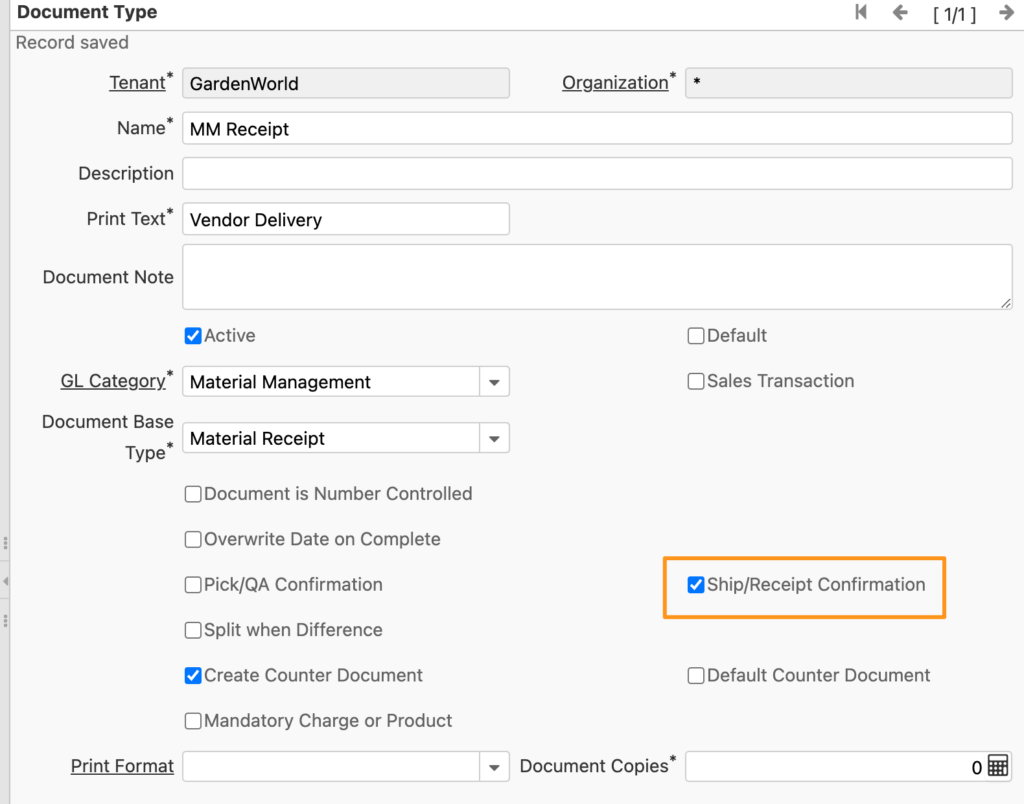
In the material receipt document type, ensure that “Ship/Receipt Confirmation” is selected. When the document action “Prepare” or “Complete” is clicked, the system will automatically generate a confirmation.
Conclusion
In conclusion, material confirmation plays a crucial role in ensuring the accuracy of inventory records and optimizing warehouse management processes. By confirming the receipt of materials, companies can verify the quantity and quality of the received goods, update inventory records, and identify any discrepancies or issues that need to be addressed. With the help of advanced ERP systems, companies can automate the material confirmation process and reduce the risk of errors or delays caused by manual data entry. By implementing best practices for material confirmation, companies can improve their inventory accuracy, reduce costs, and enhance their overall operational efficiency.
English Version
ExcerptThis article discusses the process of generating material confirmations in iDempiere ERP. It explains the steps involved in creating a receipt confirmation for materials and how the system automatically updates the receipt data once the confirmation is completed. By using iDempiere’s material confirmation feature, businesses can ensure the accuracy of their inventory and streamline their…
iDempiere ERP is an open-source enterprise resource planning (ERP) system that offers a wide range of functionalities for managing business processes. One of the core modules of iDempiere ERP is the Material Receipt and Confirm module, which is used for managing the receipt of goods and confirming their delivery.
The Material Receipt and Confirm module allows organizations to efficiently manage the receipt of goods, including raw materials, finished products, and supplies. It provides a streamlined process for receiving goods, tracking inventory levels, and confirming delivery, which helps to ensure that the right products are available at the right time and in the right quantities.
When a purchase order is created in iDempiere ERP, the Material Receipt and Confirm module allows users to create a corresponding receipt record for each item in the order. This receipt record contains information such as the quantity of the item received, the date of receipt, and the supplier information. Once the goods have been received, users can then confirm the receipt, which updates the inventory levels in the system.
The Material Receipt and Confirm module also allows users to manage partial receipts, which can be useful when only a portion of the order has been received. For example, if an order for 100 units is placed, but only 50 units are received, users can create a partial receipt for the 50 units and update the remaining 50 units as back-ordered. This helps to ensure that inventory levels are accurately reflected in the system and that future orders can be placed accordingly.
In addition to managing the receipt of goods, the Material Receipt and Confirm module also provides functionality for managing returns and rejections. If a shipment is received and found to be defective or incorrect, users can create a return record to initiate the process of returning the goods to the supplier. Similarly, if goods are received and found to be unsatisfactory, users can create a rejection record to initiate the process of rejecting the goods and forming a replacement order.
Overall, the Material Receipt and Confirm module in iDempiere ERP is an essential tool for managing the receipt of goods and confirming their delivery. It provides a streamlined process for receiving goods, tracking inventory levels, and managing returns and rejections. By using this module, organizations can improve their supply chain management processes and ensure that the right products are available at the right time and in the right quantities.
How to receive and return non-inventory items?
This is a topic worth exploring. In iDempiere ERP, the process of receiving and returning also applies to non-inventory items.
For non-inventory items, such as services or other expenses, the receiving process may involve more documents or agreements. The Material Receipt and Confirm module in iDempiere ERP provides a function to associate relevant documents or agreements with specific orders or items. After the receipt is completed, the related documents or agreements will be archived and can be queried and retrieved through the document management system in iDempiere ERP.
If a return or refund is needed, the processing method for non-inventory items is different from that of inventory items. In iDempiere ERP, a Credit Memo can be used to handle returns or refunds. When a return or refund is needed, a Credit Memo can be created to associate the relevant order or item with the amount. Then, the Credit Memo can be sent to the supplier or customer for the return or refund process. In iDempiere ERP, the progress of returns or refunds can be tracked by querying the status of the Credit Memo.
In summary, the process of receiving and returning non-inventory items can be managed through the Material Receipt and Confirm module in iDempiere ERP. The module provides a powerful system that can associate relevant documents or agreements with orders or items and handle returns or refunds through Credit Memo. This can help organizations better manage the process of receiving and returning non-inventory items and improve supply chain management efficiency.
The workflow of Material receipt confirmation
The Material Receipt Confirm process begins with creating a purchase order for the items that need to be received. Once the order is created, the items are shipped from the supplier to the receiving location. The receiving personnel then physically receive the items and verify that the quantity and quality of the items received match the information on the purchase order.
After verifying the items received, the receiving personnel then log into iDempiere ERP and create a receipt for the items in the system. The receiver can manually or automatically generate a confirmation receipt after inputting the received quantity, which will be thoroughly inspected by the IQC or other department personnel, and record the confirmed quantity and scrapped quantity. After completion, the data will be automatically updated to the receipt. They can also attach any relevant documents or agreements related to the receipt.
Once the receipt is created, the system will automatically update the inventory levels and the purchase order status in real time. If there are any discrepancies or damages, the system will also create an alert or notification for the relevant personnel to take corrective action.
The Material Receipt Confirm process is not limited to inventory items only. Non-inventory items, such as services or expenses, can also be managed through the Material Receipt Confirm module in iDempiere ERP. For non-inventory items, the relevant documents or agreements can be attached to the receipt and a Credit Memo can be used to handle returns or refunds, as I explained in my previous response.
In conclusion, the Material Receipt Confirm process in iDempiere ERP streamlines the process of receiving and managing items, both inventory and non-inventory, by automating inventory updates, providing alerts for discrepancies or damages, and associating relevant documents or agreements with the receipts.
The differences between the PickQAConfirm and ShipReceiptConfirm type in iDempiere ERP
PickQAConfirm is a type of confirmation used to verify the picking and quality assurance of items prior to shipment. This confirm type is used when items are being prepared for shipment from a warehouse or distribution center. In this process, the system generates a pick list based on the sales order or other shipping document. The pick list identifies the specific items and quantities that need to be picked and prepared for shipment. Once the items are picked, they are then sent to the quality assurance area for inspection. The quality assurance personnel will check the items to ensure they meet the required quality standards. If any issues are found, the items may need to be reworked or replaced before they can be shipped. Once the quality check is completed, the PickQAConfirm is created to confirm that the items are ready for shipment.
On the other hand, ShipReceiptConfirm is a type of confirmation used to verify the receipt of items by the customer. This confirm type is used when items are delivered to the customer’s location. In this process, the items are shipped from the warehouse or distribution center to the customer’s location. Once the items arrive at the customer’s location, the customer verifies the items received and confirms the shipment. This confirmation can be done through the ShipReceiptConfirm in iDempiere ERP. The ShipReceiptConfirm verifies that the items were received in good condition and that the quantity and quality of the items received match the information on the shipping documents. This confirmation triggers the final steps in the order fulfillment process, such as invoicing and payment processing.
In summary, the PickQAConfirm and ShipReceiptConfirm confirm types serve different purposes in the order fulfillment process. PickQAConfirm is used to verify the picking and quality assurance of items prior to shipment, while ShipReceiptConfirm is used to verify the receipt of items by the customer. Both confirm types are important for ensuring the accuracy and quality of the items being shipped and received and are key components of the overall order fulfillment process in iDempiere ERP.
How to calculate the actual quantity received?
| Confirmation Type | Calculation of Material Receipt Movement Quantity |
| PickQAConfirm | Movement Quantity = Confirmed Quantity (confirm) Picked Quantity = Confirmed Quantity (confirm) Scrapped Quantity = Scrapped Quantity (confirm) |
| ShipReceiptConfirm (In Material Receipt) | Movement Quantity = Confirmed Quantity + Scrapped Quantity (confirm) |
For example
Entered Quantity = 100
Confirmed Quantity = 70
Scrapped Quantity = 30
| Confirmation Type | Calculation of Material Receipt Movement Quantity |
| PickQAConfirm | Movement Quantity = 70 Picked Quantity = 70 Scrapped Quantity = 30 |
| ShipReceiptConfirm (In Material Receipt) | Movement Quantity = 100 Scrapped Quantity = 30 |
How to generate material confirmation manually and automatically?
Manually
Click on the “Create Confirmation” process icon in the toolbar.
Automatically
In the material receipt document type, ensure that “Ship/Receipt Confirmation” is selected. When the document action “Prepare” or “Complete” is clicked, the system will automatically generate a confirmation.
Conclusion
In conclusion, material confirmation plays a crucial role in ensuring the accuracy of inventory records and optimizing warehouse management processes. By confirming the receipt of materials, companies can verify the quantity and quality of the received goods, update inventory records, and identify any discrepancies or issues that need to be addressed. With the help of advanced ERP systems, companies can automate the material confirmation process and reduce the risk of errors or delays caused by manual data entry. By implementing best practices for material confirmation, companies can improve their inventory accuracy, reduce costs, and enhance their overall operational efficiency.
日本語版
ExcerptThis article discusses the process of generating material confirmations in iDempiere ERP. It explains the steps involved in creating a receipt confirmation for materials and how the system automatically updates the receipt data once the confirmation is completed. By using iDempiere’s material confirmation feature, businesses can ensure the accuracy of their inventory and streamline their…
iDempiere ERPは、ビジネスプロセスを管理するための幅広い機能を提供するオープンソースの統合業務計画(ERP)システムです。iDempiere ERPのコアモジュールの一つが入庫・確認モジュールであり、商品の入庫管理と納品確認に使用されます。
入庫・確認モジュールにより、組織は原材料、完成品、消耗品を含む商品の入庫を効率的に管理できます。商品の受領、在庫レベルの追跡、納品確認のための合理化されたプロセスを提供し、適切な製品が適切なタイミングで適切な数量で利用可能であることを保証します。
iDempiere ERPで購買発注が作成されると、入庫・確認モジュールにより、注文内の各品目に対応する入庫記録を作成できます。この入庫記録には、受領した品目の数量、受領日、仕入先情報などの情報が含まれます。商品が受領されると、ユーザーは入庫を確認でき、システム内の在庫レベルが更新されます。
入庫・確認モジュールでは、注文の一部のみが受領された場合に有用な分割入庫の管理も可能です。例えば、100個の注文を出したが50個しか受領していない場合、ユーザーは50個分の分割入庫を作成し、残りの50個をバックオーダーとして更新できます。これにより、在庫レベルがシステムに正確に反映され、将来の注文を適切に行うことができます。
商品の入庫管理に加えて、入庫・確認モジュールは返品・不合格品の管理機能も提供します。出荷品が受領され、不良品または誤品と判明した場合、ユーザーは返品記録を作成して仕入先への返品プロセスを開始できます。同様に、商品が受領され品質が不十分と判明した場合、ユーザーは不合格記録を作成して商品の拒否と代替注文の作成プロセスを開始できます。
全体として、iDempiere ERPの入庫・確認モジュールは、商品の入庫管理と納品確認に不可欠なツールです。商品の受領、在庫レベルの追跡、返品・不合格品の管理のための合理化されたプロセスを提供します。このモジュールを使用することで、組織はサプライチェーン管理プロセスを改善し、適切な製品が適切なタイミングで適切な数量で利用可能であることを保証できます。
非在庫品目の入庫と返品方法
これは探求する価値のあるトピックです。iDempiere ERPでは、入庫と返品のプロセスは非在庫品目にも適用されます。
サービスやその他の経費などの非在庫品目の場合、入庫プロセスにはより多くの書類や契約が関わる場合があります。iDempiere ERPの入庫・確認モジュールは、関連する書類や契約を特定の注文や品目に関連付ける機能を提供します。入庫が完了すると、関連する書類や契約はアーカイブされ、iDempiere ERPの文書管理システムを通じて照会・取得できます。
返品や返金が必要な場合、非在庫品目の処理方法は在庫品目とは異なります。iDempiere ERPでは、クレジットメモを使用して返品や返金を処理できます。返品や返金が必要な場合、関連する注文や品目と金額を関連付けるクレジットメモを作成できます。その後、クレジットメモを仕入先や顧客に送信して返品・返金プロセスを進めることができます。iDempiere ERPでは、クレジットメモのステータスを照会することで返品・返金の進捗を追跡できます。
まとめると、非在庫品目の入庫と返品のプロセスは、iDempiere ERPの入庫・確認モジュールを通じて管理できます。このモジュールは、関連する書類や契約を注文や品目に関連付け、クレジットメモを通じて返品や返金を処理できる強力なシステムを提供します。これにより、組織は非在庫品目の入庫と返品のプロセスをより良く管理し、サプライチェーン管理の効率を向上させることができます。
入庫確認のワークフロー
入庫確認プロセスは、受領する品目の購買発注の作成から始まります。注文が作成されると、品目は仕入先から受領場所に出荷されます。受領担当者は品目を物理的に受け取り、受領した品目の数量と品質が購買発注の情報と一致することを確認します。
受領品目の確認後、受領担当者はiDempiere ERPにログインし、システムで品目の入庫伝票を作成します。受領者は受領数量を入力後、手動または自動で確認入庫を生成できます。これはIQCまたは他の部門の担当者によって徹底的に検査され、確認数量と廃棄数量が記録されます。完了後、データは自動的に入庫伝票に更新されます。また、入庫に関連する書類や契約を添付することもできます。
入庫伝票が作成されると、システムは在庫レベルと購買発注のステータスをリアルタイムで自動更新します。差異や損傷がある場合、システムは関連担当者に是正措置を取るためのアラートまたは通知も作成します。
入庫確認プロセスは在庫品目に限定されません。サービスや経費などの非在庫品目も、iDempiere ERPの入庫確認モジュールを通じて管理できます。非在庫品目の場合、関連する書類や契約を入庫伝票に添付でき、前述の通りクレジットメモを使用して返品や返金を処理できます。
結論として、iDempiere ERPの入庫確認プロセスは、在庫更新の自動化、差異や損傷に対するアラートの提供、関連する書類や契約の入庫伝票への関連付けにより、在庫品目・非在庫品目の両方の受領と管理プロセスを合理化します。
iDempiere ERPにおけるPickQAConfirmとShipReceiptConfirmタイプの違い
PickQAConfirmは、出荷前の品目のピッキングと品質保証を確認するために使用される確認タイプです。この確認タイプは、倉庫や配送センターから出荷するために品目を準備する際に使用されます。このプロセスでは、システムは販売注文やその他の出荷書類に基づいてピッキングリストを生成します。ピッキングリストには、ピッキングして出荷準備する必要がある特定の品目と数量が記載されます。品目がピッキングされると、検査のために品質保証エリアに送られます。品質保証担当者は品目が要求される品質基準を満たしているか確認します。問題が見つかった場合、品目は出荷前に再作業または交換が必要になる場合があります。品質チェックが完了すると、品目が出荷準備完了であることを確認するPickQAConfirmが作成されます。
一方、ShipReceiptConfirmは、顧客による品目の受領を確認するために使用される確認タイプです。この確認タイプは、品目が顧客の場所に配達される際に使用されます。このプロセスでは、品目は倉庫や配送センターから顧客の場所に出荷されます。品目が顧客の場所に到着すると、顧客は受領品目を確認し出荷を承認します。この確認はiDempiere ERPのShipReceiptConfirmを通じて行うことができます。ShipReceiptConfirmは、品目が良好な状態で受領され、受領した品目の数量と品質が出荷書類の情報と一致することを確認します。この確認により、請求書発行や支払い処理などの注文履行プロセスの最終ステップがトリガーされます。
まとめると、PickQAConfirmとShipReceiptConfirmの確認タイプは、注文履行プロセスにおいて異なる目的を果たします。PickQAConfirmは出荷前の品目のピッキングと品質保証の確認に使用され、ShipReceiptConfirmは顧客による品目の受領確認に使用されます。両方の確認タイプは、出荷・受領される品目の正確性と品質を確保するために重要であり、iDempiere ERPの全体的な注文履行プロセスの重要な構成要素です。
実際の受領数量の計算方法
| 確認タイプ | 入庫移動数量の計算 |
| PickQAConfirm | 移動数量 = 確認数量(confirm) ピッキング数量 = 確認数量(confirm) 廃棄数量 = 廃棄数量(confirm) |
| ShipReceiptConfirm (入庫の場合) | 移動数量 = 確認数量 + 廃棄数量(confirm) |
例
入力数量 = 100
確認数量 = 70
廃棄数量 = 30
| 確認タイプ | 入庫移動数量の計算 |
| PickQAConfirm | 移動数量 = 70 ピッキング数量 = 70 廃棄数量 = 30 |
| ShipReceiptConfirm (入庫の場合) | 移動数量 = 100 廃棄数量 = 30 |
入庫確認を手動・自動で生成する方法
手動
ツールバーの「確認作成」プロセスアイコンをクリックします。
自動
入庫伝票タイプで、「出荷/入庫確認」が選択されていることを確認してください。伝票アクション「準備」または「完了」がクリックされると、システムは自動的に確認を生成します。
結論
結論として、入庫確認は在庫記録の正確性を確保し、倉庫管理プロセスを最適化する上で重要な役割を果たします。入庫確認により、企業は受領した商品の数量と品質を検証し、在庫記録を更新し、対処が必要な差異や問題を特定できます。先進的なERPシステムの助けにより、企業は入庫確認プロセスを自動化し、手動データ入力によるエラーや遅延のリスクを低減できます。入庫確認のベストプラクティスを導入することで、企業は在庫精度を向上させ、コストを削減し、全体的な業務効率を高めることができます。