說明:
若Workflow Node 結點中設定等待時間. iDempiere 預設情況下,就算時間到了, 也不會將流程往前推進.
目前設計是由相關權責人員到簽核畫面去按確認才會往下走.
不過,我有一個實際的案例, 需要用到 Wait Timeout 自動往下走.
情境如下:
加班單送出申請後, 系統會自動檢查該員工是否有打下班卡,以核對加班單的有效性.
但是,真實使用情境,通常員工加班完後會先在自己的電腦操作ERP申請完加班申請, 這時候需要先等待一時間等員工離開公司時的打卡紀錄.
另外,若沒有打卡紀錄,系統會通知員工出勤紀錄有誤,再等待半天時間等員工補登.
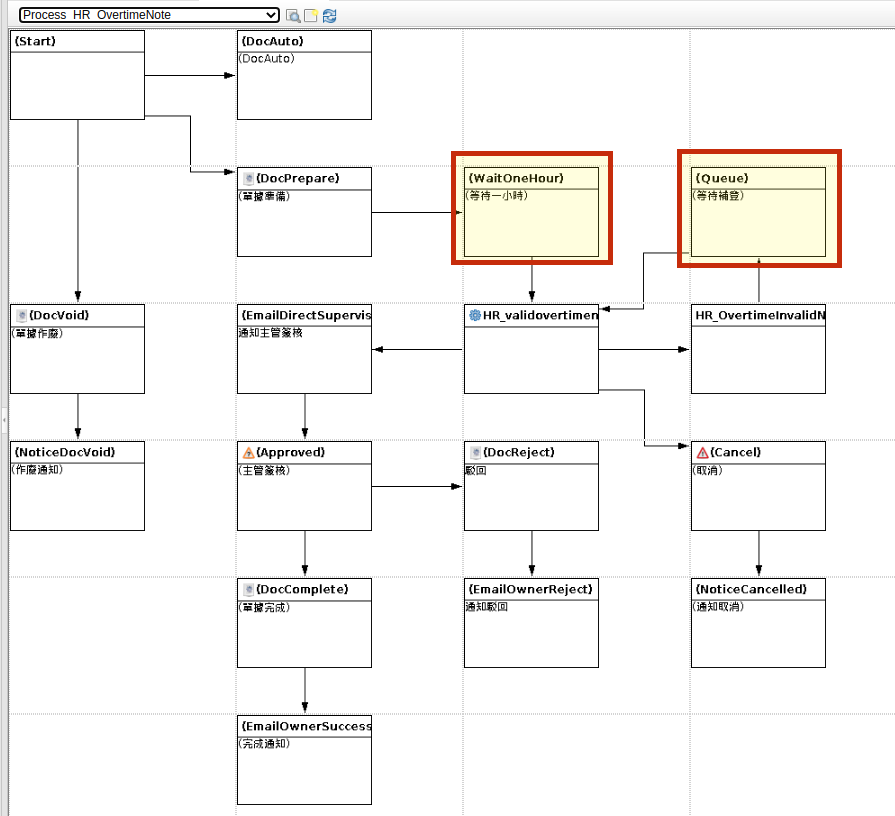
下面流程兩紅色框起來的兩個 Node 會運用到Timeout and Next 的自動功能.
實作法法:
撰寫一個 IProcess 並安裝到 Scheduler 讓它自動執行.
package tw.ninniku.trade.process;

import java.math.BigDecimal;
import java.net.UnknownHostException;
import java.sql.*;
import java.text.SimpleDateFormat;
import java.util.ArrayList;
import java.util.Arrays;
import java.util.Calendar;
import java.util.Date;
import java.util.List;
import java.util.Properties;
import java.util.logging.Level;

import javax.xml.bind.JAXBException;
import javax.xml.datatype.DatatypeConfigurationException;

import org.compiere.db.CConnection;
import org.compiere.model.I_M_ProductionPlan;
import org.compiere.model.MClient;
import org.compiere.model.MInOut;
import org.compiere.model.MInOutLine;
import org.compiere.model.MProductCategory;
import org.compiere.model.MProduction;
import org.compiere.model.MProductionPlan;
import org.compiere.model.MRole;
import org.compiere.model.MSysConfig;
import org.compiere.model.MUser;
import org.compiere.model.Query;
import org.compiere.process.ProcessInfoParameter;
import org.compiere.process.StateEngine;
import org.compiere.process.SvrProcess;
import org.compiere.util.AdempiereUserError;
import org.compiere.util.DB;
import org.compiere.util.EMail;
import org.compiere.util.Env;
import org.compiere.util.Msg;
import org.compiere.wf.MWFActivity;

import tw.ninniku.einvoice.A0401.A0401Builder;
import tw.ninniku.trade.model.MTradeInvoice;

/**
 *
 * 針對 HR 模組 workflow node 去推動
 * @author Ray Lee
 *
 */
public class CheckWaitingWorkflow extends SvrProcess {

	/**	Open Activities				*/
	private MWFActivity[] 		m_activities = null;
	/**	Current Activity			*/
	private MWFActivity 		m_activity = null;
	/**	Current Activity			*/
	private int	 				m_index = 0;
	private String host = null;

	protected void prepare() {

		ProcessInfoParameter[] para = getParameter();
		for (int i = 0; i < para.length; i++)
		{
			String name = para[i].getParameterName();
			if ("Host".equals(name))
				host = para[i].getParameterAsString();
			else
				log.log(Level.SEVERE, "Unknown Parameter: " + name);
		}
	}	//prepare

	@Override
	protected String doIt() throws Exception {

		String hostname;
		try {
			hostname = java.net.InetAddress.getLocalHost().getHostName();
			if(!hostname.equals(host))
				return "Non-specified host.";
			updateActivities();
		} catch (UnknownHostException e) {
			// TODO Auto-generated catch block
			e.printStackTrace();
		}

		return "Done";
	}

	public int updateActivities()
	{
		int counter = 0;
		String sql = "select * from AD_WF_Activity aa"
				 +" where wfstate = 'OS'"
				 + " and endwaittime < now()"
				 + " and endwaittime is not null"
				 + " and isactive = 'Y'"
				 + " and exists ( select * from  AD_WF_Node where AD_WF_Node_id = aa.AD_WF_Node_id and action = 'Z' and waittime != 0 and EntityType = 'TG02') ";

		PreparedStatement pstmt = null;
		ResultSet rs = null;
		try
		{
			pstmt = DB.prepareStatement (sql, get_TrxName());

			rs = pstmt.executeQuery ();
			while (rs.next ())
			{
				MWFActivity activity = new MWFActivity(Env.getCtx(), rs, null);
				activity.setWFState(StateEngine.STATE_Running);
				activity.setWFState(StateEngine.STATE_Completed);
				counter++;
			}
		}
		catch (Exception e)
		{
			log.log(Level.SEVERE, sql, e);
		}
		finally
		{
			DB.close(rs, pstmt);
			rs = null; pstmt = null;
		}

		return counter;
	}	//	loadActivities
}
English Version
Description:
When a wait time is configured in a Workflow Node, iDempiere by default will not automatically advance the process even when the time has elapsed.
The current design requires the responsible personnel to go to the approval screen and click confirm to proceed.
However, I have a real-world use case that requires Wait Timeout to automatically advance the process.
The scenario is as follows:
After an overtime request is submitted, the system automatically checks whether the employee has clocked out, to verify the validity of the overtime request.
However, in actual usage, employees typically submit their overtime request via ERP on their own computer after finishing overtime work. At this point, the system needs to wait for some time for the employee’s clock-out record when leaving the company.
Additionally, if there is no clock-out record, the system notifies the employee of an attendance discrepancy and waits for half a day for the employee to make a correction.
The two Nodes highlighted with red boxes in the flow below utilize the Timeout and Next automatic functionality.
Implementation approach:
Write an IProcess and install it in the Scheduler to run automatically.
package tw.ninniku.trade.process;

import java.math.BigDecimal;
import java.net.UnknownHostException;
import java.sql.*;
import java.text.SimpleDateFormat;
import java.util.ArrayList;
import java.util.Arrays;
import java.util.Calendar;
import java.util.Date;
import java.util.List;
import java.util.Properties;
import java.util.logging.Level;

import javax.xml.bind.JAXBException;
import javax.xml.datatype.DatatypeConfigurationException;

import org.compiere.db.CConnection;
import org.compiere.model.I_M_ProductionPlan;
import org.compiere.model.MClient;
import org.compiere.model.MInOut;
import org.compiere.model.MInOutLine;
import org.compiere.model.MProductCategory;
import org.compiere.model.MProduction;
import org.compiere.model.MProductionPlan;
import org.compiere.model.MRole;
import org.compiere.model.MSysConfig;
import org.compiere.model.MUser;
import org.compiere.model.Query;
import org.compiere.process.ProcessInfoParameter;
import org.compiere.process.StateEngine;
import org.compiere.process.SvrProcess;
import org.compiere.util.AdempiereUserError;
import org.compiere.util.DB;
import org.compiere.util.EMail;
import org.compiere.util.Env;
import org.compiere.util.Msg;
import org.compiere.wf.MWFActivity;

import tw.ninniku.einvoice.A0401.A0401Builder;
import tw.ninniku.trade.model.MTradeInvoice;

/**
 *
 * 針對 HR 模組 workflow node 去推動
 * @author Ray Lee
 *
 */
public class CheckWaitingWorkflow extends SvrProcess {

	/**	Open Activities				*/
	private MWFActivity[] 		m_activities = null;
	/**	Current Activity			*/
	private MWFActivity 		m_activity = null;
	/**	Current Activity			*/
	private int	 				m_index = 0;
	private String host = null;

	protected void prepare() {

		ProcessInfoParameter[] para = getParameter();
		for (int i = 0; i < para.length; i++)
		{
			String name = para[i].getParameterName();
			if ("Host".equals(name))
				host = para[i].getParameterAsString();
			else
				log.log(Level.SEVERE, "Unknown Parameter: " + name);
		}
	}	//prepare

	@Override
	protected String doIt() throws Exception {

		String hostname;
		try {
			hostname = java.net.InetAddress.getLocalHost().getHostName();
			if(!hostname.equals(host))
				return "Non-specified host.";
			updateActivities();
		} catch (UnknownHostException e) {
			// TODO Auto-generated catch block
			e.printStackTrace();
		}

		return "Done";
	}

	public int updateActivities()
	{
		int counter = 0;
		String sql = "select * from AD_WF_Activity aa"
				 +" where wfstate = 'OS'"
				 + " and endwaittime < now()"
				 + " and endwaittime is not null"
				 + " and isactive = 'Y'"
				 + " and exists ( select * from  AD_WF_Node where AD_WF_Node_id = aa.AD_WF_Node_id and action = 'Z' and waittime != 0 and EntityType = 'TG02') ";

		PreparedStatement pstmt = null;
		ResultSet rs = null;
		try
		{
			pstmt = DB.prepareStatement (sql, get_TrxName());

			rs = pstmt.executeQuery ();
			while (rs.next ())
			{
				MWFActivity activity = new MWFActivity(Env.getCtx(), rs, null);
				activity.setWFState(StateEngine.STATE_Running);
				activity.setWFState(StateEngine.STATE_Completed);
				counter++;
			}
		}
		catch (Exception e)
		{
			log.log(Level.SEVERE, sql, e);
		}
		finally
		{
			DB.close(rs, pstmt);
			rs = null; pstmt = null;
		}

		return counter;
	}	//	loadActivities
}
日本語版
説明:
Workflowノードに待機時間が設定されている場合、iDempiereはデフォルトでは時間が経過してもプロセスを自動的に進めません。
現在の設計では、担当者が承認画面で確認ボタンを押すことで次のステップに進む仕組みになっています。
しかし、Wait Timeoutによる自動進行が必要な実際のユースケースがあります。
シナリオは以下の通りです:
残業申請が提出された後、システムは従業員が退勤打刻をしたかどうかを自動的にチェックし、残業申請の有効性を確認します。
ただし、実際の使用場面では、従業員は通常、残業終了後に自分のPCでERPから残業申請を行います。この時点では、従業員が会社を出る際の打刻記録を待つ必要があります。
また、打刻記録がない場合、システムは従業員に出勤記録の不一致を通知し、従業員が修正するまで半日間待機します。
以下のフローで赤枠で囲まれた2つのノードは、Timeout and Nextの自動機能を使用しています。
実装方法:
IProcessを作成し、Schedulerに登録して自動実行させます。
package tw.ninniku.trade.process;

import java.math.BigDecimal;
import java.net.UnknownHostException;
import java.sql.*;
import java.text.SimpleDateFormat;
import java.util.ArrayList;
import java.util.Arrays;
import java.util.Calendar;
import java.util.Date;
import java.util.List;
import java.util.Properties;
import java.util.logging.Level;

import javax.xml.bind.JAXBException;
import javax.xml.datatype.DatatypeConfigurationException;

import org.compiere.db.CConnection;
import org.compiere.model.I_M_ProductionPlan;
import org.compiere.model.MClient;
import org.compiere.model.MInOut;
import org.compiere.model.MInOutLine;
import org.compiere.model.MProductCategory;
import org.compiere.model.MProduction;
import org.compiere.model.MProductionPlan;
import org.compiere.model.MRole;
import org.compiere.model.MSysConfig;
import org.compiere.model.MUser;
import org.compiere.model.Query;
import org.compiere.process.ProcessInfoParameter;
import org.compiere.process.StateEngine;
import org.compiere.process.SvrProcess;
import org.compiere.util.AdempiereUserError;
import org.compiere.util.DB;
import org.compiere.util.EMail;
import org.compiere.util.Env;
import org.compiere.util.Msg;
import org.compiere.wf.MWFActivity;

import tw.ninniku.einvoice.A0401.A0401Builder;
import tw.ninniku.trade.model.MTradeInvoice;

/**
 *
 * 針對 HR 模組 workflow node 去推動
 * @author Ray Lee
 *
 */
public class CheckWaitingWorkflow extends SvrProcess {

	/**	Open Activities				*/
	private MWFActivity[] 		m_activities = null;
	/**	Current Activity			*/
	private MWFActivity 		m_activity = null;
	/**	Current Activity			*/
	private int	 				m_index = 0;
	private String host = null;

	protected void prepare() {

		ProcessInfoParameter[] para = getParameter();
		for (int i = 0; i < para.length; i++)
		{
			String name = para[i].getParameterName();
			if ("Host".equals(name))
				host = para[i].getParameterAsString();
			else
				log.log(Level.SEVERE, "Unknown Parameter: " + name);
		}
	}	//prepare

	@Override
	protected String doIt() throws Exception {

		String hostname;
		try {
			hostname = java.net.InetAddress.getLocalHost().getHostName();
			if(!hostname.equals(host))
				return "Non-specified host.";
			updateActivities();
		} catch (UnknownHostException e) {
			// TODO Auto-generated catch block
			e.printStackTrace();
		}

		return "Done";
	}

	public int updateActivities()
	{
		int counter = 0;
		String sql = "select * from AD_WF_Activity aa"
				 +" where wfstate = 'OS'"
				 + " and endwaittime < now()"
				 + " and endwaittime is not null"
				 + " and isactive = 'Y'"
				 + " and exists ( select * from  AD_WF_Node where AD_WF_Node_id = aa.AD_WF_Node_id and action = 'Z' and waittime != 0 and EntityType = 'TG02') ";

		PreparedStatement pstmt = null;
		ResultSet rs = null;
		try
		{
			pstmt = DB.prepareStatement (sql, get_TrxName());

			rs = pstmt.executeQuery ();
			while (rs.next ())
			{
				MWFActivity activity = new MWFActivity(Env.getCtx(), rs, null);
				activity.setWFState(StateEngine.STATE_Running);
				activity.setWFState(StateEngine.STATE_Completed);
				counter++;
			}
		}
		catch (Exception e)
		{
			log.log(Level.SEVERE, sql, e);
		}
		finally
		{
			DB.close(rs, pstmt);
			rs = null; pstmt = null;
		}

		return counter;
	}	//	loadActivities
}


