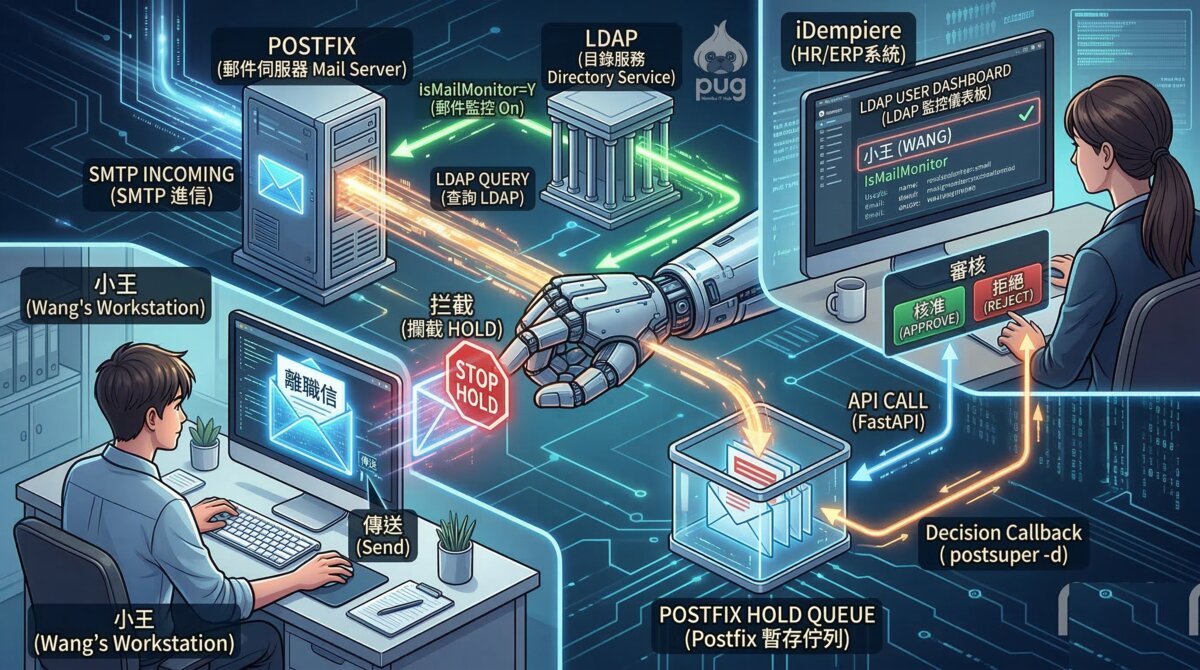
小王在座位上坐到下午六點,等同事們陸陸續續拎包走人,才悄悄打開信箱。履歷已經是第三版了,封面信也改了兩個措辭。他掃視了一遍,覺得文字渾然天成,語氣不卑不亢。他關掉辦公室的網頁,換到個人帳號,把滑鼠移到「傳送」上面,深吸一口氣。他不知道的是,兩個小時以前,HR 已經默默地勾了一個核取方塊。那個核取方塊,在等他。
幕一:Postfix 在等他
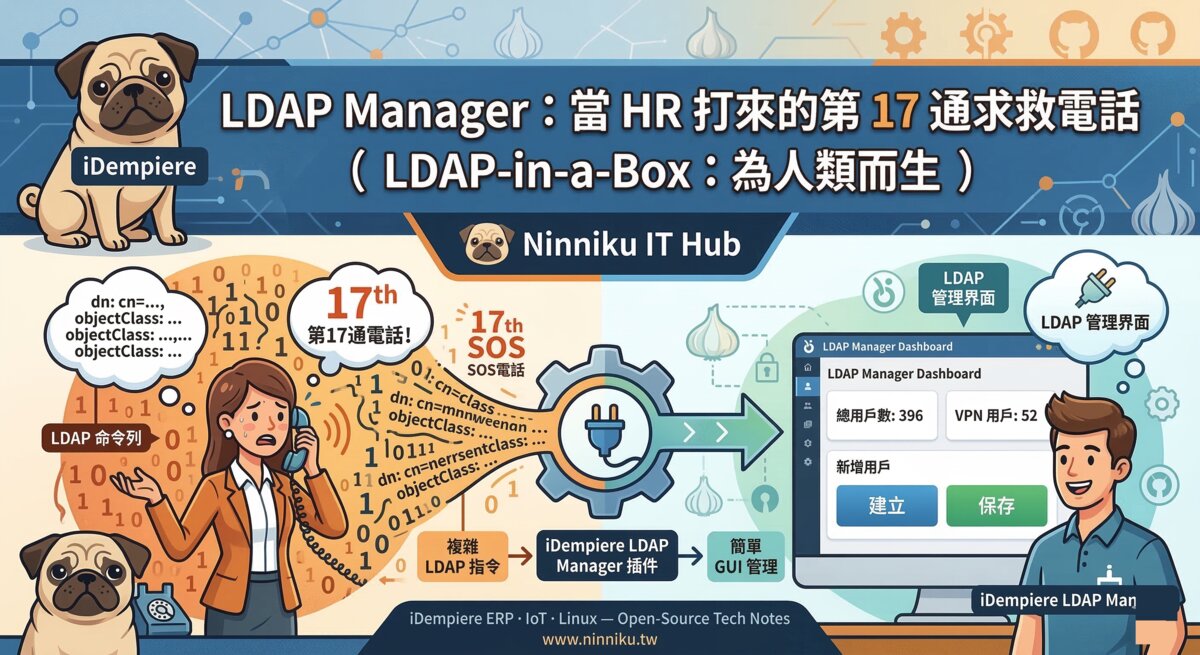
下午四點,HR 打開 iDempiere,在員工資料頁找到小王的紀錄,把「郵件監控(IsMailMonitor)」欄位打了勾,按下儲存。一個欄位,三個系統同步更新:iDempiere 寫入資料庫,LDAP 同步了屬性,Postfix 更新了查詢結果。小王對此一無所知,他還在想封面信的最後一句要不要加驚嘆號。
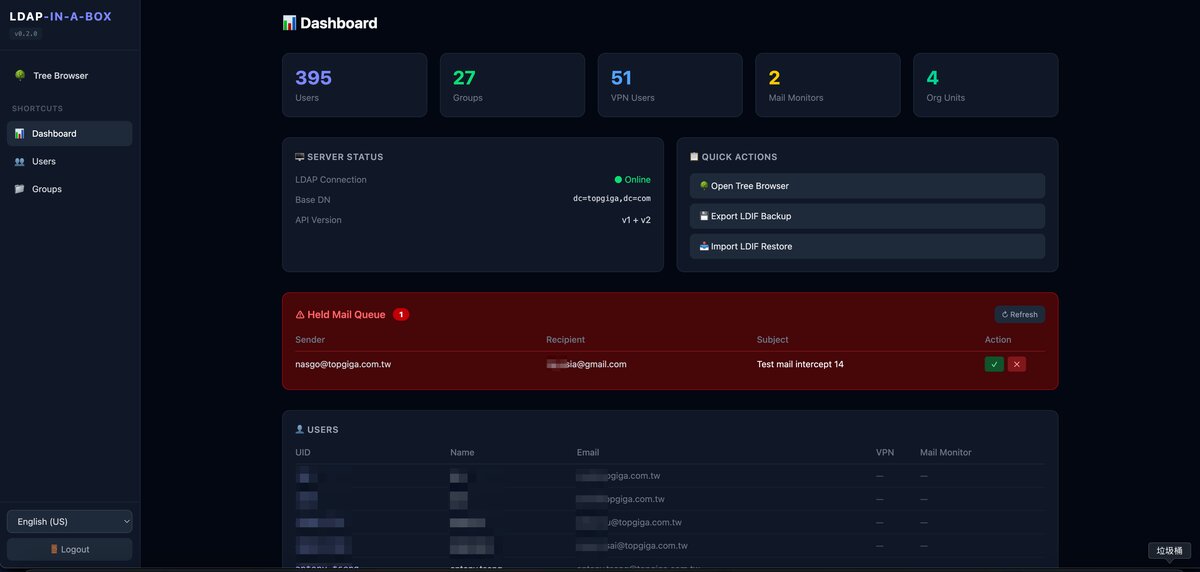
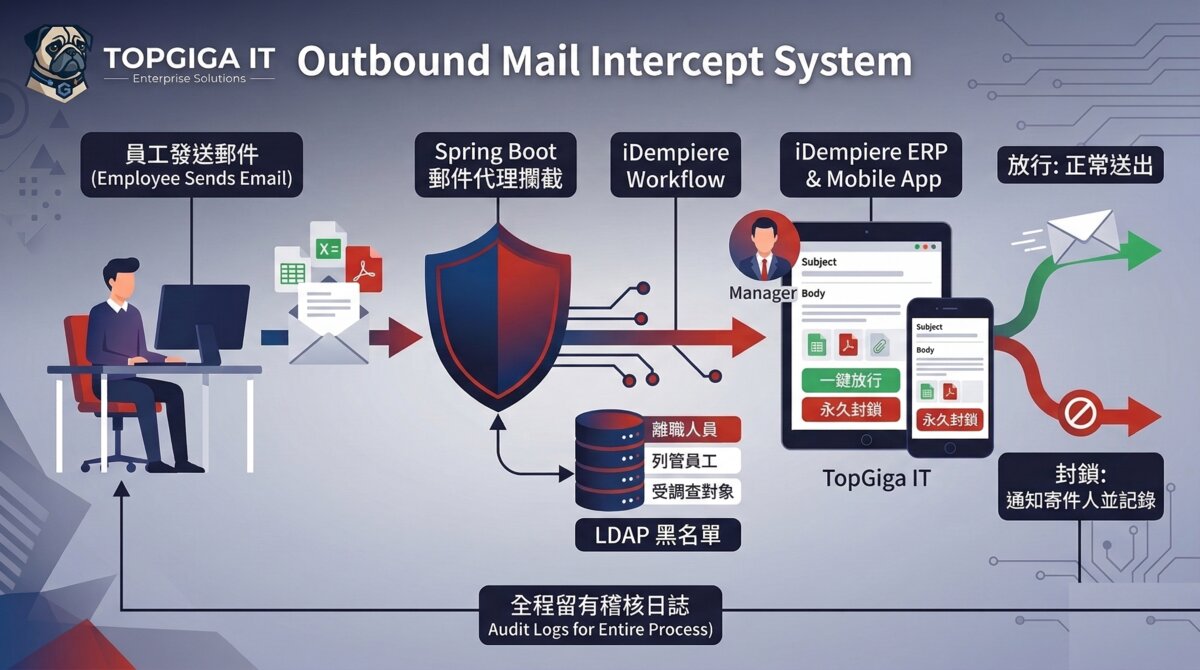
整套系統做了三件事:第一,動態攔截——Postfix 即時查詢 LDAP,決定這封信要不要先停下來;第二,ERP 工作流——信件內容送進 iDempiere,由主管或 HR 決定放行還是退回;第三,遠端控制——審核結果透過 API 回傳,FastAPI 再下指令給 Postfix,叫它放人或刪除。三個動作,決定了信件的命運。
幕二:第一封信的命運
18:03。小王按下傳送。郵件進入 Postfix。Postfix 查了一下 LDAP。LDAP 說:「這個人,Hold 住。」
Postfix 配置
Postfix 的攔截邏輯寫在 main.cf 裡,只有三行。
# /etc/postfix/main.cf
smtpd_recipient_restrictions =
    check_recipient_access hash:/etc/postfix/recipient_permit.cf,
    check_sender_access ldap:/etc/postfix/ldap-sender.cf,
    permit
這三行,決定了小王的命運。
ldap-sender.cf
LDAP 查詢的具體條件寫在 ldap-sender.cf:
server_host = ldap://your-ldap-host
search_base = ou=users,dc=ninniku,dc=tw
query_filter = (&(uid=%s)(IsMailMonitor=Y))
result_attribute = hold
查詢條件同時比對兩件事:這個寄件人的 uid 存在,而且 IsMailMonitor 是 Y。兩個條件都符合,LDAP 回傳 hold,Postfix 就把這封信扔進 HOLD 佇列,什麼都不說,什麼都不解釋。
FastAPI 監控服務
信進了 HOLD 佇列,不代表故事結束。有人在看著那個佇列。
FastAPI 監控服務在背景靜靜運行,每隔幾秒就做三件事:
- 用
postqueue -p掃描 HOLD 佇列,取得所有被攔截信件的 Queue ID - 對每個 Queue ID 執行
postcat -q <id>,解析寄件人、收件人、主旨與信件內文 - 透過 iDempiere REST API 將資料寫入
HR_MailIntercept表格,生成一筆等待審核的文件
小王的第一封信,在 Postfix 的佇列裡排隊等候,像一個在海關被攔下來的旅客,說不清楚自己要去哪。
幕三:ERP 裡的小王
隔天早上,HR 打開 iDempiere,進入「郵件攔截處理」視窗。小王昨晚發出的三封信,整整齊齊地排在那裡。寄件人:小王。主旨:應徵資深工程師。
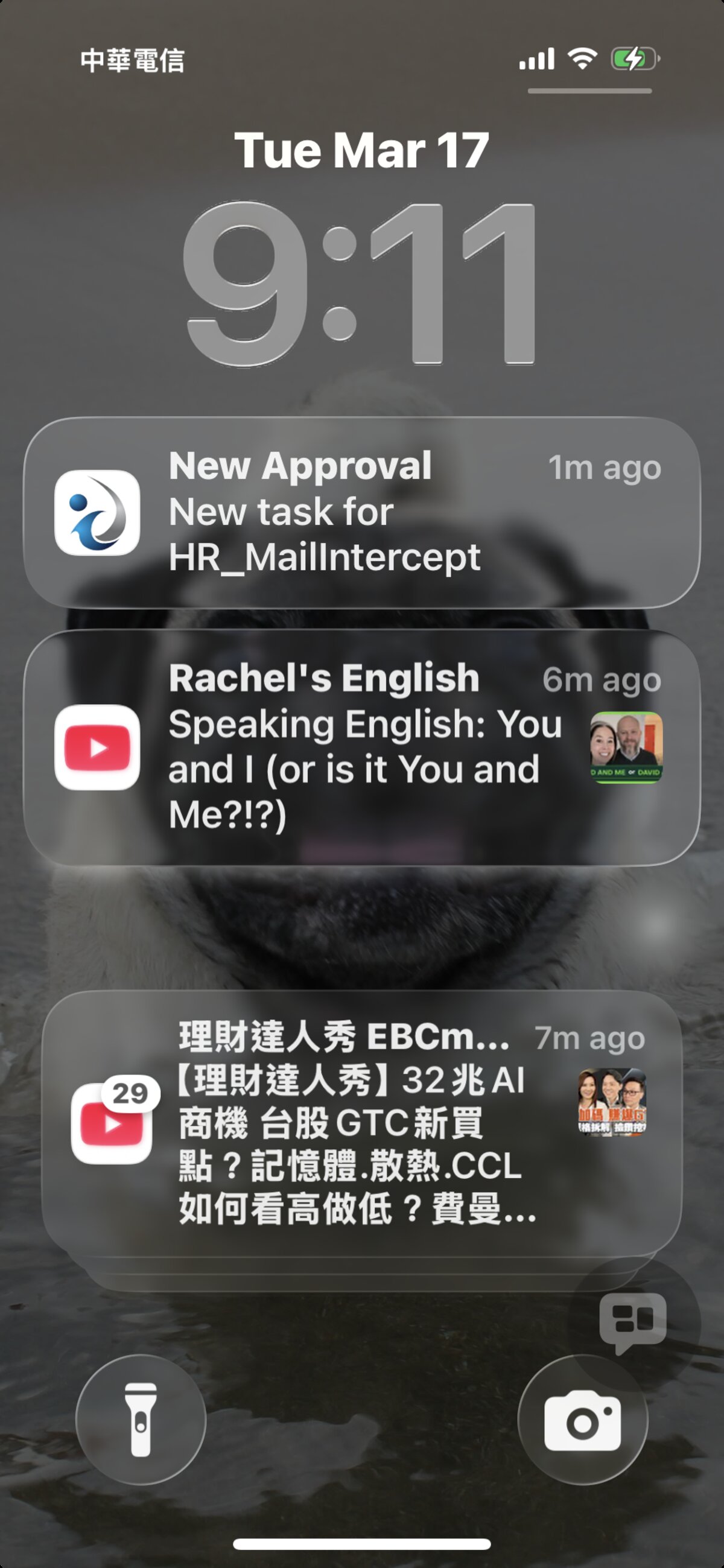
審核介面很簡單,只有兩條路:
- 核准:點「完成」→ FastAPI 收到 callback →
postsuper -H <queue_id>→ 信件從 HOLD 釋放,正常發出 - 拒絕:點「作廢」→ FastAPI 收到 callback →
postsuper -d <queue_id>→ 信件永久刪除,小王永遠不知道
HR 看著那封主旨寫著『應徵資深工程師』的信,點了『作廢』。小王永遠不知道那封信發生了什麼事。
這個核取方塊是從哪裡來的?它寫在 LDAPUser.java 的 afterSave 鉤子裡。員工資料一儲存,系統就自動把變動同步出去:
// LDAPUser.afterSave 片段
if (success && (newRecord || is_ValueChanged("IsMailMonitor"))) {
    LdapService.syncUserFlags(
        getAD_Client_ID(),
        getLDAPUser(),
        getName(),
        getEMail(),
        "Y".equalsIgnoreCase(get_ValueAsString("IsMailMonitor"))
    );
}
一個勾,三個系統同步。HR 不需要懂 LDAP。工程師不需要在旁邊等待。
尾:太史公曰
太史公曰:昔者小王夜深寄書,以為神不知鬼不覺。殊不知 Postfix 早已立於門前,LDAP 明察秋毫,ERP 靜候審判。信未出,已入佇列;人未走,已成檔案。天網恢恢,Hold 而不漏。
完整的 iDempiere HRM 插件(含郵件監控模組)開源於 GitHub:https://github.com/ray-idempiere/ldap-in-a-box
本功能已獲本公司虛構法務部「應該沒問題吧部門」審核通過。實際使用前請洽真實法務,本站不負責任何現實後果。
English Version
Prologue
Wang had a plan.
His resume went through three drafts. The second was too modest; the third struck the right balance between “experienced” and “not desperate.” His cover letter took longer — he rewrote the opening line four times before settling on something that sounded confident without being smug. He chose 6pm as his window, that quiet stretch after the last stragglers leave and before the cleaning crew arrives. He would send it then. No one would notice. He had thought of everything.
He was completely wrong about all of it.
Act 1: Postfix Was Waiting
That afternoon, HR checked a box in iDempiere. It took four clicks — navigate to the employee record, find the LDAP configuration tab, toggle IsMailMonitor to Y, save. She didn’t dwell on it. There was a stack of onboarding forms waiting. Three systems silently updated: iDempiere wrote to the database, the LDAP sync service pushed the flag to the directory, and Postfix — which had been running quietly on a server in the corner rack — now had new instructions.
Two floors away, Wang was proofreading his cover letter for typos.
Three things happen before Wang even notices the email is gone. First, Postfix queries LDAP in real time — the interception flag lives in the directory, not in a config file, which means it takes effect the moment HR saves the record. No restarts. No waiting. Second, email flagged for HOLD doesn’t bounce and doesn’t deliver; it sits in a queue, suspended, while a review is initiated in the ERP. Third, a FastAPI service bridges the gap between Postfix’s queue and iDempiere’s workflow — it is the piece that turns a mail server action into a business process. Together, the three form a loop Wang had no reason to know existed.
Act 2: The Fate of the First Email
Wang hit send at 6:03pm. His email entered Postfix. Postfix consulted LDAP. LDAP returned: HOLD.
The interception logic lives in three lines of main.cf:
# /etc/postfix/main.cf
smtpd_recipient_restrictions =
    check_recipient_access hash:/etc/postfix/recipient_permit.cf,
    check_sender_access ldap:/etc/postfix/ldap-sender.cf,
    permit
Postfix evaluates sender restrictions in order. If the LDAP lookup matches, the sender’s message is held. Three lines. Wang’s email never had a chance.
The LDAP query that does the actual work is in ldap-sender.cf:
server_host = ldap://your-ldap-host
search_base = ou=users,dc=ninniku,dc=tw
query_filter = (&(uid=%s)(IsMailMonitor=Y))
result_attribute = hold
The filter checks two things simultaneously: does this uid exist, and is IsMailMonitor set to Y? If both match, the result attribute hold is returned to Postfix, which interprets that as the HOLD action. The email enters the queue. Wang’s client shows the message as sent — his side of the conversation ended there. The other side hadn’t started yet.
The email entering the HOLD queue wasn’t the end of the story. Something was watching the queue.
FastAPI is the bridge no one talks about. It does three things on a loop:
- Every few seconds,
postqueue -pscans the HOLD queue and collects Queue IDs for intercepted emails — any message suspended and waiting for a decision. - For each Queue ID,
postcat -q <id>extracts the sender address, subject line, and body text in full. - That data is pushed to iDempiere via REST API, creating a review record in the
HR_MailIntercepttable — sender, subject, content, timestamp, status: Pending.
Wang’s email was now in limbo — like a traveler detained at customs with no good explanation for what’s in the bag.
Act 3: Wang in the ERP
The next morning, HR opened the Mail Intercept window. Three emails, neatly listed. Sender: Wang. Subject: Application – Senior Engineer.
The window offered two paths for each record.
Approve — click Complete. FastAPI receives the callback, runs postsuper -H <queue_id> to release the email from HOLD, and Postfix delivers it normally. The recipient gets the email. The sender never knows there was a delay.
Reject (Void) — click Void. FastAPI receives the callback, runs postsuper -d <queue_id> to permanently delete the message from the queue. The email ceases to exist. The sender’s client still shows it as sent.
HR looked at the email with the subject line Application – Senior Engineer. She clicked Void. Wang never found out what happened to that email.
The glue holding this together is a Java hook in the iDempiere LDAP user model. When HR saves the record — whether it’s a new employee or a flag change on an existing one — the hook fires and pushes the update to LDAP immediately:
// LDAPUser.afterSave snippet
if (success && (newRecord || is_ValueChanged("IsMailMonitor"))) {
    LdapService.syncUserFlags(
        getAD_Client_ID(),
        getLDAPUser(),
        getName(),
        getEMail(),
        "Y".equalsIgnoreCase(get_ValueAsString("IsMailMonitor"))
    );
}
One checkbox. Three systems in sync. HR doesn’t need to know LDAP. The engineer doesn’t need to be on standby.
The Historian’s Note
The historian notes: Wang believed he was invisible. He was not. Postfix had been waiting at the door. LDAP had been watching without blinking. The ERP had been keeping records, patiently. The email never left. The queue holds all; nothing escapes unreviewed.
The full iDempiere HRM plugin (including the mail monitoring module) is open source on GitHub: https://github.com/ray-idempiere/ldap-in-a-box
This feature has been approved by our company’s fictional legal department, the “Probably Fine” division. Consult actual lawyers before deployment.
日本語版
序:王さんの計画
残業が終わり、フロアの照明が半分落ちた。王さんはモニターの光だけを頼りに、ゆっくりとキーボードに向かった。件名欄に「シニアエンジニア応募について」と打ち込み、送信ボタンの上に指を置いた。誰も見ていない。誰も気づかない。完璧な計画のはずだった。
幕一:Postfix は待っていた
HRがその午後、iDempiere を開き、王さんのユーザーレコードにある「メールモニター (IsMailMonitor)」にチェックを入れて保存した。それだけで、3つのシステムが静かに更新された。王さんは何も知らなかった。
3つの動作が、メールの運命を決める。まず Postfix が LDAP に問い合わせ、対象者かどうかを動的に判定する。次に iDempiere のワークフローがHRに承認・却下の画面を提示する。そして FastAPI がその決定をリモートから Postfix に伝え、メールを解放するか、永久に消すかを執行する。王さんのメールは、この3つの関門を黙って通り抜けなければならなかった。
幕二:最初のメールの行方
18:03。王さんが送信ボタンを押した。Postfix が LDAP に問い合わせた。結果:HOLD。
Postfix 設定
王さんのメールが HOLD に落ちたのは、main.cf のたった3行のルールによるものだった。
# /etc/postfix/main.cf
smtpd_recipient_restrictions =
    check_recipient_access hash:/etc/postfix/recipient_permit.cf,
    check_sender_access ldap:/etc/postfix/ldap-sender.cf,
    permit
この3行が、王さんの運命を決めた。
ldap-sender.cf
Postfix が LDAP に何を聞くかは、ldap-sender.cf に書かれている。
server_host = ldap://your-ldap-host
search_base = ou=users,dc=ninniku,dc=tw
query_filter = (&(uid=%s)(IsMailMonitor=Y))
result_attribute = hold
送信者のメールアドレスを UID として LDAP を検索し、IsMailMonitor=Y であれば hold を返す。Postfix はその返答を受け取り、静かにメールをキューに積む。王さんには何の通知も届かない。送信は「成功」したように見える。
FastAPI 監視サービス
メールが HOLD キューに入ったからといって、話は終わらない。そのキューを見張っているものがいる。
- 数秒おきに
postqueue -pが HOLD キューをスキャンし、傍受されたメールの Queue ID を取得する - 各 Queue ID に対して
postcat -q <id>を実行し、送信者・件名・本文を解析する - iDempiere REST API 経由でデータを
HR_MailInterceptテーブルに書き込み、審査ドキュメントを生成する
王さんのメールは、パスポートを持っていない旅人のように、キューの中で立ち往生していた。目的地は見えている。しかし、誰かが扉を開けるまで、一歩も進めない。
幕三:ERP の中の王さん
翌朝、HRが iDempiere を開いた。
3通のメールが並んでいた。件名:「シニアエンジニア応募について」。送信時刻:18:03、18:47、21:15。HRはマウスを動かし、最初のメールをクリックした。本文が展開された。静かなオフィスに、キーボードの音だけが響いた。
HRには2つの選択肢がある。
- 承認:「完了」をクリックすると、FastAPI が callback を受信し、
postsuper -H <queue_id>を実行する。HOLD が解除され、メールは通常の送信経路に戻る。 - 却下(無効化):「無効」をクリックすると、FastAPI が callback を受信し、
postsuper -d <queue_id>を実行する。メールは永久に削除される。
HRは「シニアエンジニア応募について」という件名のメールを見て、「無効」をクリックした。王さんは永遠にそのメールの行方を知ることはなかった。
この一連の動作は、iDempiere の Java フックによって起動する。
// LDAPUser.afterSave の抜粋
if (success && (newRecord || is_ValueChanged("IsMailMonitor"))) {
    LdapService.syncUserFlags(
        getAD_Client_ID(),
        getLDAPUser(),
        getName(),
        getEMail(),
        "Y".equalsIgnoreCase(get_ValueAsString("IsMailMonitor"))
    );
}
チェックひとつで、3つのシステムが同期する。HRはLDAPを知らなくていい。エンジニアは待機しなくていい。
結び:史家曰く
史家曰く:王さんは深夜にメールを送った。神も知らぬと思っていた。しかし Postfix はすでに門の前に立っており、LDAP は秋の毫を明察し、ERP は静かに審判を待っていた。キューは空になることなく、何も見逃さない。
iDempiere HRM プラグイン(メール監視モジュールを含む)は GitHub でオープンソース公開中です:https://github.com/ray-idempiere/ldap-in-a-box
本機能は弊社の架空法務部「たぶん大丈夫課」の審査を通過しました。実際の運用前に本物の法務担当者にご確認ください。