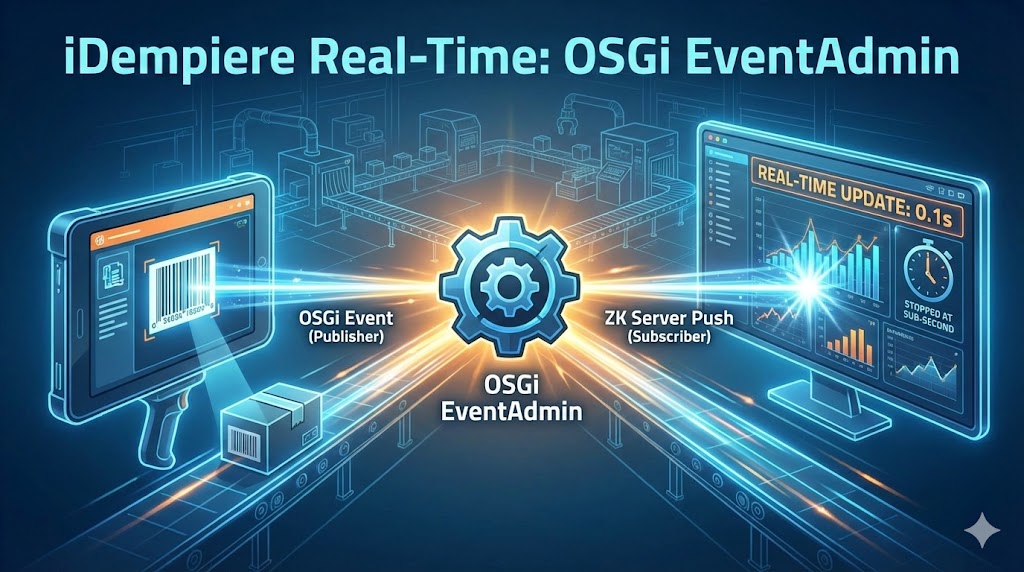
在現代製造執行系統(MES)或高頻物流環境中,預設的「輪詢」機制往往讓人感覺遲鈍。現今使用者期望即時回饋:就像通訊軟體一樣,當倉庫掃描條碼的瞬間,辦公室的儀表板就應該立刻閃爍更新。
在本文中,我們將深入探討如何在 iDempiere 中解決「伺服器推送延遲」問題,從標準的 ZK EventQueues 轉向穩健的 OSGi EventAdmin 方案,實現跨瀏覽器會話的亞秒級即時更新。
問題:「太慢了!」
我們最近為生產現場打造了一個資源 KPI 看板,用於即時顯示每個工作站的統計數據(目標 vs. 已完成)。
- 作業員:在工業平板上掃描產品條碼。
- 管理者:在 65 吋電視螢幕上觀看 KPI 儀表板。
最初,我們使用標準的 ZK EventQueues.APPLICATION。然而,使用者反映有 10-30 秒的延遲,甚至更糟糕的是完全漏掉更新。
為什麼會這樣? ZK 的預設機制在客戶端配置不完美時,有時會退回到「捎帶式」輪詢。此外,嚴格在 Web 容器內管理的 EventQueues,在業務邏輯從背景程序或不同的 OSGi Bundle 上下文觸發時,往往力不從心。
解決方案:OSGi EventAdmin + 伺服器推送
為了解決這個問題,我們研究了 iDempiere 本身如何處理「廣播訊息」。它利用了 OSGi EventAdmin,這是 OSGi 框架的原生事件匯流排。它位於更底層的系統級別,是連接業務邏輯與 UI 的完美橋梁。
將 OSGi Events 與 ZK 的 enableServerPush 結合,我們建立了一個閃電般快速、解耦的更新循環。
架構設計
- 發布者(掃描端):觸發包含中繼資料(訂單 ID、數量)的 OSGi Event(
idempiere/mes/update)。 - 訂閱者(儀表板):ZK UI 元件註冊一個 OSGi
EventHandler。 - 橋接層:當 OSGi 事件到達時,處理器使用
Executions.schedule()將任務安全地注入 ZK Desktop 執行緒。
實作指南
核心元件
1. MESBroadcastUtil – 事件廣播工具類
Java
package tw.ninniku.mrp.util;

import java.util.HashMap;
import java.util.Map;
import org.adempiere.base.event.EventManager;
import org.osgi.service.event.Event;

public class MESBroadcastUtil {
    // Define Event Topic
    public static final String TOPIC_MES_UPDATE = "idempiere/mes/update";
    public static final String PROPERTY_ORDER_ID = "M_Production_ID";
    public static final String PROPERTY_QTY = "Qty";

    /**
     * Send event to the OSGi System Bus
     * sendEvent = Synchronous delivery (Recommended for real-time updates)
     * postEvent = Asynchronous delivery
     */
    public static void publishMESUpdate(int orderId, int qty) {
        Map<String, Object> properties = new HashMap<>();
        properties.put(PROPERTY_ORDER_ID, orderId);
        properties.put(PROPERTY_QTY, qty);
        Event event = new Event(TOPIC_MES_UPDATE, properties);
        EventManager.getInstance().sendEvent(event);
    }
}
2. Model afterSave – 觸發事件
在 Model 類別的 afterSave() 方法中觸發事件:
Java
@Override
protected boolean afterSave(boolean newRecord, boolean success) {
    if (success) {
        // Send real-time update event
        MESBroadcastUtil.publishMESUpdate(get_ID(), 0);
    }
    return super.afterSave(newRecord, success);
}
3. AbstractKanbanForm – 基底類別
Java
package tw.ninniku.mrp.webui.form;

import org.adempiere.base.event.EventManager;
import org.adempiere.webui.panel.ADForm;
import org.adempiere.webui.panel.IFormController;
import org.osgi.service.event.EventHandler;
import org.zkoss.zk.ui.Desktop;
import org.zkoss.zk.ui.Executions;
import org.zkoss.zk.ui.event.Event;
import org.zkoss.zk.ui.event.EventListener;
import org.zkoss.zul.Hlayout;
import tw.ninniku.mrp.util.MESBroadcastUtil;

public abstract class AbstractKanbanForm extends ADForm
        implements IFormController, EventListener<Event> {

    protected Hlayout mainLayout = new Hlayout();
    private EventHandler subscriber;

    /** Subclass must implement: Returns Kanban name for Debugging */
    protected abstract String getKanbanName();

    /** Subclass must implement: Refreshes Kanban content */
    protected abstract void refreshKanban();

    /**
     * Crucial! Enable Server Push when the page is attached.
     */
    @Override
    public void onPageAttached(org.zkoss.zk.ui.Page newpage,
                               org.zkoss.zk.ui.Page oldpage) {
        super.onPageAttached(newpage, oldpage);
        if (newpage != null) {
            newpage.getDesktop().enableServerPush(true);
        }
    }

    @Override
    protected void initForm() {
        mainLayout.setHflex("1");
        mainLayout.setVflex("1");
        this.appendChild(mainLayout);

        // Render UI immediately
        refreshKanban();

        // Subscribe to real-time update events
        subscribeToEvents();
    }

    /**
     * Subscribe to OSGi EventAdmin events
     */
    private void subscribeToEvents() {
        try {
            // Get current Desktop and enable Server Push
            final Desktop myDesktop = Executions.getCurrent().getDesktop();
            myDesktop.enableServerPush(true);

            subscriber = new EventHandler() {
                @Override
                public void handleEvent(final org.osgi.service.event.Event event) {
                    // Check event topic
                    if (MESBroadcastUtil.TOPIC_MES_UPDATE.equals(event.getTopic())) {
                        // Check if Desktop is still alive
                        if (myDesktop.isAlive()) {
                            try {
                                // Use Executions.schedule to bridge to the ZK UI thread
                                Executions.schedule(myDesktop,
                                    new EventListener<Event>() {
                                        public void onEvent(Event evt) {
                                            // UI Safe Zone - UI can be updated here
                                            refreshKanban();
                                        }
                                    }, new Event("updateKanban"));
                            } catch (Exception e) {
                                e.printStackTrace();
                            }
                        }
                    }
                }
            };

            // Register event listener
            EventManager.getInstance().register(
                MESBroadcastUtil.TOPIC_MES_UPDATE, subscriber);

            // Important! Prevent memory leaks - Unregister when component detaches
            this.addEventListener("onDetach", (event) -> {
                EventManager.getInstance().unregister(subscriber);
            });
        } catch (Exception e) {
            e.printStackTrace();
        }
    }

    @Override
    public ADForm getForm() {
        return this;
    }
}
實作步驟
步驟一:建立事件廣播工具類別
建立 MESBroadcastUtil.java,定義事件主題與發送方法。
步驟二:在 Model 中觸發事件
在需要即時更新的 Model 類別中,覆寫 afterSave() 方法並呼叫 MESBroadcastUtil.publishMESUpdate()。
步驟三:建立基底表單類別
建立 AbstractKanbanForm.java,包含:
onPageAttached():啟用伺服器推送。subscribeToEvents():訂閱事件。onDetach監聽器:取消註冊以防止記憶體洩漏。
步驟四:實作具體表單
繼承 AbstractKanbanForm 並實作:
getKanbanName():回傳識別名稱。refreshKanban():重繪 UI 的邏輯。
Java
public class WLabKanban extends AbstractKanbanForm {

    @Override
    protected String getKanbanName() {
        return "LabKanban";
    }

    @Override
    protected void refreshKanban() {
        mainLayout.getChildren().clear();
        // Rebuild UI components...
    }
}
重要注意事項
1. 必須啟用伺服器推送
確保呼叫 desktop.enableServerPush(true);,否則伺服器無法將更新推送到客戶端。
2. UI 更新必須在 ZK 執行緒中進行
OSGi 事件處理器在不同的執行緒中運行,無法直接更新 UI。必須使用 Executions.schedule() 來橋接執行:
Java
Executions.schedule(desktop,
    new EventListener<Event>() {
        public void onEvent(Event evt) {
            // Update UI here
        }
    }, new Event("eventName"));
3. 防止記憶體洩漏
當元件被分離或移除時,務必取消註冊事件監聽器。
4. 檢查 Desktop 存活狀態
在處理事件之前,使用 myDesktop.isAlive() 確認 Desktop 是否仍然存活。
MANIFEST.MF 中必要的 Import-Package
確保你的 OSGi Bundle 包含以下套件:
MANIFEST.MF
Import-Package:
 org.adempiere.base.event,
 org.adempiere.webui.component,
 org.adempiere.webui.panel,
 org.osgi.service.event;version="[1.4,2)",
 org.zkoss.zk.ui,
 org.zkoss.zk.ui.event,
 org.zkoss.zul,
 ...
如果你需要進一步優化程式碼註解,或是為這篇教學製作精美的特色圖片,歡迎留言告訴我們!
為什麼這個方法更好?
- 解耦:你的業務邏輯 Bundle 不需要依賴
org.adempiere.ui.zkBundle,只需向 OSGi 匯流排發送訊息。 - 效能:OSGi EventAdmin 針對高頻內部訊息傳遞進行了高度優化。
- 可靠性:不同於 ZK EventQueues 可能被限制在會話範圍內,OSGi 事件是系統級的。
- 叢集就緒:如果實作自訂的
IMessageService,此模式可以擴展到跨多台實體伺服器進行廣播。
結論
即時回饋為終端使用者帶來「高級感」的體驗,同時提升營運效率。透過善用 iDempiere 內建的 OSGi 基礎設施,你可以打造極其靈敏的儀表板,無需額外的 WebSocket 伺服器。
你有使用 OSGi 事件來更新 UI 的經驗嗎?歡迎在下方留言分享你的想法或效能調校秘訣!
English Version
In modern Manufacturing Execution Systems (MES) or high-frequency logistics environments, the default “polling” mechanism often feels sluggish. Users today expect instant feedback: just like a chat app, when a barcode is scanned in the warehouse, the dashboard in the office should blink immediately.
In this post, we will dive into how to solve “Server Push Delay” in iDempiere by moving from standard ZK EventQueues to a robust OSGi EventAdmin approach, achieving true sub-second updates across browser sessions.
The Problem: “It’s too slow!”
We recently built a Resource KPI Board for a production floor. It displays real-time stats (Target vs. Delivered) for each workstation.
- Operator: Scans a product barcode on an industrial tablet.
- Manager: Watches the KPI Dashboard on a 65-inch TV screen.
Initially, we used the standard ZK EventQueues.APPLICATION. However, users reported lags of 10-30 seconds or, worse, missed updates.
Why does this happen? ZK’s default mechanism sometimes falls back to “piggyback” polling if the client-side configuration isn’t perfect. Furthermore, EventQueues managed strictly within the web container can struggle when business logic fires from a background process or a different OSGi bundle context.
The Solution: OSGi EventAdmin + Server Push
To fix this, we looked at how iDempiere handles its own “Broadcast Messages.” It utilizes OSGi EventAdmin, the native event bus of the OSGi framework. It sits at a lower, system-wide level, making it the perfect bridge between business logic and the UI.
By coupling OSGi Events with ZK’s enableServerPush, we created a lightning-fast, decoupled update cycle.
The Architecture
- Publisher (The Scanner): Fires an OSGi Event (
idempiere/mes/update) containing metadata (Order ID, Qty). - Subscriber (The Dashboard): A ZK UI component registers an OSGi
EventHandler. - The Bridge: When the OSGi event arrives, the handler uses
Executions.schedule()to safely inject the task into the ZK Desktop thread.
Implementation Guide
Core Components
1. MESBroadcastUtil – Event Broadcasting Utility
Java
package tw.ninniku.mrp.util;

import java.util.HashMap;
import java.util.Map;
import org.adempiere.base.event.EventManager;
import org.osgi.service.event.Event;

public class MESBroadcastUtil {
    // Define Event Topic
    public static final String TOPIC_MES_UPDATE = "idempiere/mes/update";
    public static final String PROPERTY_ORDER_ID = "M_Production_ID";
    public static final String PROPERTY_QTY = "Qty";

    /**
     * Send event to the OSGi System Bus
     * sendEvent = Synchronous delivery (Recommended for real-time updates)
     * postEvent = Asynchronous delivery
     */
    public static void publishMESUpdate(int orderId, int qty) {
        Map<String, Object> properties = new HashMap<>();
        properties.put(PROPERTY_ORDER_ID, orderId);
        properties.put(PROPERTY_QTY, qty);
        Event event = new Event(TOPIC_MES_UPDATE, properties);
        EventManager.getInstance().sendEvent(event);
    }
}
2. Model afterSave – Triggering the Event
Trigger the event within the afterSave() method of your Model class:
Java
@Override
protected boolean afterSave(boolean newRecord, boolean success) {
    if (success) {
        // Send real-time update event
        MESBroadcastUtil.publishMESUpdate(get_ID(), 0);
    }
    return super.afterSave(newRecord, success);
}
3. AbstractKanbanForm – Base Class
Java
package tw.ninniku.mrp.webui.form;

import org.adempiere.base.event.EventManager;
import org.adempiere.webui.panel.ADForm;
import org.adempiere.webui.panel.IFormController;
import org.osgi.service.event.EventHandler;
import org.zkoss.zk.ui.Desktop;
import org.zkoss.zk.ui.Executions;
import org.zkoss.zk.ui.event.Event;
import org.zkoss.zk.ui.event.EventListener;
import org.zkoss.zul.Hlayout;
import tw.ninniku.mrp.util.MESBroadcastUtil;

public abstract class AbstractKanbanForm extends ADForm
        implements IFormController, EventListener<Event> {

    protected Hlayout mainLayout = new Hlayout();
    private EventHandler subscriber;

    /** Subclass must implement: Returns Kanban name for Debugging */
    protected abstract String getKanbanName();

    /** Subclass must implement: Refreshes Kanban content */
    protected abstract void refreshKanban();

    /**
     * Crucial! Enable Server Push when the page is attached.
     */
    @Override
    public void onPageAttached(org.zkoss.zk.ui.Page newpage,
                               org.zkoss.zk.ui.Page oldpage) {
        super.onPageAttached(newpage, oldpage);
        if (newpage != null) {
            newpage.getDesktop().enableServerPush(true);
        }
    }

    @Override
    protected void initForm() {
        mainLayout.setHflex("1");
        mainLayout.setVflex("1");
        this.appendChild(mainLayout);

        // Render UI immediately
        refreshKanban();

        // Subscribe to real-time update events
        subscribeToEvents();
    }

    /**
     * Subscribe to OSGi EventAdmin events
     */
    private void subscribeToEvents() {
        try {
            // Get current Desktop and enable Server Push
            final Desktop myDesktop = Executions.getCurrent().getDesktop();
            myDesktop.enableServerPush(true);

            subscriber = new EventHandler() {
                @Override
                public void handleEvent(final org.osgi.service.event.Event event) {
                    // Check event topic
                    if (MESBroadcastUtil.TOPIC_MES_UPDATE.equals(event.getTopic())) {
                        // Check if Desktop is still alive
                        if (myDesktop.isAlive()) {
                            try {
                                // Use Executions.schedule to bridge to the ZK UI thread
                                Executions.schedule(myDesktop,
                                    new EventListener<Event>() {
                                        public void onEvent(Event evt) {
                                            // UI Safe Zone - UI can be updated here
                                            refreshKanban();
                                        }
                                    }, new Event("updateKanban"));
                            } catch (Exception e) {
                                e.printStackTrace();
                            }
                        }
                    }
                }
            };

            // Register event listener
            EventManager.getInstance().register(
                MESBroadcastUtil.TOPIC_MES_UPDATE, subscriber);

            // Important! Prevent memory leaks - Unregister when component detaches
            this.addEventListener("onDetach", (event) -> {
                EventManager.getInstance().unregister(subscriber);
            });
        } catch (Exception e) {
            e.printStackTrace();
        }
    }

    @Override
    public ADForm getForm() {
        return this;
    }
}
Implementation Steps
Step 1: Create the Event Broadcasting Utility Class
Create MESBroadcastUtil.java to define event topics and sending methods.
Step 2: Trigger the Event in the Model
In the Model class that requires real-time updates, override the afterSave() method and call MESBroadcastUtil.publishMESUpdate().
Step 3: Create the Base Form Class
Create AbstractKanbanForm.java including:
onPageAttached(): To enable Server Push.subscribeToEvents(): To subscribe to events.onDetachlistener: To unregister and prevent memory leaks.
Step 4: Implement the Specific Form
Extend AbstractKanbanForm and implement:
getKanbanName(): Return an identification name.refreshKanban(): Logic to redraw the UI.
Java
public class WLabKanban extends AbstractKanbanForm {

    @Override
    protected String getKanbanName() {
        return "LabKanban";
    }

    @Override
    protected void refreshKanban() {
        mainLayout.getChildren().clear();
        // Rebuild UI components...
    }
}
Important Considerations
1. Server Push Must be Enabled
Ensure you call desktop.enableServerPush(true); otherwise, the server cannot push updates to the client.
2. UI Updates Must Occur in the ZK Thread
OSGi event handlers run on different threads and cannot update the UI directly. You must use Executions.schedule() to bridge the execution:
Java
Executions.schedule(desktop,
    new EventListener<Event>() {
        public void onEvent(Event evt) {
            // Update UI here
        }
    }, new Event("eventName"));
3. Prevent Memory Leaks
Always unregister the event listener when the component is detached or removed.
4. Check Desktop Vitality
Before processing an event, verify if the Desktop is still alive using myDesktop.isAlive().
Required Import-Package in MANIFEST.MF
Ensure your OSGi bundle includes the following packages:
MANIFEST.MF
Import-Package:
 org.adempiere.base.event,
 org.adempiere.webui.component,
 org.adempiere.webui.panel,
 org.osgi.service.event;version="[1.4,2)",
 org.zkoss.zk.ui,
 org.zkoss.zk.ui.event,
 org.zkoss.zul,
 ...
Would you like me to help you refine the code comments further or generate a WordPress-friendly featured image for this tutorial?
Why is this better?
- Decoupling: Your business logic bundle doesn’t need to depend on the
org.adempiere.ui.zkbundle. It just sends a message to the OSGi bus. - Performance: OSGi EventAdmin is highly optimized for high-frequency internal messaging.
- Reliability: Unlike ZK EventQueues which can be scoped to a session, OSGi events are system-wide.
- Cluster Ready: If you implement a custom
IMessageService, this pattern can be extended to broadcast across multiple physical servers.
Conclusion
Real-time feedback creates a “premium” feel for end-users and increases operational efficiency. By leveraging the OSGi infrastructure already built into iDempiere, you can build incredibly responsive dashboards without the overhead of external WebSocket servers.
Have you used OSGi events for UI updates? Let me know your thoughts or performance tips in the comments below!
日本語版
現代の製造実行システム(MES)や高頻度物流環境において、デフォルトの「ポーリング」メカニズムは鈍く感じられがちです。今日のユーザーは即座のフィードバックを期待しています。チャットアプリのように、倉庫でバーコードをスキャンした瞬間、オフィスのダッシュボードが即座に点滅更新されるべきなのです。
本記事では、iDempiere における「サーバープッシュ遅延」問題を、標準の ZK EventQueues から堅牢な OSGi EventAdmin アプローチへ移行することで解決し、ブラウザセッション間でのサブ秒リアルタイム更新を実現する方法を詳しく解説します。
問題:「遅すぎる!」
私たちは最近、生産現場向けのリソース KPI ボードを構築しました。各ワークステーションのリアルタイム統計(目標 vs. 実績)を表示するものです。
- オペレーター:工業用タブレットで製品バーコードをスキャンします。
- 管理者:65インチテレビ画面で KPI ダッシュボードを監視します。
当初、標準の ZK EventQueues.APPLICATION を使用していました。しかし、ユーザーから 10〜30 秒の遅延や、さらに悪いことに更新の欠落が報告されました。
なぜこのようなことが起こるのでしょうか? ZK のデフォルトメカニズムは、クライアント側の設定が完璧でない場合、「ピギーバック」ポーリングにフォールバックすることがあります。さらに、Web コンテナ内で厳密に管理される EventQueues は、ビジネスロジックがバックグラウンドプロセスや別の OSGi バンドルコンテキストから実行される場合に問題が生じやすくなります。
解決策:OSGi EventAdmin + サーバープッシュ
この問題を解決するために、iDempiere 自体が「ブロードキャストメッセージ」をどのように処理しているかを調査しました。iDempiere は OSGi フレームワークのネイティブイベントバスである OSGi EventAdmin を活用しています。これはより低レベルのシステム全体で動作し、ビジネスロジックと UI を橋渡しする完璧な手段です。
OSGi Events と ZK の enableServerPush を組み合わせることで、超高速で疎結合な更新サイクルを実現しました。
アーキテクチャ
- パブリッシャー(スキャナー):メタデータ(オーダーID、数量)を含む OSGi Event(
idempiere/mes/update)を発行します。 - サブスクライバー(ダッシュボード):ZK UI コンポーネントが OSGi
EventHandlerを登録します。 - ブリッジ:OSGi イベントが到着すると、ハンドラーは
Executions.schedule()を使用してタスクを ZK Desktop スレッドに安全に注入します。
実装ガイド
コアコンポーネント
1. MESBroadcastUtil – イベントブロードキャストユーティリティ
Java
package tw.ninniku.mrp.util;

import java.util.HashMap;
import java.util.Map;
import org.adempiere.base.event.EventManager;
import org.osgi.service.event.Event;

public class MESBroadcastUtil {
    // イベントトピックの定義
    public static final String TOPIC_MES_UPDATE = "idempiere/mes/update";
    public static final String PROPERTY_ORDER_ID = "M_Production_ID";
    public static final String PROPERTY_QTY = "Qty";

    /**
     * Send event to the OSGi System Bus
     * sendEvent = Synchronous delivery (Recommended for real-time updates)
     * postEvent = Asynchronous delivery
     */
    public static void publishMESUpdate(int orderId, int qty) {
        Map<String, Object> properties = new HashMap<>();
        properties.put(PROPERTY_ORDER_ID, orderId);
        properties.put(PROPERTY_QTY, qty);
        Event event = new Event(TOPIC_MES_UPDATE, properties);
        EventManager.getInstance().sendEvent(event);
    }
}
2. Model afterSave – イベントのトリガー
Model クラスの afterSave() メソッド内でイベントをトリガーします:
Java
@Override
protected boolean afterSave(boolean newRecord, boolean success) {
    if (success) {
        // リアルタイム更新イベントの送信
        MESBroadcastUtil.publishMESUpdate(get_ID(), 0);
    }
    return super.afterSave(newRecord, success);
}
3. AbstractKanbanForm – 基底クラス
Java
package tw.ninniku.mrp.webui.form;

import org.adempiere.base.event.EventManager;
import org.adempiere.webui.panel.ADForm;
import org.adempiere.webui.panel.IFormController;
import org.osgi.service.event.EventHandler;
import org.zkoss.zk.ui.Desktop;
import org.zkoss.zk.ui.Executions;
import org.zkoss.zk.ui.event.Event;
import org.zkoss.zk.ui.event.EventListener;
import org.zkoss.zul.Hlayout;
import tw.ninniku.mrp.util.MESBroadcastUtil;

public abstract class AbstractKanbanForm extends ADForm
        implements IFormController, EventListener<Event> {

    protected Hlayout mainLayout = new Hlayout();
    private EventHandler subscriber;

    /** Subclass must implement: Returns Kanban name for Debugging */
    protected abstract String getKanbanName();

    /** Subclass must implement: Refreshes Kanban content */
    protected abstract void refreshKanban();

    /**
     * Crucial! Enable Server Push when the page is attached.
     */
    @Override
    public void onPageAttached(org.zkoss.zk.ui.Page newpage,
                               org.zkoss.zk.ui.Page oldpage) {
        super.onPageAttached(newpage, oldpage);
        if (newpage != null) {
            newpage.getDesktop().enableServerPush(true);
        }
    }

    @Override
    protected void initForm() {
        mainLayout.setHflex("1");
        mainLayout.setVflex("1");
        this.appendChild(mainLayout);

        // UIを即座にレンダリング
        refreshKanban();

        // リアルタイム更新イベントの購読
        subscribeToEvents();
    }

    /**
     * Subscribe to OSGi EventAdmin events
     */
    private void subscribeToEvents() {
        try {
            // Get current Desktop and enable Server Push
            final Desktop myDesktop = Executions.getCurrent().getDesktop();
            myDesktop.enableServerPush(true);

            subscriber = new EventHandler() {
                @Override
                public void handleEvent(final org.osgi.service.event.Event event) {
                    // Check event topic
                    if (MESBroadcastUtil.TOPIC_MES_UPDATE.equals(event.getTopic())) {
                        // Check if Desktop is still alive
                        if (myDesktop.isAlive()) {
                            try {
                                // Use Executions.schedule to bridge to the ZK UI thread
                                Executions.schedule(myDesktop,
                                    new EventListener<Event>() {
                                        public void onEvent(Event evt) {
                                            // UI Safe Zone - UI can be updated here
                                            refreshKanban();
                                        }
                                    }, new Event("updateKanban"));
                            } catch (Exception e) {
                                e.printStackTrace();
                            }
                        }
                    }
                }
            };

            // イベントリスナーの登録
            EventManager.getInstance().register(
                MESBroadcastUtil.TOPIC_MES_UPDATE, subscriber);

            // Important! Prevent memory leaks - Unregister when component detaches
            this.addEventListener("onDetach", (event) -> {
                EventManager.getInstance().unregister(subscriber);
            });
        } catch (Exception e) {
            e.printStackTrace();
        }
    }

    @Override
    public ADForm getForm() {
        return this;
    }
}
実装ステップ
ステップ1:イベントブロードキャストユーティリティクラスの作成
MESBroadcastUtil.java を作成し、イベントトピックと送信メソッドを定義します。
ステップ2:モデルでのイベントトリガー
リアルタイム更新が必要な Model クラスで、afterSave() メソッドをオーバーライドし、MESBroadcastUtil.publishMESUpdate() を呼び出します。
ステップ3:基底フォームクラスの作成
AbstractKanbanForm.java を作成します。以下を含みます:
onPageAttached():サーバープッシュを有効にします。subscribeToEvents():イベントを購読します。onDetachリスナー:登録解除してメモリリークを防止します。
ステップ4:具体的なフォームの実装
AbstractKanbanForm を継承し、以下を実装します:
getKanbanName():識別名を返します。refreshKanban():UIを再描画するロジック。
Java
public class WLabKanban extends AbstractKanbanForm {

    @Override
    protected String getKanbanName() {
        return "LabKanban";
    }

    @Override
    protected void refreshKanban() {
        mainLayout.getChildren().clear();
        // UIコンポーネントの再構築...
    }
}
重要な考慮事項
1. サーバープッシュを有効にする必要がある
desktop.enableServerPush(true); を必ず呼び出してください。そうしないと、サーバーからクライアントへの更新プッシュができません。
2. UI更新はZKスレッドで行う必要がある
OSGi イベントハンドラーは異なるスレッドで実行されるため、UI を直接更新することはできません。実行を橋渡しするために Executions.schedule() を使用する必要があります:
Java
Executions.schedule(desktop,
    new EventListener<Event>() {
        public void onEvent(Event evt) {
            // ここでUIを更新
        }
    }, new Event("eventName"));
3. メモリリークの防止
コンポーネントがデタッチまたは削除された際は、必ずイベントリスナーの登録を解除してください。
4. デスクトップの生存確認
イベントを処理する前に、myDesktop.isAlive() を使用してデスクトップがまだ有効かどうかを確認してください。
MANIFEST.MFに必要なImport-Package
OSGi バンドルに以下のパッケージが含まれていることを確認してください:
MANIFEST.MF
Import-Package:
 org.adempiere.base.event,
 org.adempiere.webui.component,
 org.adempiere.webui.panel,
 org.osgi.service.event;version="[1.4,2)",
 org.zkoss.zk.ui,
 org.zkoss.zk.ui.event,
 org.zkoss.zul,
 ...
コードコメントの改善や、このチュートリアル用のWordPress向け特集画像の作成をご希望の場合は、ぜひコメントでお知らせください!
なぜこの方法が優れているのか?
- 疎結合:ビジネスロジックバンドルが
org.adempiere.ui.zkバンドルに依存する必要がありません。OSGi バスにメッセージを送信するだけです。 - パフォーマンス:OSGi EventAdmin は高頻度の内部メッセージングに高度に最適化されています。
- 信頼性:セッションスコープに制限される可能性がある ZK EventQueues とは異なり、OSGi イベントはシステム全体で動作します。
- クラスター対応:カスタム
IMessageServiceを実装すれば、このパターンを複数の物理サーバー間でのブロードキャストに拡張できます。
まとめ
リアルタイムフィードバックはエンドユーザーに「プレミアム」な体験を提供し、運用効率を向上させます。iDempiere に組み込まれた OSGi インフラストラクチャを活用することで、外部 WebSocket サーバーのオーバーヘッドなしに、驚くほど応答性の高いダッシュボードを構築できます。
OSGi イベントを UI 更新に活用したことはありますか?ぜひ下のコメントで感想やパフォーマンス改善のヒントを共有してください!