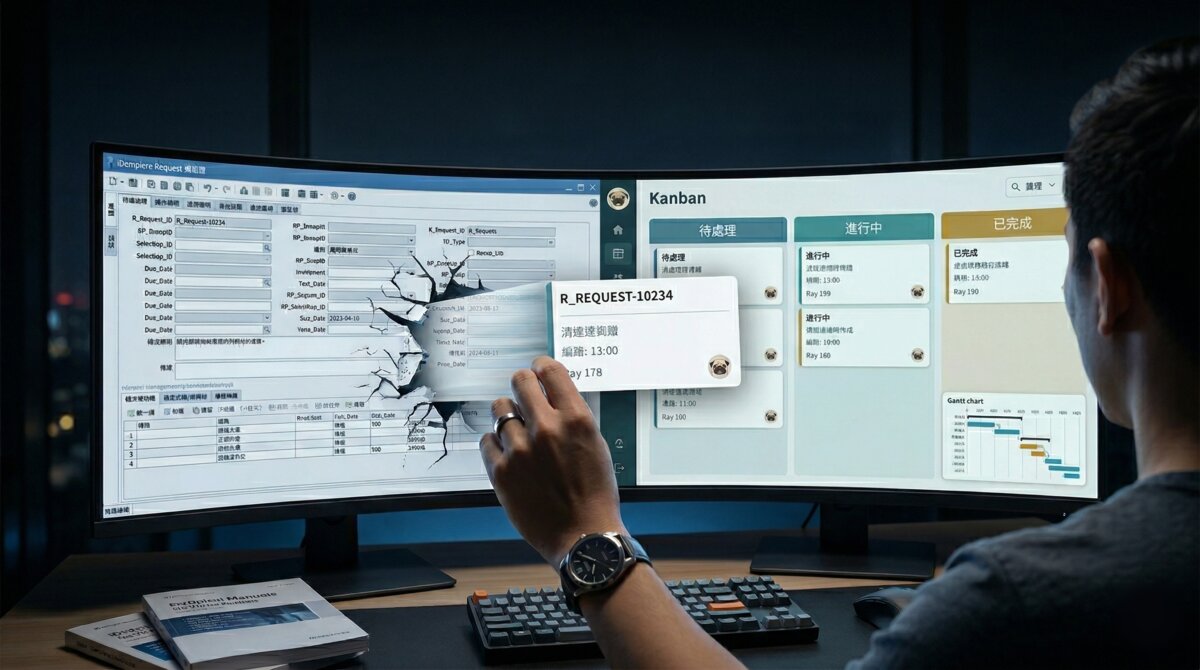
iDempiere 內建了一個 Request 模組。它是 ERP 流程裡的工單與請求追蹤系統,功能完整,幾乎什麼都有。
我第一次打開它的時候,看著視窗裡密密麻麻的欄位,每一個都有意義,每一個都有理由存在,但我不知道從哪裡開始。就像第一次翻開易經:六十四卦,三百八十四爻,什麼都有,就是沒有入口。
幕一:我試著用原版
搜尋可以做。篩選可以做。狀態切換可以做。幾乎所有功能都在那裡,只是每一個動作都需要多點幾下,多填幾格,多想幾秒。不是壞,是累。
我試了一陣子,然後想清楚了一件事:這個模組沒有問題,是我和它之間的距離太遠。我不是要改掉它,我是要在它上面蓋一扇正常人的門。
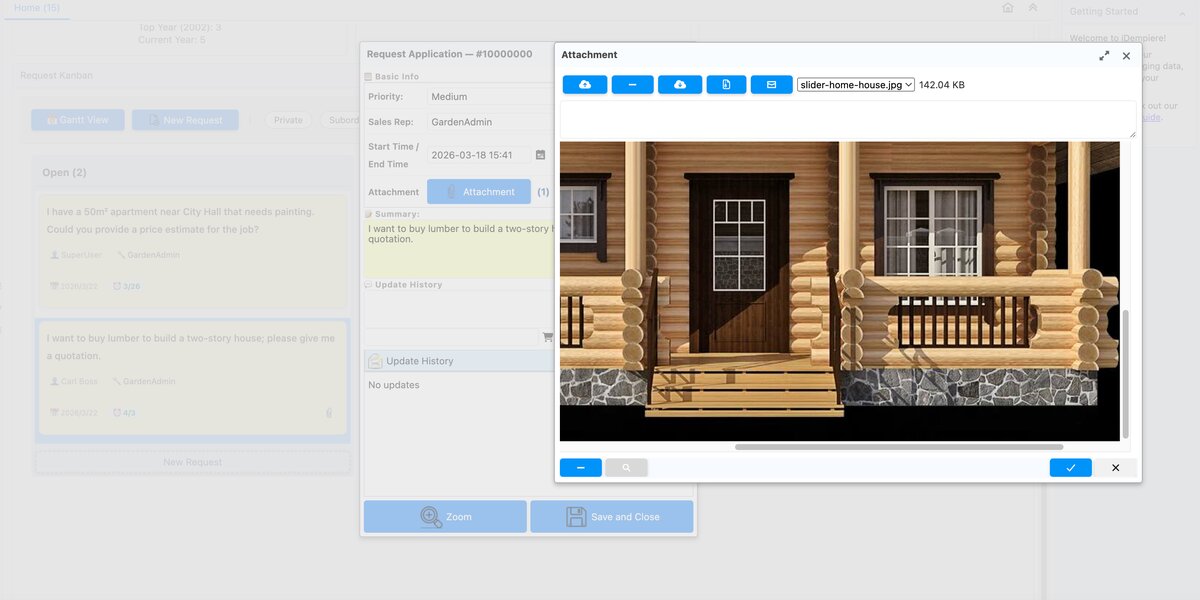
幕二:看板的技術選擇
做這個 plugin 的過程裡,我做了一些選擇。以下說明我為什麼這樣選,而不是因為我懶。(雖然有一點。)
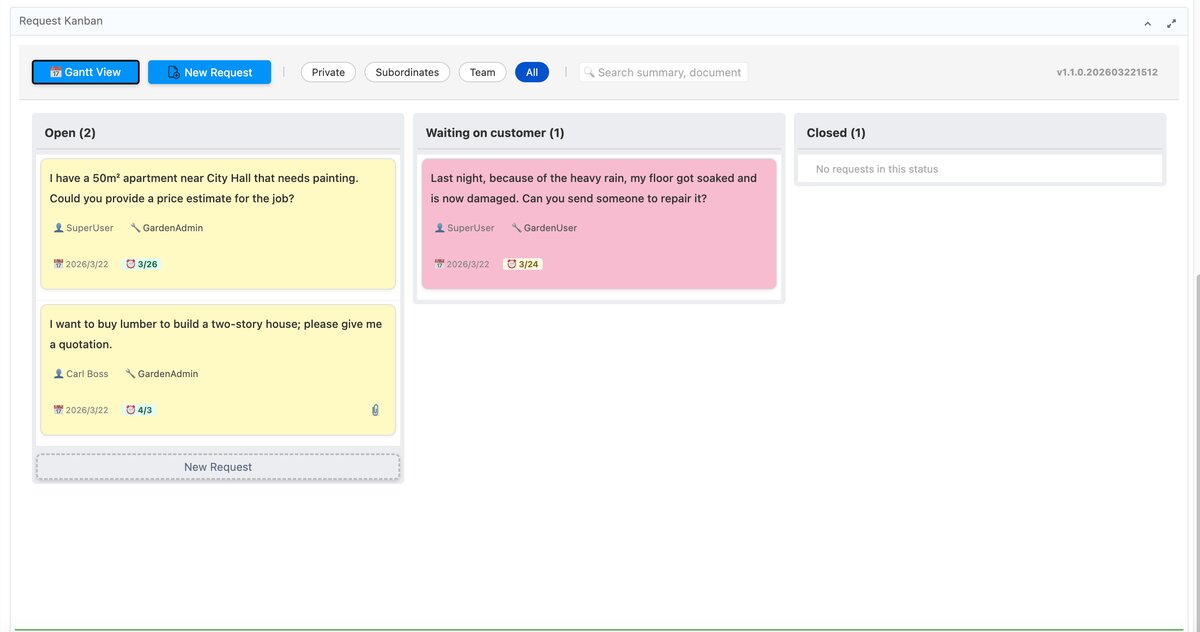
不動資料庫 schema。零新增資料表,零新增欄位。理由很簡單:不留後患。iDempiere 升版的時候,我不想踩到自己埋的地雷。所有狀態都從既有的 R_Request 資料讀取,沒有額外的東西需要維護。
即時更新用 OSGi EventAdmin。iDempiere 平台本身就有這個機制,不需要引入外部依賴。能用平台提供的就用平台的,這是原則,也是懶人哲學。
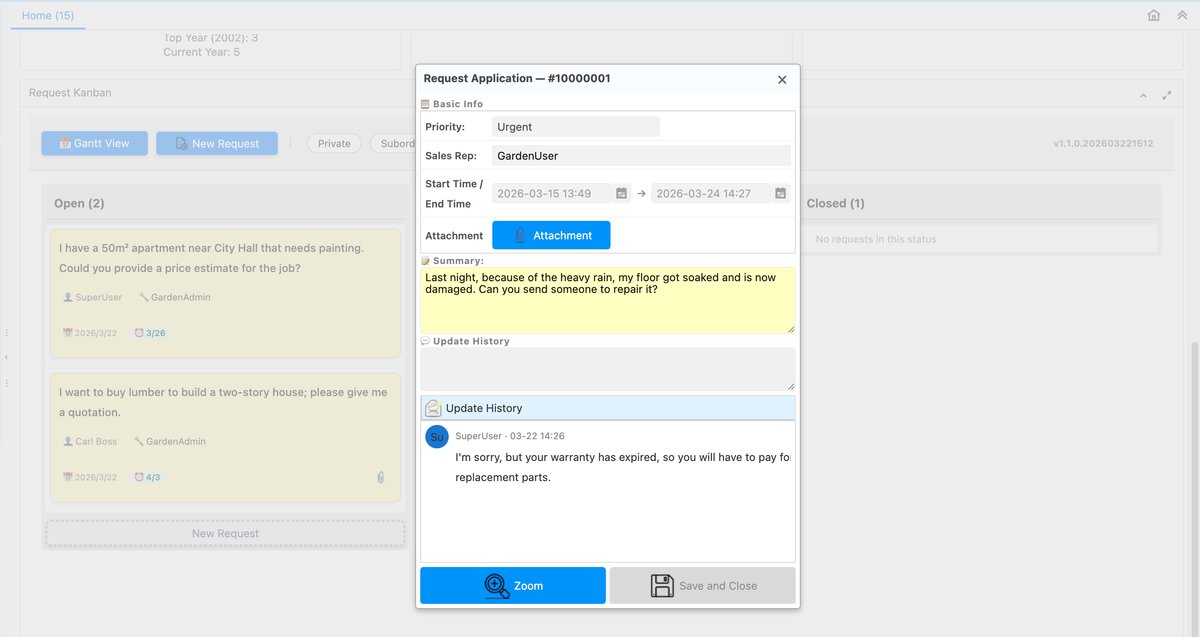
拖拉卡片有權限限制。只有 SalesRep 或 Requester 本人可以移動自己的卡片。拖拉很好玩,但不能亂拖。這是功能,不是設計疏漏。
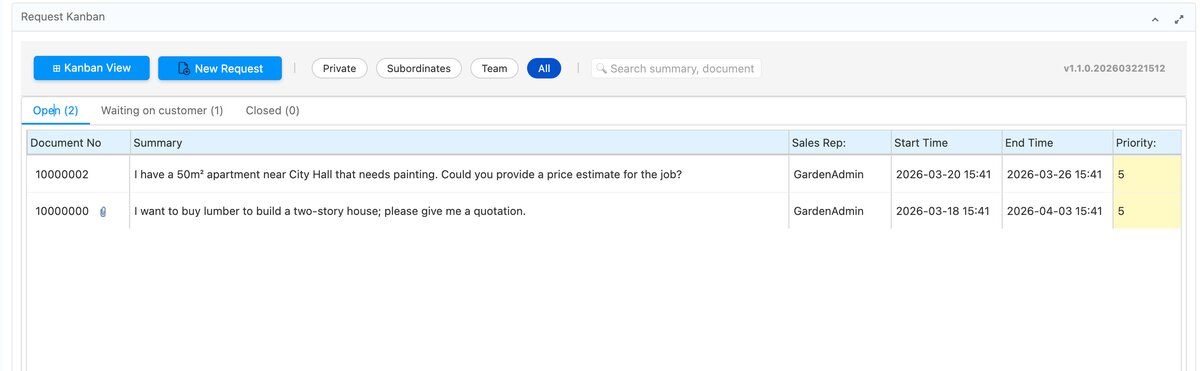
另外也有 List view,給那些不需要酷炫的人。傳統分頁表格,按狀態分組,一切如常。
幕三:甘特圖是給主管的
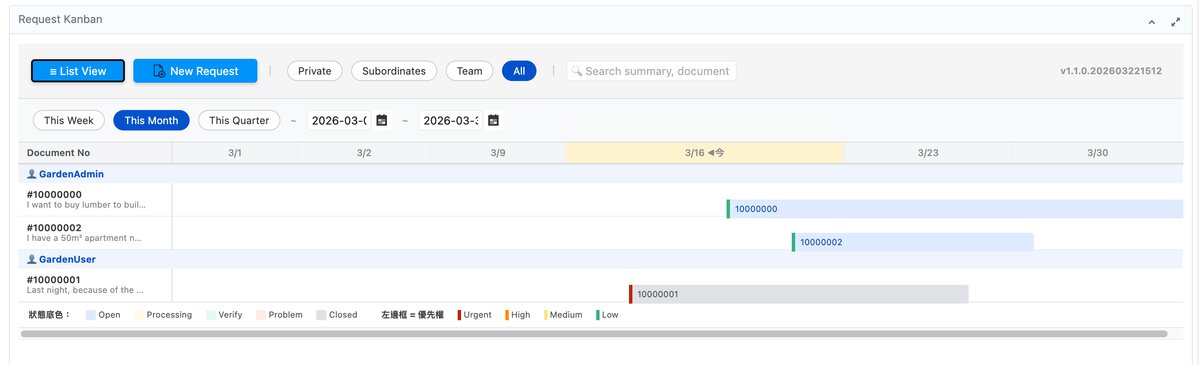
有人問我為什麼加甘特圖。答案是:主管要看進度,不想聽解釋,要看圖。一張時間軸,自動依範圍調整粒度(日、週、月),所有 Request 的開始與截止日一目瞭然。專案經理看了點頭,需求就關閉了。
甘特圖不是給工程師看的。甘特圖是讓主管覺得一切盡在掌握的儀式。我加了它,需求就關閉了。這件事本身就值得記錄。
結:雷公曰
Request 模組本已功德圓滿,奈何天道難測,凡人望而卻步。雷公不才,添門一扇,加燈一盞,置看板於其上,使諸君得以入內,拖拉卡片,各安其位。至於甘特圖一事,乃主管所求,雷公從之,需求遂閉。此亦治理之道也。
如果這個 plugin 對你有幫助,歡迎到 GitHub 給顆星——讓雷公知道這扇門值得繼續開著。
⭐ github.com/ray-idempiere/tw.idempiere.requestkanban
English
iDempiere ships with a built-in Request module. It’s a ticket and request tracker for ERP workflows. It is feature-complete in the way that an encyclopedia is feature-complete: everything is in there; you just need to know what you’re looking for.
The first time I opened it, I counted the fields in the main window. I stopped counting. It felt like opening the I Ching — sixty-four hexagrams, three hundred and eighty-four lines, an answer to every question, and no table of contents.
Act 1: I Tried Using It As-Is
Everything works. Search: works. Filter: works. Status transitions: works. It just takes a few extra clicks each time, a few extra fields each time, a few extra seconds of “wait, which tab was that again.” Not broken. Just tiring.
After a while I had a clear thought: this module has no problem. The problem is the distance between it and me. I wasn’t going to replace it. I was going to build a normal human door in front of it.
Act 2: Technical Choices
I made some decisions while building this. Here’s why I made them, and not because I was lazy. (Partially because I was lazy.)
Zero new DB tables or columns. Everything reads from the existing R_Request data. When iDempiere upgrades, I don’t want to step on anything I buried. No extra maintenance surface.
Real-time updates via OSGi EventAdmin. It’s built into the iDempiere platform. Use what the platform gives you. This is both a principle and a lazy person’s instinct.
Drag-and-drop is permission-gated. Only the SalesRep or the Requester can move their own cards. Drag-and-drop is fun. Uncontrolled drag-and-drop is a support ticket.
There’s also a List view for people who don’t need the excitement. Tabbed table, grouped by status, nothing flashy.
Act 3: The Gantt Chart Is For Management
Someone asked why I added a Gantt chart. The answer: a manager wanted to see progress, didn’t want to read a report, and wanted a chart. One timeline, auto-adjusting granularity (day / week / month), every Request’s start and due date visible at once. The PM nodded. The requirement was closed.
The Gantt chart is not for engineers. The Gantt chart is the ritual that makes managers feel like everything is under control. I added it, and the requirement closed. That’s worth documenting.
雷公曰
The Request module was already complete. The problem was that complete things are not always approachable things. Ray — that’s me — added a door, turned on a light, put a Kanban board up front so you could drag cards around and feel productive. The Gantt chart was a manager’s request. I complied. The requirement closed. Governance, after all, is about knowing which battles to pick.
If this plugin saved you a few clicks (or a few arguments with your PM), a GitHub star goes a long way.
⭐ github.com/ray-idempiere/tw.idempiere.requestkanban
日本語
iDempiere にはリクエストモジュールが内蔵されています。ERP ワークフローのチケット・要求追跡システムで、機能は完全に揃っています。
初めて開いたとき、画面に並ぶ入力欄の数を数え始めて、途中でやめました。易経のようです——六十四卦、三百八十四爻、すべての問いへの答えがある。ただし、入口がない。
第一幕:標準機能で試してみた
検索できます。フィルターできます。ステータスの切り替えもできます。すべての機能はそこにある。ただし、毎回少し余計にクリックして、少し余計に考える必要があります。壊れているわけではない。ただ、疲れる。
しばらく使って、一つのことが明確になりました。モジュールに問題があるのではない。私とモジュールの間に距離がある。だから、その前に「普通の人間用のドア」を作ることにしました。
第二幕:技術的な選択
このプラグインを作る過程でいくつかの判断をしました。なぜそうしたかを説明します。怠けていたからではありません。(少しはそうですが。)
DB テーブル・カラムの追加はゼロ。既存の R_Request データだけを読み取ります。iDempiere のバージョンアップ時に自分が埋めた地雷を踏みたくない。追加のメンテナンス負担もなし。
リアルタイム更新は OSGi EventAdmin。iDempiere プラットフォームに組み込まれている仕組みです。プラットフォームが提供するものを使う。これは原則であり、合理的な怠惰でもあります。
ドラッグ&ドロップは権限制御あり。カードを動かせるのは SalesRep または Requester 本人だけ。楽しい機能ですが、自由に動かせてはいけない。
リストビューもあります——派手さが不要な方向けの、ステータス別タブ形式の一覧表示です。
第三幕:ガントチャートは上司のために
なぜガントチャートを追加したのか聞かれることがあります。答えは:上司が進捗を見たかった。説明を読みたくない。図が欲しい。一つのタイムライン、粒度自動調整(日・週・月)、すべてのリクエストの開始日と期日が一目でわかる。PM がうなずいた。要件がクローズされた。
ガントチャートはエンジニアのためではありません。ガントチャートは、上司が「すべては掌握されている」と感じるための儀式です。追加したら、要件がクローズされました。これは記録する価値があります。
雷公曰
リクエストモジュールはすでに完成していた。しかし、完成したものが必ずしも近づきやすいとは限らない。雷公(=私)はドアを一枚追加し、照明をつけ、カンバンボードを手前に置いた。上司の要望でガントチャートも加えた。要件はクローズされた。
技術選択のすべてには理由がある。DB に手を入れない。プラットフォームの力を使う。権限は守る。モジュールは完成していたが、人間が近づけるようにすることこそが、統治の知恵である。
このプラグインが役に立ったなら、GitHub でスターをいただけると励みになります。
⭐ github.com/ray-idempiere/tw.idempiere.requestkanban


