前言:開源江湖的入門儀式
天下開源之道,知寫 code 者多,知協作者少。
你在 GitHub 上看到一個好專案,心生仰慕,想貢獻一份力。可是你一看——沒有 push 權限。就像你路過少林寺,覺得武功不錯想練兩招,結果人家山門都不讓你進。
這時候你需要的,就是 Fork。
Fork 就是把別人的 repo 完整複製一份到你的帳號下。你對 fork 有完整的讀寫權限,可以自由修改,再透過 Pull Request 把改動提交回原始專案。簡單說:先把秘笈抄一份回家練,練出心得再回山門獻藝。
bxservice/idempiere-rest  (upstream,原始門派)
        │
        └── fork ──→  你的帳號/idempiere-rest  (你的修煉場)
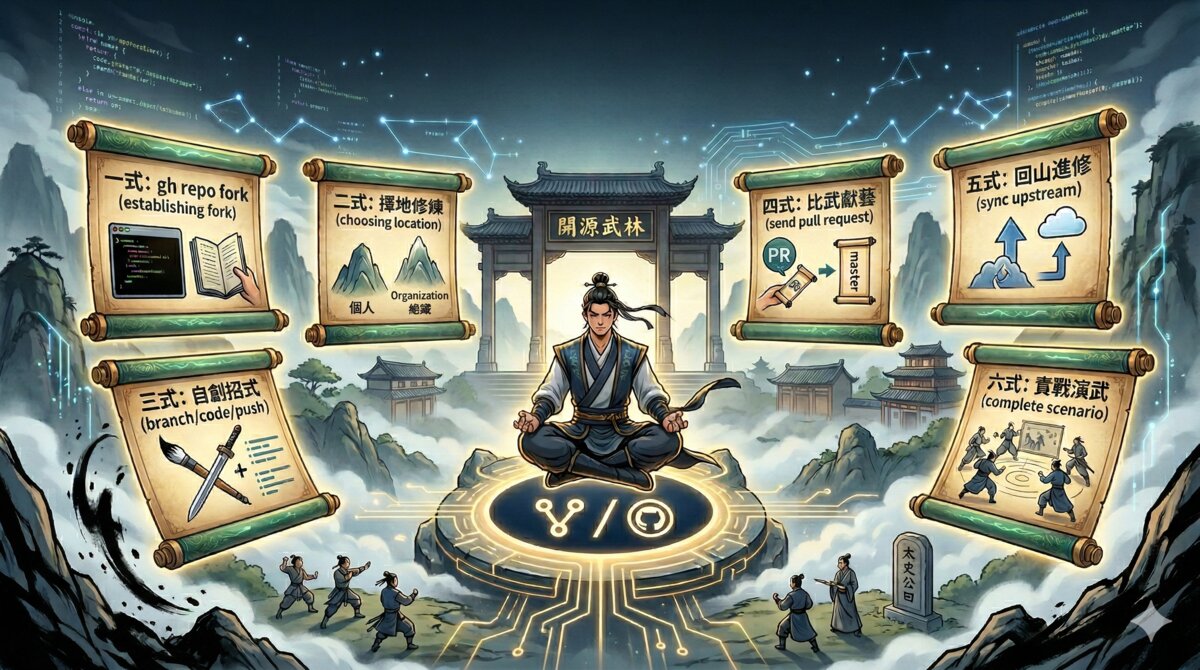
本文將帶你走過 Fork 協作的完整六式心法,從拜師入門到獨當一面。所有指令皆為實戰驗證,拿去直接用。
第一式:拜入門派 — 建立 Fork
心法口訣:「欲練神功,先抄秘笈。」
拜入門派的第一步,就是把師父的武功秘笈(repo)完整複製一份到自己名下。
基本用法:fork 到個人帳號
# 如果你已經 clone 了原始 repo,在該目錄下執行
gh repo fork bxservice/idempiere-rest

# 如果還沒 clone,加 --clone 會一併 clone 下來
gh repo fork bxservice/idempiere-rest --clone
執行後會:
- 在你的 GitHub 帳號下建立 fork
- 自動在本機加一個
forkremote 指向它
恭喜,你已經正式抄到秘笈了。但先別急著練功,還有山頭要選。
第二式:擇地修煉 — 選擇練功場
心法口訣:「山頭不同,規矩各異。」
Fork 可以建在個人帳號下,也可以建在組織(Organization)下。就像你可以選擇在自家後院練功,或是到公司的練武場操練。
Fork 到組織下
gh repo fork bxservice/idempiere-rest --org topgiga
這會把 fork 建在 topgiga/idempiere-rest 而不是個人帳號下。
先探路:檢查組織下是否已有人 fork 過
GitHub 每個 org/user 只能有一個 fork。就像一個門派只能有一本秘笈副本。建立前先確認:
# 方法一:直接查該 repo 是否存在且是 fork
gh api repos/topgiga/idempiere-rest --jq '.fork' 2>/dev/null && echo "已存在" || echo "不存在"

# 方法二:列出 upstream 的所有 fork
gh api repos/bxservice/idempiere-rest/forks --jq '.[].full_name'
組織下已有 fork 怎麼辦?
如果 topgiga/idempiere-rest 已經存在,你有三個選擇:
選擇一:共用現有的 fork(最常見)
整個 org 共用一個 fork,每個人 push 自己的 branch。就像同門師兄弟共用一本秘笈,各自在上面做筆記:
git remote add topgiga https://github.com/topgiga/idempiere-rest.git
git push topgiga feature/my-branch
選擇二:用個人帳號的 fork
從個人 fork 發 PR,一樣可以提交到 upstream。自己練自己的,誰也不干擾:
gh repo fork bxservice/idempiere-rest
git push fork feature/my-branch
選擇三:建立一般 repo
不建議。會跟 upstream 斷開關係,無法直接發 PR。就像叛出師門自立門戶——聽起來很帥,但以後要回來切磋就麻煩了。
第三式:自創招式 — 開發新功能
心法口訣:「師承為本,創新為用。」
秘笈到手、練功場選好,接下來就是在師父的基礎上自創新招。
確認 Remote 設定
先檢查你的「通訊管道」是否暢通:
git remote -v
你應該會看到:
origin  https://github.com/bxservice/idempiere-rest.git   (upstream,唯讀)
fork    https://github.com/你的帳號/idempiere-rest.git     (你的 fork,讀寫)
建立 Feature Branch 並開發
# 建立新招式的練功分支
git checkout -b feature/my-feature

# ... 開發、commit ...
Push 到你的 Fork
# 把練好的新招推送到你的練功場
git push fork feature/my-feature
到這裡,你的新招已經練成,存放在自己的練功場裡。接下來,是時候回山門獻藝了。
第四式:比武獻藝 — 發 Pull Request
心法口訣:「招式再妙,掌門不點頭也是白搭。」
Pull Request 就是你回到師門,把新招展示給掌門(maintainer)過目。掌門覺得好,就把你的招式納入正統秘笈。
gh pr create --repo bxservice/idempiere-rest \
  --title "Add my feature" \
  --body "Description of changes"
這會從 你的帳號:feature/my-feature 發 PR 到 bxservice:master。
掌門(例如 Carlos)審核通過後會 merge 進 upstream master。恭喜,你的招式正式列入門派武學了。
根據 Review 意見修改
掌門通常不會一次就滿意。他可能會說:「這招的馬步不夠紮實」或「這裡的防禦有破綻」。修改後再 push 即可,PR 會自動更新:
git add .
git commit -m "Address review feedback"
git push fork feature/my-feature
如果需要 Squash Commits
掌門可能要求你把零散的修改合併成一個乾淨的 commit:
git reset --soft $(git merge-base master HEAD)
git commit -m "Add callout endpoint (squashed)"
git push fork feature/my-feature --force-with-lease
第五式:回山進修 — 同步 Upstream
心法口訣:「閉門練功,不如回山取經。」
師門的武學日新月異(別人的 PR 被 merge 了),你需要定期回山學習最新招式,保持跟師門同步:
# 抓 upstream 最新
git fetch origin

# 更新本機 master
git checkout master
git merge origin/master

# 同步到你的 fork
git push fork master
這就像每隔一陣子回少林寺藏經閣翻翻有沒有新的秘笈——不回來看看,你的武功就落伍了。
第六式:實戰演武 — 完整流程示範
心法口訣:「紙上談兵終覺淺,實戰演武方知深。」
以下是一個完整的實戰套路,以 idempiere-rest 專案為例,從入門到出師一氣呵成:
# 1. 下載原始秘笈
git clone https://github.com/bxservice/idempiere-rest.git
cd idempiere-rest

# 2. 建立 fork(自動加 fork remote)
gh repo fork --remote

# 3. 開闢新招練功場
git checkout -b feature/callout-endpoint

# 4. 開發、測試、commit
git add .
git commit -m "Add callout endpoint"

# 5. 推送到你的練功場
git push fork feature/callout-endpoint

# 6. 回山獻藝(發 PR)
gh pr create --repo bxservice/idempiere-rest \
  --title "Add callout endpoint" \
  --body "Description..."

# 7. 根據掌門意見修改、再 push
git add .
git commit -m "Address review feedback"
git push fork feature/callout-endpoint

# 8. 如果掌門要求整理招式(squash commits)
git reset --soft $(git merge-base master HEAD)
git commit -m "Add callout endpoint (squashed)"
git push fork feature/callout-endpoint --force-with-lease

# 9. 掌門 merge 後,回山同步最新秘笈
git checkout master
git fetch origin
git merge origin/master
git push fork master

# 10. 清理已 merge 的練功場
git branch -d feature/callout-endpoint
git push fork --delete feature/callout-endpoint
江湖問答:前輩答疑
Q: Fork 跟 Clone 有什麼不同?
Fork 是 GitHub 上的操作,在你的帳號下建立一份 repo 副本——相當於在師門登記處抄錄一份秘笈。Clone 是 Git 操作,把 repo 下載到本機——相當於把秘笈帶回自己的練功房。
通常兩個都要做:先 fork(抄秘笈),再 clone(帶回家)。
Q: 可以從 fork 發 PR 到任何 repo 嗎?
只能發到同一個 fork network 裡的 repo。也就是 upstream 和所有從它 fork 出來的 repo。你只能跟同門切磋,不能拿少林的招式去武當踢館。
Q: Fork 後 upstream 更新了,我的 fork 會自動同步嗎?
不會。你需要手動 fetch + merge(參考上方「第五式:回山進修」)。師父不會主動送秘笈到你家,你得自己回山取。
Q: 我可以刪除 fork 嗎?
可以。在 GitHub repo Settings > Danger Zone > Delete this repository。刪除 fork 不會影響 upstream——退出師門不影響師門運作。但如果有未 merge 的 PR,PR 會失效。所以確保你的招式已經被收錄再退。
整體流程圖
upstream (師門)                   fork (你的練功場)               本機
      │                                │                        │
      │                                │   git clone / fetch     │
      │                                │ ◄─────────────────────► │
      │                                │                        │
      │                                │   git push fork        │
      │                                │ ◄──────────────────── │
      │                                │                        │
      │   Pull Request (比武獻藝)       │                        │
      │ ◄───────────────────────────── │                        │
      │                                │                        │
      │   merge 後 (招式入典)           │                        │
      │ ──────────────────────────────►│                        │
雷公李曰
雷公李曰:「余觀天下之開源,其道如武林。Fork 者,拜師抄經也;Branch 者,自創新招也;PR 者,回山獻藝也;Merge 者,招式入典也。夫不知 Fork 者,徒有一身好 code 而無處施展,如獨行俠空有絕學卻無門可投。習得此六式者,可縱橫開源江湖,與天下高手切磋,終成一代大俠。」
願你在開源江湖中,找到屬於自己的門派,練出獨門絕學。
English Version
Prologue: The Initiation Rite of Open Source
In the world of open source, many know how to write code — few know how to collaborate.
You spot a great project on GitHub. You’re impressed, you want to contribute. But then you check — no push permission. It’s like walking up to the Shaolin Temple, thinking the kung fu looks awesome, only to find the gates are locked.
What you need is a Fork.
A fork creates a complete copy of someone else’s repo under your own account. You get full read-write access, can modify freely, and submit changes back to the original project via Pull Request. In short: copy the master’s manual, practice at home, then return to demonstrate your new moves.
bxservice/idempiere-rest  (upstream, the original school)
        │
        └── fork ──→  your-account/idempiere-rest  (your training ground)
This article walks you through the complete Six Moves of Fork collaboration, from joining the school to standing on your own. All commands are battle-tested. Copy, paste, conquer.
Move 1: Join the School — Creating a Fork
Mantra: “To master the art, first copy the manual.”
The first step in joining a martial arts school is to get your own copy of the master’s manual (repo).
Basic Usage: Fork to Personal Account
# If you've already cloned the original repo, run from that directory
gh repo fork bxservice/idempiere-rest

# If you haven't cloned yet, add --clone to clone it as well
gh repo fork bxservice/idempiere-rest --clone
This will:
- Create a fork under your GitHub account
- Automatically add a
forkremote on your local machine
Congratulations, you’ve got the manual. But don’t start practicing yet — you need to pick your training ground first.
Move 2: Choose Your Training Ground
Mantra: “Different mountains, different rules.”
You can fork to your personal account or to an organization. Think of it as choosing between practicing in your backyard or at the company dojo.
Fork to an Organization
gh repo fork bxservice/idempiere-rest --org topgiga
This creates the fork at topgiga/idempiere-rest instead of your personal account.
Scout First: Check if Someone Already Forked
GitHub only allows one fork per org/user. Like a school that only keeps one copy of each manual. Check before creating:
# Method 1: Check if the repo exists and is a fork
gh api repos/topgiga/idempiere-rest --jq '.fork' 2>/dev/null && echo "exists" || echo "doesn't exist"

# Method 2: List all forks of the upstream
gh api repos/bxservice/idempiere-rest/forks --jq '.[].full_name'
What If the Org Already Has a Fork?
If topgiga/idempiere-rest already exists, you have three options:
Option 1: Share the existing fork (most common)
The whole org shares one fork, each person pushes their own branches. Like fellow students sharing one manual, each adding their own notes:
git remote add topgiga https://github.com/topgiga/idempiere-rest.git
git push topgiga feature/my-branch
Option 2: Use your personal fork
Submit PRs from your personal fork — works just as well. Practice solo, no interference:
gh repo fork bxservice/idempiere-rest
git push fork feature/my-branch
Option 3: Create a regular repo
Not recommended. Breaks the link with upstream, can’t submit PRs directly. Like leaving the school to start your own — sounds cool, but you can’t spar with your old classmates anymore.
Move 3: Create Your Own Technique — Development
Mantra: “Learn from the master, innovate on your own.”
Manual acquired, training ground chosen — now it’s time to develop new techniques based on the master’s foundation.
Verify Remote Setup
First, check that your communication channels are clear:
git remote -v
You should see:
origin  https://github.com/bxservice/idempiere-rest.git   (upstream, read-only)
fork    https://github.com/your-account/idempiere-rest.git (your fork, read-write)
Create a Feature Branch and Develop
# Create a training branch for your new technique
git checkout -b feature/my-feature

# ... develop, commit ...
Push to Your Fork
# Push your perfected technique to your training ground
git push fork feature/my-feature
Your new technique is ready, stored safely in your training ground. Now it’s time to return to the school and show the master.
Move 4: The Tournament — Pull Request
Mantra: “Even the finest technique is nothing until the master approves.”
A Pull Request is you returning to the school to demonstrate your new technique to the master (maintainer). If the master approves, your technique gets added to the official manual.
gh pr create --repo bxservice/idempiere-rest \
  --title "Add my feature" \
  --body "Description of changes"
This creates a PR from your-account:feature/my-feature to bxservice:master.
Once the master (e.g., Carlos) reviews and approves, it gets merged into upstream master. Your technique is now part of the school’s official curriculum.
Addressing Review Feedback
The master rarely approves on the first try. They might say: “Your stance is sloppy” or “There’s an opening in your defense.” Fix it and push again — the PR updates automatically:
git add .
git commit -m "Address review feedback"
git push fork feature/my-feature
Squashing Commits If Required
The master may ask you to consolidate your scattered fixes into one clean commit:
git reset --soft $(git merge-base master HEAD)
git commit -m "Add callout endpoint (squashed)"
git push fork feature/my-feature --force-with-lease
Move 5: Return to the Mountain — Sync Upstream
Mantra: “Training alone is no match for learning from the source.”
The school’s martial arts evolve constantly (other PRs get merged). You need to return periodically to learn the latest techniques and stay in sync:
# Fetch the latest from upstream
git fetch origin

# Update local master
git checkout master
git merge origin/master

# Sync to your fork
git push fork master
Think of it as visiting the Shaolin library every now and then to check for new manuals — skip this, and your kung fu falls behind.
Move 6: Full Combat Demo — Complete Workflow
Mantra: “Theory fades on paper; only battle reveals true skill.”
Here’s a complete combat sequence using the idempiere-rest project, from enrollment to graduation in one fluid motion:
# 1. Download the original manual
git clone https://github.com/bxservice/idempiere-rest.git
cd idempiere-rest

# 2. Create your fork (auto-adds fork remote)
gh repo fork --remote

# 3. Open a new training branch
git checkout -b feature/callout-endpoint

# 4. Develop, test, commit
git add .
git commit -m "Add callout endpoint"

# 5. Push to your training ground
git push fork feature/callout-endpoint

# 6. Return to demonstrate (create PR)
gh pr create --repo bxservice/idempiere-rest \
  --title "Add callout endpoint" \
  --body "Description..."

# 7. Address master's feedback, push again
git add .
git commit -m "Address review feedback"
git push fork feature/callout-endpoint

# 8. Squash if master requires clean history
git reset --soft $(git merge-base master HEAD)
git commit -m "Add callout endpoint (squashed)"
git push fork feature/callout-endpoint --force-with-lease

# 9. After merge, sync latest from school
git checkout master
git fetch origin
git merge origin/master
git push fork master

# 10. Clean up the training branch
git branch -d feature/callout-endpoint
git push fork --delete feature/callout-endpoint
Q&A: Wisdom from the Elders
Q: What’s the difference between Fork and Clone?
Fork is a GitHub operation — creating a copy of a repo under your account. Like registering at the school office to get your own copy of the manual. Clone is a Git operation — downloading the repo to your local machine. Like carrying that manual back to your practice room.
You usually need both: fork first (copy the manual), then clone (bring it home).
Q: Can I submit a PR from my fork to any repo?
Only to repos within the same fork network — the upstream and all its forks. You can spar with fellow students, but you can’t take Shaolin techniques to challenge Wudang.
Q: Does my fork auto-sync when upstream updates?
No. You need to manually fetch + merge (see “Move 5: Return to the Mountain”). The master doesn’t deliver new manuals to your doorstep — you have to go get them yourself.
Q: Can I delete my fork?
Yes. Go to GitHub repo Settings > Danger Zone > Delete this repository. Deleting your fork doesn’t affect upstream — leaving the school doesn’t shut it down. But any unmerged PRs will become invalid. Make sure your techniques are recorded before you leave.
Workflow Diagram
upstream (the school)             fork (your training ground)     local
      │                                │                          │
      │                                │   git clone / fetch       │
      │                                │ ◄───────────────────────► │
      │                                │                          │
      │                                │   git push fork          │
      │                                │ ◄──────────────────────  │
      │                                │                          │
      │   Pull Request (tournament)    │                          │
      │ ◄───────────────────────────── │                          │
      │                                │                          │
      │   after merge (into canon)     │                          │
      │ ──────────────────────────────►│                          │
Ray Lee’s Verdict
Ray Lee writes: “I have observed the world of open source, and its way is like the martial arts world. To fork is to join a school and copy the manual; to branch is to create new techniques; to PR is to return and demonstrate; to merge is to enshrine a technique in the canon. Those who know not the way of Fork possess great coding skill but nowhere to wield it — lone wolves with legendary abilities but no school to call home. Master these six moves, and you shall roam the open source world freely, sparring with the greatest, and become a true master.”
May you find your school in the open source world, and forge your own legendary technique.
日本語版
序章:オープンソース武林の入門儀式
天下のオープンソース道において、コードを書く者は多いが、協力の道を知る者は少ない。
GitHub で素晴らしいプロジェクトを見つけ、憧れを抱き、貢献したいと思う。しかし確認してみると——push 権限がない。まるで少林寺の前を通りかかって「いい武功だな、修行したい」と思ったのに、山門で門前払いを食らうようなものです。
そこで必要になるのが Fork です。
Fork とは、他人の repo を丸ごと自分のアカウントにコピーすること。Fork した repo には完全な読み書き権限があり、自由に修正でき、Pull Request を通じて変更を元のプロジェクトに提出できます。簡単に言えば:まず師匠の秘伝書を写し取って家で修行し、成果が出たら山門に戻って披露するということです。
bxservice/idempiere-rest  (upstream、本家道場)
        │
        └── fork ──→  あなたのアカウント/idempiere-rest  (あなたの修行場)
本記事では、Fork 協力の完全なる六式心法を伝授します。入門から一人前になるまで。すべてのコマンドは実戦検証済み。コピペしてすぐ使えます。
第一の型:入門 — Fork の作成
心法口伝:「神技を極めんとせば、まず秘伝書を写すべし。」
道場に入門する第一歩は、師匠の秘伝書(repo)を丸ごと自分の名義でコピーすることです。
基本的な使い方:個人アカウントへ Fork
# すでに元の repo を clone している場合、そのディレクトリで実行
gh repo fork bxservice/idempiere-rest

# まだ clone していない場合、--clone を付けると同時に clone される
gh repo fork bxservice/idempiere-rest --clone
実行後:
- あなたの GitHub アカウントに fork が作成される
- ローカルに
forkremote が自動追加される
おめでとうございます。秘伝書の写しを手に入れました。でもまだ修行を始めないでください——まず修行場を選ぶ必要があります。
第二の型:修行場選び — 練習の場を定める
心法口伝:「山が違えば、流儀も異なる。」
Fork は個人アカウントにも、Organization(組織)にも作成できます。自宅の裏庭で練習するか、会社の道場で稽古するかの選択です。
Organization へ Fork
gh repo fork bxservice/idempiere-rest --org topgiga
これにより fork が個人アカウントではなく topgiga/idempiere-rest に作成されます。
まず偵察:Organization に既存の Fork があるか確認
GitHub では org/user ごとに fork は一つだけ。道場に秘伝書の写しは一冊のみ。作成前に確認しましょう:
# 方法1:該当 repo が存在し fork であるか確認
gh api repos/topgiga/idempiere-rest --jq '.fork' 2>/dev/null && echo "存在する" || echo "存在しない"

# 方法2:upstream の全 fork を一覧表示
gh api repos/bxservice/idempiere-rest/forks --jq '.[].full_name'
Organization に既に Fork がある場合
topgiga/idempiere-rest が既に存在する場合、三つの選択肢があります:
選択肢1:既存の fork を共有する(最も一般的)
org 全体で一つの fork を共有し、各自が自分のブランチを push。同門の兄弟弟子が一冊の秘伝書を共有し、それぞれメモを書き込むようなものです:
git remote add topgiga https://github.com/topgiga/idempiere-rest.git
git push topgiga feature/my-branch
選択肢2:個人アカウントの fork を使う
個人の fork から PR を送る——同じように upstream に提出できます。一人で修行、誰にも邪魔されない:
gh repo fork bxservice/idempiere-rest
git push fork feature/my-branch
選択肢3:通常の repo を作成する
非推奨。upstream との関係が切れ、直接 PR を送れなくなります。破門して独立するようなもの——かっこよく聞こえますが、以後の切磋琢磨が面倒になります。
第三の型:独自の技を創る — 開発
心法口伝:「師の教えを基とし、革新を旨とせよ。」
秘伝書を手に入れ、修行場を選んだ。次は師匠の基礎の上に独自の新技を編み出す番です。
Remote 設定の確認
まず「通信経路」が正しいか確認:
git remote -v
以下のように表示されるはずです:
origin  https://github.com/bxservice/idempiere-rest.git       (upstream、読み取り専用)
fork    https://github.com/あなたのアカウント/idempiere-rest.git (あなたの fork、読み書き可能)
Feature Branch を作成して開発
# 新技の修行用ブランチを作成
git checkout -b feature/my-feature

# ... 開発、commit ...
Fork へ Push
# 完成した新技を修行場に送る
git push fork feature/my-feature
ここまでで、新技は完成し修行場に保管されています。いよいよ師門に戻って披露する時です。
第四の型:武術大会 — Pull Request の作成
心法口伝:「技いかに妙なりとも、師範の承認なくば空しきのみ。」
Pull Request とは、道場に戻って新技を師範(maintainer)に披露すること。師範が認めれば、あなたの技は正式な秘伝書に加えられます。
gh pr create --repo bxservice/idempiere-rest \
  --title "Add my feature" \
  --body "Description of changes"
これにより あなたのアカウント:feature/my-feature から bxservice:master へ PR が作成されます。
師範(例えば Carlos)がレビューして承認すると、upstream master にマージされます。おめでとうございます。あなたの技が正式に門派の武学に加わりました。
レビューフィードバックへの対応
師範が一発で満足することは稀です。「この構えが甘い」「ここの防御に隙がある」と指摘されるでしょう。修正して再度 push すれば、PR は自動的に更新されます:
git add .
git commit -m "Address review feedback"
git push fork feature/my-feature
コミットの Squash が必要な場合
師範が散らばった修正を一つのきれいなコミットにまとめるよう求めることがあります:
git reset --soft $(git merge-base master HEAD)
git commit -m "Add callout endpoint (squashed)"
git push fork feature/my-feature --force-with-lease
第五の型:帰山修行 — Upstream の同期
心法口伝:「独りの修行は、源に学ぶに如かず。」
道場の武学は日進月歩(他の人の PR がマージされる)。定期的に帰山して最新の技を学び、同期を保つ必要があります:
# upstream の最新を取得
git fetch origin

# ローカル master を更新
git checkout master
git merge origin/master

# fork に同期
git push fork master
少林寺の蔵経閣に時々足を運んで新しい秘伝書がないか確認するようなもの——怠れば、あなたの武功は時代遅れになります。
第六の型:実戦演武 — 完全なワークフロー
心法口伝:「紙上の談兵は浅きを覚え、実戦の演武にて深きを知る。」
以下は idempiere-rest プロジェクトを例とした完全な実戦套路です。入門から卒業まで一気に:
# 1. 元の秘伝書をダウンロード
git clone https://github.com/bxservice/idempiere-rest.git
cd idempiere-rest

# 2. fork を作成(fork remote を自動追加)
gh repo fork --remote

# 3. 新技の修行ブランチを開設
git checkout -b feature/callout-endpoint

# 4. 開発、テスト、commit
git add .
git commit -m "Add callout endpoint"

# 5. 修行場に push
git push fork feature/callout-endpoint

# 6. 帰山して披露(PR 作成)
gh pr create --repo bxservice/idempiere-rest \
  --title "Add callout endpoint" \
  --body "Description..."

# 7. 師範のフィードバックに対応して再 push
git add .
git commit -m "Address review feedback"
git push fork feature/callout-endpoint

# 8. 師範が履歴整理を要求した場合(squash)
git reset --soft $(git merge-base master HEAD)
git commit -m "Add callout endpoint (squashed)"
git push fork feature/callout-endpoint --force-with-lease

# 9. マージ後、最新の秘伝書を同期
git checkout master
git fetch origin
git merge origin/master
git push fork master

# 10. マージ済みの修行ブランチを整理
git branch -d feature/callout-endpoint
git push fork --delete feature/callout-endpoint
武林問答:先達の教え
Q: Fork と Clone の違いは?
Fork は GitHub 上の操作で、自分のアカウントに repo のコピーを作成します——道場の事務所で秘伝書の写しを登録するようなもの。Clone は Git の操作で、repo をローカルにダウンロードします——秘伝書を自分の稽古場に持ち帰ること。
通常は両方必要です:まず fork(秘伝書を写す)、次に clone(持ち帰る)。
Q: Fork から任意の repo に PR を送れますか?
同じ fork ネットワーク内の repo にのみ送れます。upstream とそこから fork された全ての repo です。同門との切磋琢磨はできますが、少林の技で武当に殴り込みはできません。
Q: Fork 後、upstream が更新されたら自動的に同期されますか?
されません。手動で fetch + merge が必要です(上記「第五の型:帰山修行」を参照)。師匠が秘伝書を届けてはくれません——自分で取りに行くのです。
Q: Fork を削除できますか?
できます。GitHub repo の Settings > Danger Zone > Delete this repository から。Fork の削除は upstream に影響しません——退門しても道場の運営には影響なし。ただし、未マージの PR は無効になります。技が正式に記録されてから退門しましょう。
全体フロー図
upstream (本家道場)               fork (あなたの修行場)            ローカル
      │                                │                          │
      │                                │   git clone / fetch       │
      │                                │ ◄───────────────────────► │
      │                                │                          │
      │                                │   git push fork          │
      │                                │ ◄──────────────────────  │
      │                                │                          │
      │   Pull Request (武術大会)       │                          │
      │ ◄───────────────────────────── │                          │
      │                                │                          │
      │   マージ後 (技が正典入り)       │                          │
      │ ──────────────────────────────►│                          │
雷公李曰
雷公李曰く:「余、天下のオープンソースを観るに、その道は武林の如し。Fork とは入門して秘伝書を写すこと、Branch とは独自の新技を創ること、PR とは帰山して披露すること、Merge とは技が正典に収められること。Fork の道を知らざる者は、優れたコード力を持ちながらも発揮する場なく、絶技を持つ孤高の剣士が投じる門を見つけられぬが如し。この六式を修めし者、オープンソースの武林を自在に闊歩し、天下の高手と切磋琢磨し、ついには一代の大俠となるべし。」
オープンソースの武林で、あなただけの道場を見つけ、独自の秘技を磨き上げてください。