Introduction:
Efficient data management is a cornerstone of successful ERP systems, and iDempiere stands out for its flexibility in addressing specific business needs. In this blog post, we’ll explore four distinct methods for automatically deleting detail lines when deleting document headers in iDempiere ERP. From the simplest to more advanced techniques, these approaches provide developers and administrators with options to tailor the system to their specific requirements.
Discover seamless data management in iDempiere ERP with automatic order line deletion. Dive into four powerful methods, from the user-friendly Model Cascade in Table Column Management to the database-centric DB Triggers and programmatic solutions leveraging POs. Uncover the simplicity and efficiency of these approaches as they relate to tables with foreign keys. Streamline your ERP operations and enhance data consistency effortlessly.
1. Model Cascade in Table Column Management:
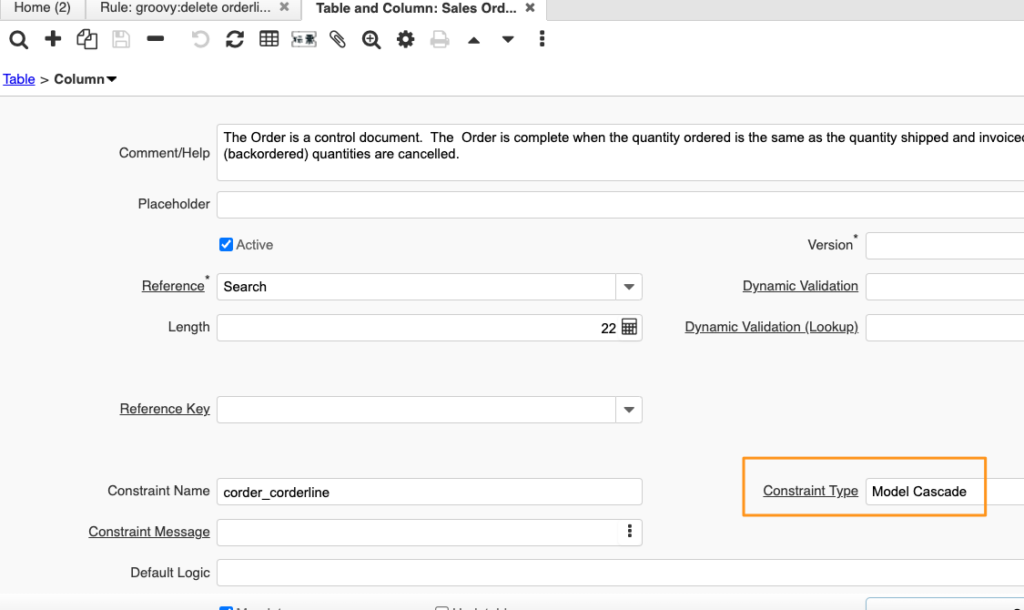
The most straightforward method involves utilizing the Model Cascade option in the Table Column Management interface. By specifying the Constraint Type as Model Cascade in the foreign key relationship, iDempiere will automatically handle the deletion of associated records. This user-friendly option minimizes manual configurations, making it an efficient choice for quick implementation.
2. DB Trigger:
For those who prefer a more database-centric approach, iDempiere allows the creation of Database (DB) Triggers. By implementing a trigger, you can automate the deletion of related order lines when an order header is deleted. This method provides a direct and efficient means of ensuring data consistency at the database level.
CREATE OR REPLACE FUNCTION delete_order_lines()
RETURNS TRIGGER AS $$
BEGIN
    DELETE FROM C_OrderLine WHERE C_Order_ID = OLD.c_order_id;
    RETURN OLD;
END;
$$ LANGUAGE plpgsql;

CREATE TRIGGER order_header_delete_trigger
AFTER DELETE ON order_header_table
FOR EACH ROW EXECUTE FUNCTION delete_order_lines();
3. Before Delete Method Override in PO:
Leveraging the Before Delete method in Persistence Objects (PO) offers a programmatic solution within the iDempiere framework. By overriding the Before Delete method in the Order PO, custom logic can be implemented to delete associated order lines just before the order header is deleted.
    @Override
    protected boolean beforeDelete() {
        // Custom logic to delete associated order lines
        String orderId = get_Value("C_Order_ID").toString();
        String deleteLinesSQL = "DELETE FROM C_OrderLine WHERE C_Order_ID = " + orderId;
        DB.executeUpdate(deleteLinesSQL, get_TrxName());
        return true;
    }
4. Table Script Validator with Rule Script:
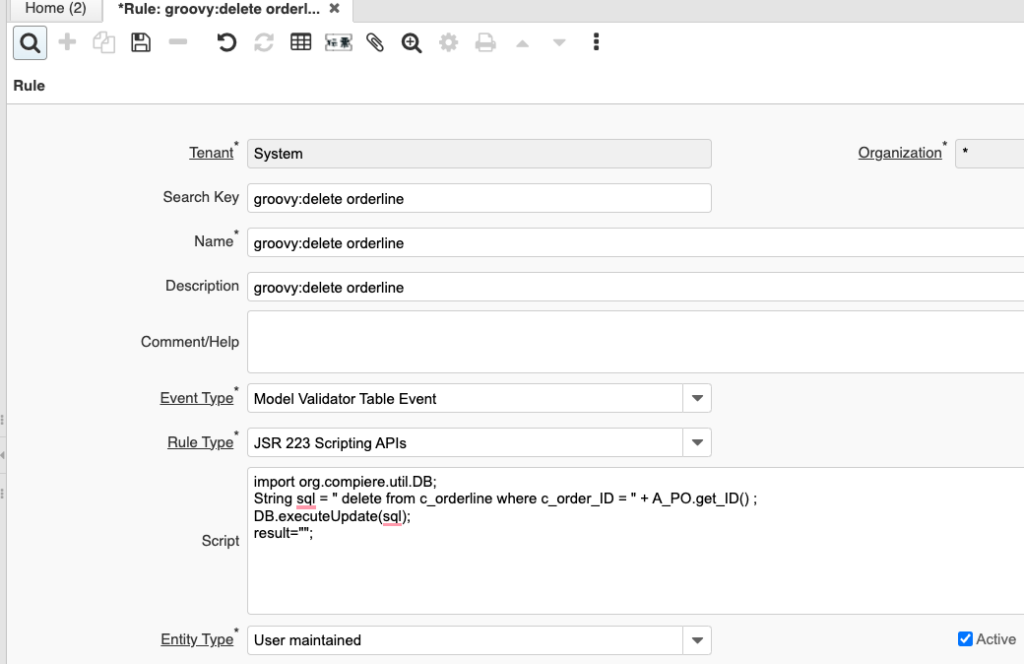
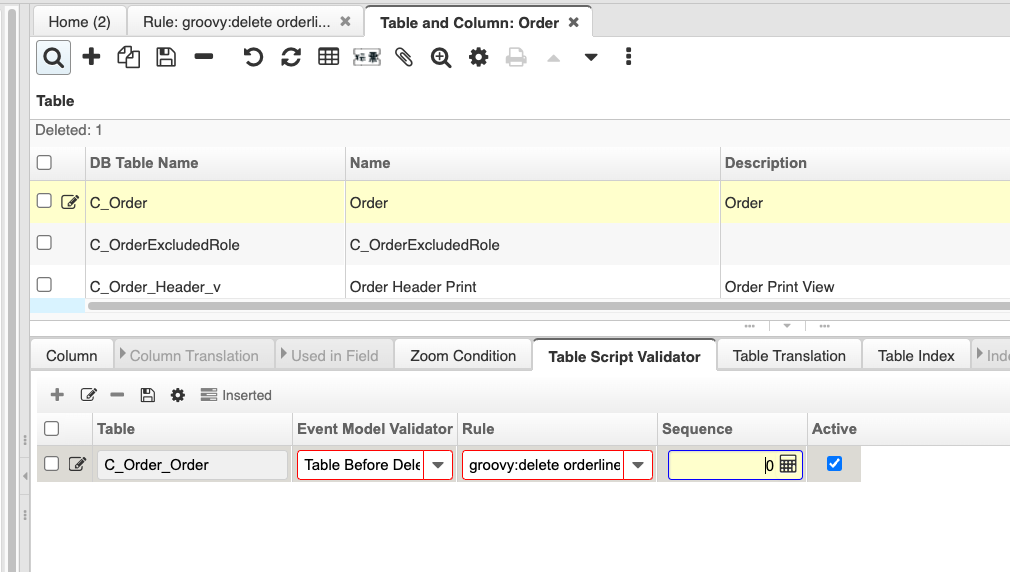
For a more user-friendly and configurable solution, iDempiere offers the Table Script Validator along with Rule Scripts. By defining a script in the validator, you can automatically delete order lines using the Rule Script when a corresponding order header is deleted.
Absolutely, beyond basic data deletion, iDempiere empowers users to perform additional automated tasks through scripts.
Conclusion:
iDempiere ERP empowers users with multiple options to automate the deletion of detail lines associated with document headers. Whether opting for the simplicity of Model Cascade, the database-level control of DB Triggers, programmatic flexibility with POs, or the user-friendly Table Script Validator, iDempiere provides a robust framework for tailoring data management to meet the unique needs of businesses. Choose the method that best aligns with your preferences and business requirements to enhance the efficiency of your ERP operations.
English Version
Introduction:
Efficient data management is a cornerstone of successful ERP systems, and iDempiere stands out for its flexibility in addressing specific business needs. In this blog post, we’ll explore four distinct methods for automatically deleting detail lines when deleting document headers in iDempiere ERP. From the simplest to more advanced techniques, these approaches provide developers and administrators with options to tailor the system to their specific requirements.
Discover seamless data management in iDempiere ERP with automatic order line deletion. Dive into four powerful methods, from the user-friendly Model Cascade in Table Column Management to the database-centric DB Triggers and programmatic solutions leveraging POs. Uncover the simplicity and efficiency of these approaches as they relate to tables with foreign keys. Streamline your ERP operations and enhance data consistency effortlessly.
1. Model Cascade in Table Column Management:
The most straightforward method involves utilizing the Model Cascade option in the Table Column Management interface. By specifying the Constraint Type as Model Cascade in the foreign key relationship, iDempiere will automatically handle the deletion of associated records. This user-friendly option minimizes manual configurations, making it an efficient choice for quick implementation.
2. DB Trigger:
For those who prefer a more database-centric approach, iDempiere allows the creation of Database (DB) Triggers. By implementing a trigger, you can automate the deletion of related order lines when an order header is deleted. This method provides a direct and efficient means of ensuring data consistency at the database level.
CREATE OR REPLACE FUNCTION delete_order_lines()
RETURNS TRIGGER AS $$
BEGIN
    DELETE FROM C_OrderLine WHERE C_Order_ID = OLD.c_order_id;
    RETURN OLD;
END;
$$ LANGUAGE plpgsql;

CREATE TRIGGER order_header_delete_trigger
AFTER DELETE ON order_header_table
FOR EACH ROW EXECUTE FUNCTION delete_order_lines();
3. Before Delete Method Override in PO:
Leveraging the Before Delete method in Persistence Objects (PO) offers a programmatic solution within the iDempiere framework. By overriding the Before Delete method in the Order PO, custom logic can be implemented to delete associated order lines just before the order header is deleted.
    @Override
    protected boolean beforeDelete() {
        // Custom logic to delete associated order lines
        String orderId = get_Value("C_Order_ID").toString();
        String deleteLinesSQL = "DELETE FROM C_OrderLine WHERE C_Order_ID = " + orderId;
        DB.executeUpdate(deleteLinesSQL, get_TrxName());
        return true;
    }
4. Table Script Validator with Rule Script:
For a more user-friendly and configurable solution, iDempiere offers the Table Script Validator along with Rule Scripts. By defining a script in the validator, you can automatically delete order lines using the Rule Script when a corresponding order header is deleted.
Absolutely, beyond basic data deletion, iDempiere empowers users to perform additional automated tasks through scripts.
Conclusion:
iDempiere ERP empowers users with multiple options to automate the deletion of detail lines associated with document headers. Whether opting for the simplicity of Model Cascade, the database-level control of DB Triggers, programmatic flexibility with POs, or the user-friendly Table Script Validator, iDempiere provides a robust framework for tailoring data management to meet the unique needs of businesses. Choose the method that best aligns with your preferences and business requirements to enhance the efficiency of your ERP operations.
日本語版
はじめに:
効率的なデータ管理は、成功するERPシステムの基盤であり、iDempiereは特定のビジネスニーズに対応する柔軟性において際立っています。このブログ記事では、iDempiere ERPにおいてドキュメントヘッダーを削除する際に明細行を自動的に削除する4つの異なる方法を紹介します。最もシンプルな方法からより高度な技術まで、これらのアプローチは開発者や管理者に、システムを特定の要件に合わせてカスタマイズするための選択肢を提供します。
iDempiere ERPにおける受注明細行の自動削除によるシームレスなデータ管理をご紹介します。テーブルカラム管理のユーザーフレンドリーなModel Cascadeから、データベース中心のDBトリガー、POを活用したプログラム的ソリューションまで、4つの強力な方法をご覧ください。外部キーを持つテーブルに関連するこれらのアプローチのシンプルさと効率性を発見してください。ERPオペレーションを合理化し、データの一貫性を容易に向上させましょう。
1. テーブルカラム管理におけるModel Cascade:
最も簡単な方法は、テーブルカラム管理インターフェースのModel Cascadeオプションを利用することです。外部キーリレーションシップで制約タイプをModel Cascadeに指定することで、iDempiereが関連レコードの削除を自動的に処理します。このユーザーフレンドリーなオプションは手動設定を最小限に抑え、迅速な実装に効率的な選択肢となります。
2. DBトリガー:
よりデータベース中心のアプローチを好む方には、iDempiereはデータベース(DB)トリガーの作成を可能にします。トリガーを実装することで、受注ヘッダーが削除された際に関連する受注明細行の削除を自動化できます。この方法は、データベースレベルでデータの一貫性を確保する直接的かつ効率的な手段を提供します。
CREATE OR REPLACE FUNCTION delete_order_lines()
RETURNS TRIGGER AS $$
BEGIN
    DELETE FROM C_OrderLine WHERE C_Order_ID = OLD.c_order_id;
    RETURN OLD;
END;
$$ LANGUAGE plpgsql;

CREATE TRIGGER order_header_delete_trigger
AFTER DELETE ON order_header_table
FOR EACH ROW EXECUTE FUNCTION delete_order_lines();
3. POにおけるBefore Deleteメソッドのオーバーライド:
永続化オブジェクト(PO)のBefore Deleteメソッドを活用することで、iDempiereフレームワーク内でプログラム的なソリューションを提供します。Order POのBefore Deleteメソッドをオーバーライドすることで、受注ヘッダーが削除される直前に関連する受注明細行を削除するカスタムロジックを実装できます。
    @Override
    protected boolean beforeDelete() {
        // Custom logic to delete associated order lines
        String orderId = get_Value("C_Order_ID").toString();
        String deleteLinesSQL = "DELETE FROM C_OrderLine WHERE C_Order_ID = " + orderId;
        DB.executeUpdate(deleteLinesSQL, get_TrxName());
        return true;
    }
4. ルールスクリプト付きテーブルスクリプトバリデーター:
よりユーザーフレンドリーで設定可能なソリューションとして、iDempiereはルールスクリプトと共にテーブルスクリプトバリデーターを提供します。バリデーターでスクリプトを定義することで、対応する受注ヘッダーが削除された際にルールスクリプトを使用して受注明細行を自動的に削除できます。
もちろん、基本的なデータ削除以外にも、iDempiereはスクリプトを通じて追加の自動化タスクを実行する機能をユーザーに提供します。
まとめ:
iDempiere ERPは、ドキュメントヘッダーに関連する明細行の削除を自動化するための複数のオプションをユーザーに提供します。Model Cascadeのシンプルさ、DBトリガーのデータベースレベルの制御、POによるプログラム的な柔軟性、またはユーザーフレンドリーなテーブルスクリプトバリデーターのいずれを選択しても、iDempiereはビジネスの固有のニーズに合わせてデータ管理をカスタマイズするための堅牢なフレームワークを提供します。ERPオペレーションの効率を向上させるために、ご自身の好みやビジネス要件に最も適した方法を選択してください。