Imagine having a teammate who doesn’t just talk, but does.
For most of us, the experience of ‘AI’ has been limited to chatbots—interfaces where you type a prompt and receive a text response. While impressive, these are essentially consultants: they can tell you how to do something, but they can’t actually do it for you.
Enter the era of the AI Agent. Unlike a chatbot, an agent is designed for action. Instead of just explaining how to organize your files or research a topic across ten different browser tabs, an agent can actually reach into your system, control your browser, and execute tasks on your behalf. It transforms the AI from a conversational partner into a functional teammate.
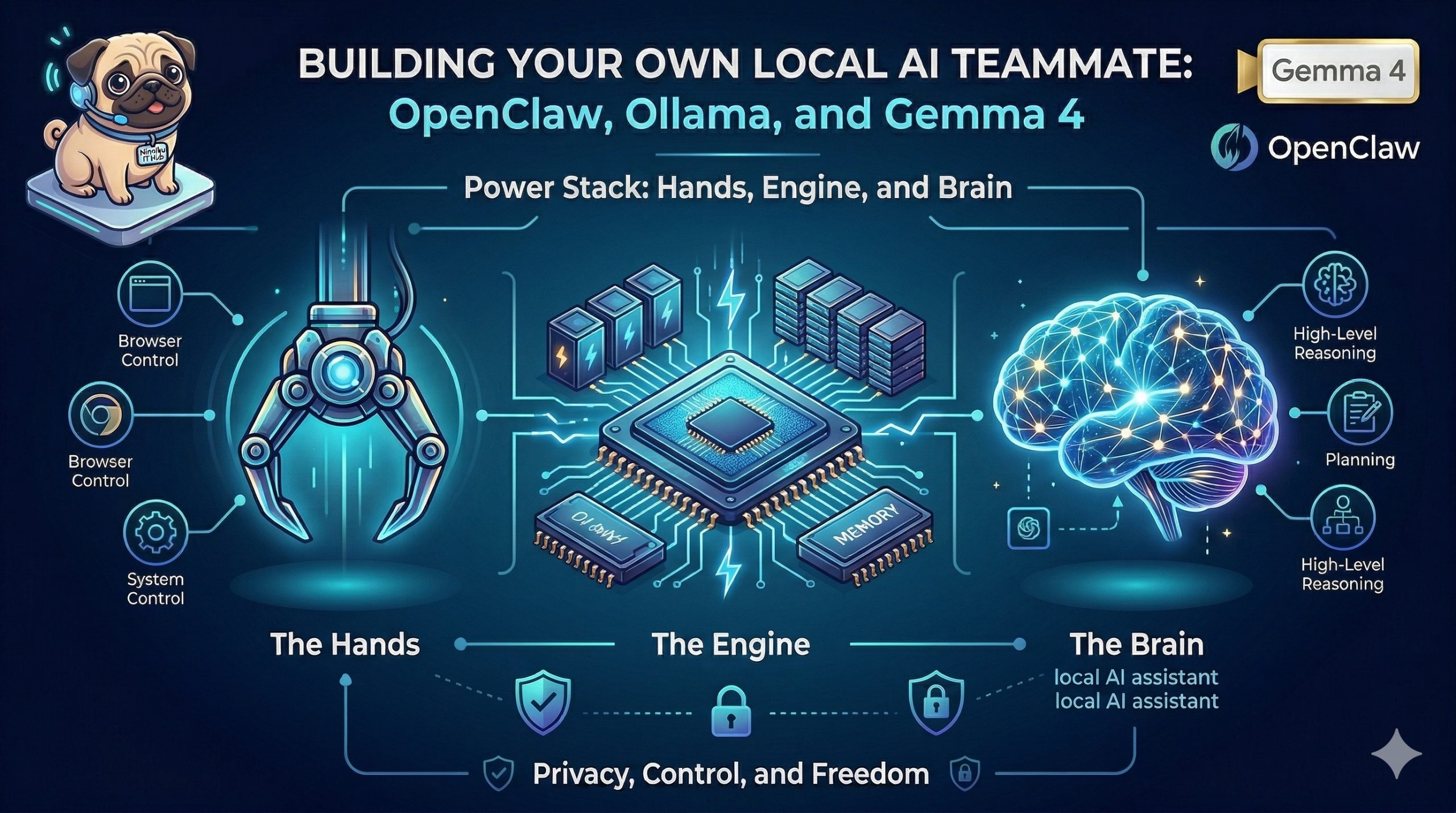
The Power Stack: Hands, Engine, and Brain
To build a truly capable local agent, we need a specialized stack that separates interface, execution, and reasoning. Here is the architecture we are using:
- OpenClaw (The Hands): This is the orchestration layer. OpenClaw provides the ‘hands’ that allow the AI to interact with the physical world of your computer. It handles the chat interfaces, manages browser automation, and provides the secure system access necessary to perform real-world actions.
- Ollama (The Engine): To run a powerful model locally without needing a PhD in machine learning, we use Ollama. It serves as the local inference engine, managing the memory and compute requirements to keep the model running efficiently on your own hardware.
- Gemma 4 (The Brain): The intelligence driving the system is Gemma 4, the latest state-of-the-art open model from Google. Gemma 4 provides the high-level reasoning, planning, and linguistic capabilities required to understand complex instructions and translate them into actionable steps.
Why Local? Privacy, Control, and Freedom
In a world of cloud-based APIs, moving the entire stack to your local machine isn’t just a technical challenge—it’s a strategic advantage.
Privacy by Design
When your AI teammate is local, your data stays local. Your system logs, browser history, and personal documents never leave your machine. You are no longer sending sensitive telemetry to a third-party server in exchange for intelligence.
Absolute Control
Local AI means no subscription fees, no ‘rate limits,’ and no surprise changes to the model’s behavior via a remote update. You own the weights, you control the engine, and you define the boundaries of what your agent can and cannot do.
What You’ll Achieve
By the end of this guide, you will have moved beyond the chat box. You will have deployed a fully operational, private local AI assistant that lives on your hardware and possesses the agency to manage your system and browser.
Let’s dive into the setup.
Prerequisites & Preparation
Before we start building, let’s make sure your environment is ready. Running powerful models locally requires a specific set of resources.
Hardware Requirements
Depending on which version of Gemma 4 you intend to use, your hardware needs will vary. We recommend starting with the 4B model if you are unsure.
| Model Variant | Min RAM/VRAM | Recommended RAM/VRAM | Notes |
|---|---|---|---|
| Gemma 4 4B | 8GB | 16GB | Great for most modern laptops; snappy performance. |
| Gemma 4 31B | 24GB | 32GB+ | Requires high-end GPUs or Apple Silicon (M-series) with unified memory. |
Software Checklist
- Ollama: Installed and running.
- Python Environment: Python 3.x installed.
- Chat Interface Account: Telegram Bot token or Discord Developer account.
- Terminal Proficiency: Basic comfort with the command line.
OS Compatibility
This setup is designed to be cross-platform and is fully compatible with Linux, macOS, and Windows.
Step-by-Step Setup
Step 1: The Brain (Ollama + Gemma 4)
- Install Ollama from ollama.com.
- Run
ollama run gemma4:e4bin your terminal. - Verify the model works by asking a question.
Step 2: The Hands (OpenClaw)
- Run
curl -fsSL https://openclaw.ai/install.sh | bash. - Launch OpenClaw and follow the onboarding.
Step 3: The Integration
- In OpenClaw Settings, set Provider to Local/Ollama.
- Set Model Name to
gemma4:e4b. - Set API Endpoint to http://localhost:11434.